<?xml version="1.0" encoding="utf-8"?>
<feed xmlns="http://www.w3.org/2005/Atom">
    <id>https://docs.litellm.ai/blog</id>
    <title>liteLLM Blog</title>
    <updated>2026-09-11T10:00:00.000Z</updated>
    <generator>https://github.com/jpmonette/feed</generator>
    <link rel="alternate" href="https://docs.litellm.ai/blog"/>
    <subtitle>liteLLM Blog</subtitle>
    <icon>https://docs.litellm.ai/img/favicon.ico</icon>
    <entry>
        <title type="html"><![CDATA[Auto Router: 45% Lower Cost on 25 SWE-bench Tasks]]></title>
        <id>https://docs.litellm.ai/blog/auto-router-capability-benchmark</id>
        <link href="https://docs.litellm.ai/blog/auto-router-capability-benchmark"/>
        <updated>2026-09-11T10:00:00.000Z</updated>
        <summary type="html"><![CDATA[We solved 23 of 25 SWE-bench Verified tasks with LiteLLM's experimental capability router for $11.15, compared with $20.27 using Opus 5.]]></summary>
        <content type="html"><![CDATA[<p><img decoding="async" loading="lazy" alt="Cost comparison: Opus 5 at $20.27 and the capability router at $11.15, with 23 of 25 SWE-bench Verified tasks solved in each run." src="data:image/svg+xml;base64,PHN2ZyB4bWxucz0iaHR0cDovL3d3dy53My5vcmcvMjAwMC9zdmciIHdpZHRoPSIxNjAwIiBoZWlnaHQ9Ijg0MCIgdmlld0JveD0iMCAwIDE2MDAgODQwIiByb2xlPSJpbWciIGFyaWEtbGFiZWxsZWRieT0idGl0bGUgZGVzYyI+CiAgPHRpdGxlIGlkPSJ0aXRsZSI+TGl0ZUxMTSBBdXRvIFJvdXRlcjogNDUlIGxvd2VyIGNvc3Qgb24gMjUgU1dFLWJlbmNoIFZlcmlmaWVkIHRhc2tzPC90aXRsZT4KICA8ZGVzYyBpZD0iZGVzYyI+VG90YWwgY29zdDogT3B1cyA1LCAkMjAuMjc7IGNhcGFiaWxpdHkgcm91dGVyLCAkMTEuMTUuIEJvdGggcnVucyBzb2x2ZWQgMjMgb2YgMjUgU1dFLWJlbmNoIFZlcmlmaWVkIHRhc2tzLiBUaGUgY2FwYWJpbGl0eSByb3V0ZXIgY29zdCA0NSUgbGVzcy48L2Rlc2M+CiAgPGRlZnM+CiAgICA8bGluZWFyR3JhZGllbnQgaWQ9ImJhY2tncm91bmQiIHgxPSIwIiB5MT0iMCIgeDI9IjEiIHkyPSIxIj4KICAgICAgPHN0b3Agb2Zmc2V0PSIwIiBzdG9wLWNvbG9yPSIjZjJmN2YwIi8+CiAgICAgIDxzdG9wIG9mZnNldD0iMSIgc3RvcC1jb2xvcj0iI2U2ZjFlOSIvPgogICAgPC9saW5lYXJHcmFkaWVudD4KICA8L2RlZnM+CiAgPHJlY3Qgd2lkdGg9IjE2MDAiIGhlaWdodD0iODQwIiByeD0iMjAiIGZpbGw9InVybCgjYmFja2dyb3VuZCkiLz4KICA8ZyBmb250LWZhbWlseT0iSW50ZXIsIC1hcHBsZS1zeXN0ZW0sIEJsaW5rTWFjU3lzdGVtRm9udCwgJ1NlZ29lIFVJJywgQXJpYWwsIHNhbnMtc2VyaWYiPgogICAgPHRleHQgeD0iOTYiIHk9IjEwNSIgZmlsbD0iIzQ0NjM0ZSIgZm9udC1zaXplPSIzMiIgZm9udC13ZWlnaHQ9IjYwMCI+TGl0ZUxMTSBBdXRvIFJvdXRlcjwvdGV4dD4KICAgIDx0ZXh0IHg9Ijg0IiB5PSI0MDIiIGZpbGw9IiMxNzNmMmIiIGZvbnQtc2l6ZT0iMjAwIiBmb250LXdlaWdodD0iNzUwIiBsZXR0ZXItc3BhY2luZz0iLTgiPjQ1JTwvdGV4dD4KICAgIDx0ZXh0IHg9Ijk2IiB5PSI1MDgiIGZpbGw9IiMxNzNmMmIiIGZvbnQtc2l6ZT0iODgiIGZvbnQtd2VpZ2h0PSI2NTAiIGxldHRlci1zcGFjaW5nPSItMiI+bG93ZXIgY29zdDwvdGV4dD4KICAgIDx0ZXh0IHg9IjEwMCIgeT0iNjA0IiBmaWxsPSIjNWY3OTY2IiBmb250LXNpemU9IjMxIj4yMy8yNSB0YXNrcyBzb2x2ZWQgwrcgU1dFLWJlbmNoIFZlcmlmaWVkPC90ZXh0PgogICAgPGxpbmUgeDE9Ijg0MCIgeTE9IjYyMCIgeDI9IjE0ODAiIHkyPSI2MjAiIHN0cm9rZT0iI2I4Y2JiYiIgc3Ryb2tlLXdpZHRoPSIyIi8+CiAgICA8cmVjdCB4PSI5MDUiIHk9IjI2MCIgd2lkdGg9IjE5MCIgaGVpZ2h0PSIzNjAiIHJ4PSI4IiBmaWxsPSIjYjVjNWI5Ii8+CiAgICA8cmVjdCB4PSIxMjI1IiB5PSI0MjEuOTczIiB3aWR0aD0iMTkwIiBoZWlnaHQ9IjE5OC4wMjciIHJ4PSI4IiBmaWxsPSIjMmU4NTU1Ii8+CiAgICA8dGV4dCB4PSIxMDAwIiB5PSIyMzIiIHRleHQtYW5jaG9yPSJtaWRkbGUiIGZpbGw9IiM0ZDYyNTMiIGZvbnQtc2l6ZT0iNDQiIGZvbnQtd2VpZ2h0PSI2NTAiPiQyMC4yNzwvdGV4dD4KICAgIDx0ZXh0IHg9IjEzMjAiIHk9IjM5NCIgdGV4dC1hbmNob3I9Im1pZGRsZSIgZmlsbD0iIzI2Nzc0ZCIgZm9udC1zaXplPSI0NCIgZm9udC13ZWlnaHQ9IjcwMCI+JDExLjE1PC90ZXh0PgogICAgPHRleHQgeD0iMTAwMCIgeT0iNjc0IiB0ZXh0LWFuY2hvcj0ibWlkZGxlIiBmaWxsPSIjNDQ2MzRlIiBmb250LXNpemU9IjMxIiBmb250LXdlaWdodD0iNTUwIj5PcHVzIDU8L3RleHQ+CiAgICA8dGV4dCB4PSIxMzIwIiB5PSI2NzQiIHRleHQtYW5jaG9yPSJtaWRkbGUiIGZpbGw9IiM0NDYzNGUiIGZvbnQtc2l6ZT0iMzEiIGZvbnQtd2VpZ2h0PSI1NTAiPkNhcGFiaWxpdHkgcm91dGVyPC90ZXh0PgogIDwvZz4KPC9zdmc+Cg==" width="1600" height="840" class="img_ev3q"></p>
<p>We solved 23 of 25 SWE-bench Verified tasks with LiteLLM's experimental capability router for <strong>$11.15</strong>. With Opus 5 for all solver calls, we solved 23 tasks for <strong>$20.27</strong>. We spent <strong>45% less</strong>, including classifier calls, with prompt caching on in both runs.</p>
<!-- -->
<div class="theme-admonition theme-admonition-info admonition_xJq3 alert alert--info"><div class="admonitionHeading_Gvgb"><span class="admonitionIcon_Rf37"><svg viewBox="0 0 14 16"><path fill-rule="evenodd" d="M7 2.3c3.14 0 5.7 2.56 5.7 5.7s-2.56 5.7-5.7 5.7A5.71 5.71 0 0 1 1.3 8c0-3.14 2.56-5.7 5.7-5.7zM7 1C3.14 1 0 4.14 0 8s3.14 7 7 7 7-3.14 7-7-3.14-7-7-7zm1 3H6v5h2V4zm0 6H6v2h2v-2z"></path></svg></span>Help shape the Auto-Router</div><div class="admonitionContent_BuS1"><p>Get early access and work with the LiteLLM team on routing for your production traffic.</p><a class="button button--primary button--lg" href="https://calendar.app.google/i2e7qVEJphHi5S8UA">Apply to Become a Design Partner</a><p>Share your results in <a href="https://github.com/BerriAI/litellm/discussions/32168" target="_blank" rel="noopener noreferrer">discussion #32168</a>.</p></div></div>
<h2 class="anchor anchorWithStickyNavbar_LWe7" id="results">Results<a href="https://docs.litellm.ai/blog/auto-router-capability-benchmark#results" class="hash-link" aria-label="Direct link to Results" title="Direct link to Results">​</a></h2>
<p>We compare four configurations on the same 25 tasks. We measure quality by solve rate and include unsuccessful attempts and classifier calls in total cost.</p>
<table><thead><tr><th>Configuration</th><th style="text-align:right">Tasks solved</th><th style="text-align:right">Solve rate</th><th style="text-align:right">Total cost</th><th style="text-align:right">Cost / solved task</th></tr></thead><tbody><tr><td><strong>LiteLLM capability router</strong></td><td style="text-align:right"><strong>23/25</strong></td><td style="text-align:right"><strong>92%</strong></td><td style="text-align:right"><strong>$11.15</strong></td><td style="text-align:right"><strong>$0.48</strong></td></tr><tr><td>Opus 5</td><td style="text-align:right">23/25</td><td style="text-align:right">92%</td><td style="text-align:right">$20.27</td><td style="text-align:right">$0.88</td></tr><tr><td>Sonnet 5</td><td style="text-align:right">22/25</td><td style="text-align:right">88%</td><td style="text-align:right">$13.19</td><td style="text-align:right">$0.60</td></tr><tr><td>NeMo Switchyard</td><td style="text-align:right">21/25</td><td style="text-align:right">84%</td><td style="text-align:right">$17.03</td><td style="text-align:right">$0.81</td></tr></tbody></table>
<p>Cost per solved task divides total run cost by the number of solved tasks.</p>
<ul>
<li><strong>45% lower cost than Opus 5 at the same solve count.</strong> We solved 23/25 tasks in each run, spending $11.15 with capability routing versus $20.27 with Opus 5.</li>
<li><strong>One more task solved than Sonnet 5, for $2.04 less.</strong> We solved 23/25 tasks with capability routing versus 22/25 with Sonnet 5.</li>
<li><strong>Two more tasks solved than NeMo Switchyard, for $5.88 less.</strong> We reached a 92% solve rate with LiteLLM capability routing versus 84% with Switchyard.</li>
</ul>
<h2 class="anchor anchorWithStickyNavbar_LWe7" id="routing-between-sonnet-and-opus">Routing between Sonnet and Opus<a href="https://docs.litellm.ai/blog/auto-router-capability-benchmark#routing-between-sonnet-and-opus" class="hash-link" aria-label="Direct link to Routing between Sonnet and Opus" title="Direct link to Routing between Sonnet and Opus">​</a></h2>
<p>We classify the task before choosing a model. We send GPT-5.4-mini the opening instruction, any latest user follow-up, and a capability checklist. We ask it to identify the hardest requirement and estimate Sonnet 5's chance of completing the whole task, using signals such as clear requirements, available inputs, and executable checks.</p>
<p>We compare that probability with the threshold for the task's capability category, requiring a higher probability for uncertain or unsupported tasks. We choose <strong>Sonnet 5</strong> when the estimate meets the threshold and <strong>Opus 5</strong> when it falls below.</p>
<p>In this run, we sent <strong>98.4% of solver calls to Sonnet 5</strong> and <strong>1.6% to Opus 5</strong>.</p>
<h2 class="anchor anchorWithStickyNavbar_LWe7" id="benchmark-setup">Benchmark setup<a href="https://docs.litellm.ai/blog/auto-router-capability-benchmark#benchmark-setup" class="hash-link" aria-label="Direct link to Benchmark setup" title="Direct link to Benchmark setup">​</a></h2>
<p>We used the same Harbor and mini-swe-agent setup for each configuration: the same 25 SWE-bench Verified tasks, one attempt per task, three concurrent tasks, and the same verifier. We enabled prompt caching in each run and measured total cost from LiteLLM gateway spend logs, including classifier and judge calls.</p>
<h2 class="anchor anchorWithStickyNavbar_LWe7" id="scope-of-the-result">Scope of the result<a href="https://docs.litellm.ai/blog/auto-router-capability-benchmark#scope-of-the-result" class="hash-link" aria-label="Direct link to Scope of the result" title="Direct link to Scope of the result">​</a></h2>
<p>We matched the Opus solve count on this subset, with different successes and failures: we solved 21 tasks in both runs, plus two distinct tasks in each. With 25 tasks and one attempt per configuration, we cannot establish equal quality across workloads or predict savings for your agent.</p>
<p>For a comparison on your workload, use the same tasks and verifier, enable prompt caching across configurations, and include classifier spend in the total.</p>
<p>For related experiments, read <a href="https://docs.litellm.ai/blog/auto-router-prompt-caching-benchmark" target="_blank" rel="noopener noreferrer">Prompt Caching Works with Auto Router</a> and <a href="https://docs.litellm.ai/blog/subtask-type-routing" target="_blank" rel="noopener noreferrer">Subtask-Specific Routing: Same Quality, 46% Less Cost</a>.</p>
<h2 class="anchor anchorWithStickyNavbar_LWe7" id="an-experimental-classifier">An experimental classifier<a href="https://docs.litellm.ai/blog/auto-router-capability-benchmark#an-experimental-classifier" class="hash-link" aria-label="Direct link to An experimental classifier" title="Direct link to An experimental classifier">​</a></h2>
<p>Capability forecasting is an experimental approach to Auto Router. It estimates whether a cheaper model can complete a task using the requirements, available information, and verification tools. We are evaluating this idea and how it can work with complexity assessment</p>
<div class="theme-admonition theme-admonition-info admonition_xJq3 alert alert--info"><div class="admonitionHeading_Gvgb"><span class="admonitionIcon_Rf37"><svg viewBox="0 0 14 16"><path fill-rule="evenodd" d="M7 2.3c3.14 0 5.7 2.56 5.7 5.7s-2.56 5.7-5.7 5.7A5.71 5.71 0 0 1 1.3 8c0-3.14 2.56-5.7 5.7-5.7zM7 1C3.14 1 0 4.14 0 8s3.14 7 7 7 7-3.14 7-7-3.14-7-7-7zm1 3H6v5h2V4zm0 6H6v2h2v-2z"></path></svg></span>Help shape the Auto-Router</div><div class="admonitionContent_BuS1"><p>Work with the LiteLLM team to evaluate Auto Router on your production traffic.</p><a class="button button--primary button--lg" href="https://calendar.app.google/i2e7qVEJphHi5S8UA">Apply to Become a Design Partner</a></div></div>]]></content>
        <author>
            <name>Tin Lo</name>
        </author>
        <category label="routing" term="routing"/>
        <category label="cost" term="cost"/>
        <category label="benchmarks" term="benchmarks"/>
    </entry>
    <entry>
        <title type="html"><![CDATA[How Pfizer Improved LiteLLM Gateway Performance and Resiliency at Scale]]></title>
        <id>https://docs.litellm.ai/blog/pfizer-gateway-performance-and-resiliency</id>
        <link href="https://docs.litellm.ai/blog/pfizer-gateway-performance-and-resiliency"/>
        <updated>2026-09-11T10:00:00.000Z</updated>
        <summary type="html"><![CDATA[How Pfizer AI Platform Engineering isolated a Redis connection handling bug that cut LiteLLM gateway throughput by ~48% with zero HTTP errors, reduced CI load-test latency by 76%, and built a regression prevention framework with LiteLLM.]]></summary>
        <content type="html"><![CDATA[<p><img decoding="async" loading="lazy" alt="LiteLLM x Pfizer" src="https://docs.litellm.ai/assets/images/litellm_pfizer_announcement-781048e57bc0ef4968ea9f4a79df9d44.png" width="4800" height="2508" class="img_ev3q"></p>
<p class="deck_jVqf">A joint debugging story with LiteLLM, and the release testing that comes next.</p>
<p>A LiteLLM version bump exposed a long-standing Redis configuration bug that cut Pfizer's gateway throughput by ~48%, with zero HTTP errors in the application logs. Here's how the team isolated it through configuration bisection, and the testing infrastructure both teams are building to catch this class of regression before it ships.</p>
<!-- -->
<hr class="introRule_ItQw">
<div class="stats_aEVk"><div class="card_Pm7j"><div class="num_A78F">~48%</div><div class="label_d9Ce">throughput drop caught in CI (≈300 → 156 RPS)</div></div><div class="card_Pm7j"><div class="num_A78F">76%</div><div class="label_d9Ce">faster CI latency after the fix (5,000ms → 1,200ms median)</div></div><div class="card_Pm7j"><div class="num_A78F">1 line</div><div class="label_d9Ce">the Redis conditional at the root of it</div></div><div class="card_Pm7j"><div class="num_A78F">134</div><div class="label_d9Ce">issues addressed in a two-week stability push (LiteLLM)</div></div></div>
<p class="kicker_RMpB">The regression</p>
<h2 class="anchor anchorWithStickyNavbar_LWe7" id="slower-with-no-http-errors-in-the-application-logs">Slower, with no HTTP errors in the application logs<a href="https://docs.litellm.ai/blog/pfizer-gateway-performance-and-resiliency#slower-with-no-http-errors-in-the-application-logs" class="hash-link" aria-label="Direct link to Slower, with no HTTP errors in the application logs" title="Direct link to Slower, with no HTTP errors in the application logs">​</a></h2>
<p class="lede_U2hj">The hardest regressions to catch are the ones that produce zero errors at the HTTP layer: no failures, no single slow request, just less work done per second under concurrency.</p>
<p>Pfizer runs LiteLLM as a self-hosted AI gateway - a single OpenAI-compatible API in front of a multi-provider model catalog, serving every team, application, and agent at Pfizer with uniform access to external and self-hosted models. One shared entry point means a regression in the gateway propagates to every consumer behind it at once, so every change, whether an upstream LiteLLM bump or an internal commit, runs through automated load and regression tests in CI before it ships.</p>
<p>That is what caught this one. CI throughput held steady around 300 requests per second on v1.85.0 and v1.87.3, then dropped to about 156 RPS on v1.89.2. Error rate: unchanged. Per-request latency at the HTTP layer: nothing obviously wrong. The throughput drop manifested only under concurrent load - internally, Redis operations were stalling on TLS handshake timeouts in the async hot path, degrading throughput without surfacing HTTP-level errors. The underlying Redis bug existed in older versions too, but surfaced during Pfizer's v1.89.2 upgrade validation under this workload. That was enough to hold the version back from production.</p>
<div class="pullquote_RcuL"><p>A throughput drop with a 0% HTTP error rate is the worst kind of regression to catch after the fact - nothing pages on it, and it only shows up under real concurrency, not in a single request. Redis timeout errors appeared in the proxy's internal logs, but the gateway still returned HTTP 200 to every caller. Our CI load-tests every version bump and every internal commit against fixed baselines specifically so this class of problem gets caught before it reaches production traffic that's latency-sensitive across chat sessions and agent loops.</p><cite>Aleksandr Liadov &amp; Praveena Mundolimoole, Pfizer AI Platform Engineering</cite></div>
<p class="kicker_RMpB">The hunt</p>
<h2 class="anchor anchorWithStickyNavbar_LWe7" id="isolate-first-then-read-the-diff">Isolate first, then read the diff<a href="https://docs.litellm.ai/blog/pfizer-gateway-performance-and-resiliency#isolate-first-then-read-the-diff" class="hash-link" aria-label="Direct link to Isolate first, then read the diff" title="Direct link to Isolate first, then read the diff">​</a></h2>
<p class="lede_U2hj">Rather than bisecting commits across two minor versions, the team narrowed the surface area by configuration first.</p>
<ol class="steps_buiZ"><li>Ran vanilla LiteLLM - no custom callbacks, no custom auth, mocked backend. Both v1.85.0 and v1.92.0 landed at 320-340ms median latency under concurrent load. The core proxy was clean on both versions.</li><li>Added Pfizer's custom components back one at a time, then all together. Still clean.</li><li>Enabled Redis caching. Median latency jumped to <strong>4,200ms</strong>. That isolated it to the Redis connection path.</li></ol>
<p>From there, the fix was in the diff. The connection-pool builder in <code>litellm/_redis.py</code> decided whether to open a TLS connection by checking whether the <code>ssl</code> key was <em>present</em> in <code>redis_kwargs</code>, not whether its value was <em>true</em>:</p>
<div class="language-python codeBlockContainer_Ckt0 theme-code-block" style="--prism-color:#000000;--prism-background-color:#ffffff"><div class="codeBlockContent_QJqH"><pre tabindex="0" class="prism-code language-python codeBlock_bY9V thin-scrollbar" style="color:#000000;background-color:#ffffff"><code class="codeBlockLines_e6Vv"><span class="token-line" style="color:#000000"><span class="token comment" style="color:rgb(0, 128, 0)"># before (litellm/_redis.py at 142d5aa): presence check</span><span class="token plain"></span><br></span><span class="token-line" style="color:#000000"><span class="token plain">connection_class </span><span class="token operator" style="color:rgb(0, 0, 0)">=</span><span class="token plain"> async_redis</span><span class="token punctuation" style="color:rgb(4, 81, 165)">.</span><span class="token plain">Connection</span><br></span><span class="token-line" style="color:#000000"><span class="token plain"></span><span class="token keyword" style="color:rgb(0, 0, 255)">if</span><span class="token plain"> </span><span class="token string" style="color:rgb(163, 21, 21)">"ssl"</span><span class="token plain"> </span><span class="token keyword" style="color:rgb(0, 0, 255)">in</span><span class="token plain"> redis_kwargs</span><span class="token punctuation" style="color:rgb(4, 81, 165)">:</span><span class="token plain">            </span><span class="token comment" style="color:rgb(0, 128, 0)"># true even when ssl: false</span><span class="token plain"></span><br></span><span class="token-line" style="color:#000000"><span class="token plain">    connection_class </span><span class="token operator" style="color:rgb(0, 0, 0)">=</span><span class="token plain"> async_redis</span><span class="token punctuation" style="color:rgb(4, 81, 165)">.</span><span class="token plain">SSLConnection</span><br></span><span class="token-line" style="color:#000000"><span class="token plain">    redis_kwargs</span><span class="token punctuation" style="color:rgb(4, 81, 165)">.</span><span class="token plain">pop</span><span class="token punctuation" style="color:rgb(4, 81, 165)">(</span><span class="token string" style="color:rgb(163, 21, 21)">"ssl"</span><span class="token punctuation" style="color:rgb(4, 81, 165)">,</span><span class="token plain"> </span><span class="token boolean">None</span><span class="token punctuation" style="color:rgb(4, 81, 165)">)</span><span class="token plain"></span><br></span><span class="token-line" style="color:#000000"><span class="token plain">    redis_kwargs</span><span class="token punctuation" style="color:rgb(4, 81, 165)">[</span><span class="token string" style="color:rgb(163, 21, 21)">"connection_class"</span><span class="token punctuation" style="color:rgb(4, 81, 165)">]</span><span class="token plain"> </span><span class="token operator" style="color:rgb(0, 0, 0)">=</span><span class="token plain"> connection_class</span><br></span><span class="token-line" style="color:#000000"><span class="token plain" style="display:inline-block"></span><br></span><span class="token-line" style="color:#000000"><span class="token plain"></span><span class="token comment" style="color:rgb(0, 128, 0)"># after (PR #32590): value check</span><span class="token plain"></span><br></span><span class="token-line" style="color:#000000"><span class="token plain"></span><span class="token keyword" style="color:rgb(0, 0, 255)">if</span><span class="token plain"> redis_kwargs</span><span class="token punctuation" style="color:rgb(4, 81, 165)">.</span><span class="token plain">pop</span><span class="token punctuation" style="color:rgb(4, 81, 165)">(</span><span class="token string" style="color:rgb(163, 21, 21)">"ssl"</span><span class="token punctuation" style="color:rgb(4, 81, 165)">,</span><span class="token plain"> </span><span class="token boolean">None</span><span class="token punctuation" style="color:rgb(4, 81, 165)">)</span><span class="token punctuation" style="color:rgb(4, 81, 165)">:</span><span class="token plain">        </span><span class="token comment" style="color:rgb(0, 128, 0)"># only when ssl is truthy</span><span class="token plain"></span><br></span><span class="token-line" style="color:#000000"><span class="token plain">    redis_kwargs</span><span class="token punctuation" style="color:rgb(4, 81, 165)">[</span><span class="token string" style="color:rgb(163, 21, 21)">"connection_class"</span><span class="token punctuation" style="color:rgb(4, 81, 165)">]</span><span class="token plain"> </span><span class="token operator" style="color:rgb(0, 0, 0)">=</span><span class="token plain"> async_redis</span><span class="token punctuation" style="color:rgb(4, 81, 165)">.</span><span class="token plain">SSLConnection</span><br></span></code></pre></div></div>
<p>The config that triggers it - <code>ssl: false</code> with a plaintext Redis endpoint:</p>
<div class="language-yaml codeBlockContainer_Ckt0 theme-code-block" style="--prism-color:#000000;--prism-background-color:#ffffff"><div class="codeBlockContent_QJqH"><pre tabindex="0" class="prism-code language-yaml codeBlock_bY9V thin-scrollbar" style="color:#000000;background-color:#ffffff"><code class="codeBlockLines_e6Vv"><span class="token-line" style="color:#000000"><span class="token comment" style="color:rgb(0, 128, 0)"># litellm_config.yaml (simplified)</span><span class="token plain"></span><br></span><span class="token-line" style="color:#000000"><span class="token plain"></span><span class="token key atrule">litellm_settings</span><span class="token punctuation" style="color:rgb(4, 81, 165)">:</span><span class="token plain"></span><br></span><span class="token-line" style="color:#000000"><span class="token plain">  </span><span class="token key atrule">cache</span><span class="token punctuation" style="color:rgb(4, 81, 165)">:</span><span class="token plain"> </span><span class="token boolean important">true</span><span class="token plain"></span><br></span><span class="token-line" style="color:#000000"><span class="token plain">  </span><span class="token key atrule">cache_params</span><span class="token punctuation" style="color:rgb(4, 81, 165)">:</span><span class="token plain"></span><br></span><span class="token-line" style="color:#000000"><span class="token plain">    </span><span class="token key atrule">type</span><span class="token punctuation" style="color:rgb(4, 81, 165)">:</span><span class="token plain"> redis</span><br></span><span class="token-line" style="color:#000000"><span class="token plain">    </span><span class="token key atrule">host</span><span class="token punctuation" style="color:rgb(4, 81, 165)">:</span><span class="token plain"> my</span><span class="token punctuation" style="color:rgb(4, 81, 165)">-</span><span class="token plain">redis.internal</span><br></span><span class="token-line" style="color:#000000"><span class="token plain">    </span><span class="token key atrule">port</span><span class="token punctuation" style="color:rgb(4, 81, 165)">:</span><span class="token plain"> </span><span class="token number" style="color:rgb(9, 134, 88)">6379</span><span class="token plain"></span><br></span><span class="token-line" style="color:#000000"><span class="token plain">    </span><span class="token key atrule">password</span><span class="token punctuation" style="color:rgb(4, 81, 165)">:</span><span class="token plain"> &lt;redacted</span><span class="token punctuation" style="color:rgb(4, 81, 165)">&gt;</span><span class="token plain"></span><br></span><span class="token-line" style="color:#000000"><span class="token plain">    </span><span class="token key atrule">ssl</span><span class="token punctuation" style="color:rgb(4, 81, 165)">:</span><span class="token plain"> </span><span class="token boolean important">false</span><span class="token plain">       </span><span class="token comment" style="color:rgb(0, 128, 0)"># valid config, but key presence triggered SSLConnection</span><br></span></code></pre></div></div>
<p>Pfizer's config sets <code>ssl: false</code> against a non-TLS Redis instance - a valid, common setup. But because the key was merely present, cache operations attempted to use <code>SSLConnection</code> against a plaintext endpoint, stalling on TLS handshakes that never completed. This bug was version-independent - it existed in v1.85.0 too - but only surfaced under Pfizer's specific load profile when combined with other changes in the v1.89+ dependency tree. Several additional issues were identified during the same investigation:</p>
<ul class="cardGrid_pRwK"><li><span class="cardLabel_SYkE">Redis <code>ssl</code> handling</span><span class="cardBody_fYnx">Presence check → value check (LIT-4307 / <a href="https://github.com/BerriAI/litellm/pull/32590" target="_blank" rel="noopener noreferrer">PR #32590</a>, shipped in <a href="https://github.com/BerriAI/litellm/releases/tag/v1.93.0-rc.1" target="_blank" rel="noopener noreferrer">v1.93.0</a>).</span></li><li><span class="cardLabel_SYkE">Starlette/FastAPI dependency</span><span class="cardBody_fYnx">A Starlette dependency change showed measurable per-request middleware overhead in this benchmark under high concurrency; pinning to LiteLLM's tested version restored baseline throughput. Investigated separately from the Redis fix.</span></li><li><span class="cardLabel_SYkE">OTEL settings cache</span><span class="cardBody_fYnx"><code>is_otel_v2_enabled</code> was recomputing on every call; caching it dropped per-call cost from 28.4µs to 0.018µs (<a href="https://github.com/BerriAI/litellm/pull/30989" target="_blank" rel="noopener noreferrer">#30989</a>).</span></li><li><span class="cardLabel_SYkE">OTel lazy import fix</span><span class="cardBody_fYnx">A failed OTel import was retried on every request instead of being memoized (<a href="https://github.com/BerriAI/litellm/pull/31707" target="_blank" rel="noopener noreferrer">#31707</a>).</span></li><li><span class="cardLabel_SYkE">Spend-counter round-trips</span><span class="cardBody_fYnx">Reseed path reduced back toward a single Redis round-trip under contention.</span></li></ul>
<div class="pullquote_RcuL"><p>The reason this killed throughput without raising HTTP errors: Redis cache operations in LiteLLM's hot path use best-effort semantics with timeouts. When <code>SSLConnection</code> tried to negotiate TLS against a plaintext Redis, the handshake stalled until the socket timeout (5s default), then the proxy fell back to proceeding without the cache result. The request still returned HTTP 200 - the model response came back fine - but concurrent requests accumulated waiting on Redis connection attempts and timeouts in the async hot path. Under load, this saturated the connection pool and serialized what should have been parallel async operations. Meanwhile, Redis timeout errors appeared in the proxy's internal logs, but never surfaced as HTTP failures to the client.</p><cite>Pramod Naik &amp; Tung Hoang, Pfizer AI Platform Engineering</cite></div>
<p class="kicker_RMpB">The result</p>
<h2 class="anchor anchorWithStickyNavbar_LWe7" id="the-fix-and-the-test-that-now-runs-on-every-release">The fix, and the test that now runs on every release<a href="https://docs.litellm.ai/blog/pfizer-gateway-performance-and-resiliency#the-fix-and-the-test-that-now-runs-on-every-release" class="hash-link" aria-label="Direct link to The fix, and the test that now runs on every release" title="Direct link to The fix, and the test that now runs on every release">​</a></h2>
<p class="lede_U2hj">The fix closed the immediate gap. The more durable outcome is that the load test which caught it no longer lives only in Pfizer's CI.</p>
<p>Pfizer has shared its load-test configuration with LiteLLM for integration into their CI pipeline, including the mock-backend harness that mimics model providers without hitting real endpoints. The goal: this class of regression - a throughput drop with a clean error rate - becomes part of the release gate for every LiteLLM deployment, not just Pfizer's. This work shipped alongside a broader two-week stability push that addressed <a href="https://github.com/BerriAI/litellm/releases/tag/v1.93.0-rc.1" target="_blank" rel="noopener noreferrer">134 issues</a> across the LiteLLM codebase.</p>
<p class="signature_el8V">One conditional checked whether a key existed instead of whether it was true. Half the throughput. Both the fix and the test configuration that caught it have been contributed upstream.</p>
<div class="beforeafter_m8SO"><div class="card_Pm7j"><span class="baLabel_zT97">Before the fix</span><span class="baNum_hGHT">5,000ms</span><span class="baSub_Dvss">median CI latency · 158 RPS</span></div><div class="baArrow_Yz92">→</div><div class="card_Pm7j"><span class="baLabel_zT97">After the fix</span><span class="baNum_hGHT">1,200ms</span><span class="baSub_Dvss">median CI latency · 236 RPS, 76% faster</span></div></div>
<p><strong>Benchmark environment:</strong> CI mode: 750 concurrent Locust users, 100 users/s spawn rate, 60s sustained load, cassette-based mock backend (deterministic responses), single LiteLLM proxy container, Redis 7 with password auth, LocalStack for AWS services. Task mix weighted: chat completions (10), health (5), embeddings (3), image gen (1). Baselines: median &lt;1,200ms, &gt;200 RPS, error rate &lt;0.5%.</p>
<p class="kicker_RMpB">How Pfizer tests the gateway</p>
<h2 class="anchor anchorWithStickyNavbar_LWe7" id="five-ci-gates-and-whats-next">Five CI gates, and what's next<a href="https://docs.litellm.ai/blog/pfizer-gateway-performance-and-resiliency#five-ci-gates-and-whats-next" class="hash-link" aria-label="Direct link to Five CI gates, and what's next" title="Direct link to Five CI gates, and what's next">​</a></h2>
<p class="lede_U2hj">The load test that caught the regression isn't a one-off script. Pfizer's AI Platform Engineering team runs five automated testing gates on every code change to the gateway - no change reaches production without passing all five - plus one in active development.</p>
<ul class="cardGrid_pRwK"><li><span class="cardLabel_SYkE">Unit tests</span><span class="cardBody_fYnx">Auth, routing, health checks, and metrics validated on every PR. Tests run the same runtime configuration as production containers, so there is no config drift and no difference in behavior between the system under test and the production system.</span></li><li><span class="cardLabel_SYkE">API contract testing</span><span class="cardBody_fYnx">Automated OpenAPI diff on every PR. Breaking changes to customer-facing endpoints block the merge. Additive changes pass and get logged.</span></li><li><span class="cardLabel_SYkE">Load / performance testing</span><span class="cardBody_fYnx">Concurrent load against a fully mocked local infrastructure stack in CI with LocalStack, then again against live infrastructure post-deploy in staging environment. Dedicated load-generation infrastructure with traffic weighted to match real production patterns. Every run is checked against expected latency, throughput, and error-rate baselines.</span></li><li><span class="cardLabel_SYkE">Memory-leak detection</span><span class="cardBody_fYnx">Long-running, sustained load tests that monitor memory over hours, not minutes. This is, for instance, how the team identified a connection leak and hot-path object accumulation that were driving unnecessary autoscaling in production.</span></li><li><span class="cardLabel_SYkE">Functional / E2E testing</span><span class="cardBody_fYnx">Scenario suites running against live deployed environments covering chat completions, streaming, routing, auth flows, observability, and more. All scenarios must pass - partial passes are not accepted.</span></li><li><span class="cardLabel_SYkE">Work in progress: fault injection &amp; mutation testing</span><span class="cardBody_fYnx">Injecting provider failures to validate fallback routing under stress. Adding mutation testing to increase team's confidence in the quality of our test coverage.</span></li></ul>
<p>In practice, CI runs consistently achieve <strong>0% HTTP error rate</strong> and comfortably beat latency and throughput thresholds. The baselines are a safety net, not the norm.</p>
<p class="kicker_RMpB">How Pfizer improves gateway performance</p>
<h2 class="anchor anchorWithStickyNavbar_LWe7" id="instrument-before-you-optimize">Instrument before you optimize<a href="https://docs.litellm.ai/blog/pfizer-gateway-performance-and-resiliency#instrument-before-you-optimize" class="hash-link" aria-label="Direct link to Instrument before you optimize" title="Direct link to Instrument before you optimize">​</a></h2>
<p class="lede_U2hj">Load tests catch regressions at release time. Catching slow, cumulative drift - the kind that shows up as autoscaling pressure weeks later, not a failed CI check - needs a different discipline: instrumentation deep enough to see it, then fixes targeted enough not to introduce new drift.</p>
<ul class="cardGrid_pRwK"><li><span class="cardLabel_SYkE">Instrumentation</span><span class="cardBody_fYnx">Requests are traced down to memory allocation, HTTP connection reuse, event-loop scheduling, and Python garbage-collector behavior. This is how the team found a connection leak and hot-path object accumulation that were quietly driving unnecessary autoscaling in production - neither showed up as an error or a failed threshold, only as a slow upward trend in memory and instance count.</span></li><li><span class="cardLabel_SYkE">Targeted fixes, then a backstop</span><span class="cardBody_fYnx">Once the source is visible, fixes are narrow: tightening object lifecycles, smoothing hot-path loop behavior, closing the specific leak. As a last line of defense against whatever slips past instrumentation, long-running workers are still recycled periodically - a backstop, not a substitute for finding the root cause.</span></li></ul>
<!-- -->
<p>The instrumentation rests on three observability pillars: logs, metrics, and distributed traces — all enabled, all wired together. The team doesn't just turn them on and walk away. When something looks off, we inject additional instrumentation into the suspicious path, using all three pillars to triangulate exactly where the behavior diverges, until the root cause is fully visible. That's how we went from "something's slow" to root cause in a single investigation instead of a week of guesswork. These three pillars serve as the core foundation to gain insights into a constantly moving and dynamic system, such as the one we are working on.</p>
<p class="kicker_RMpB">What LiteLLM is building next</p>
<h2 class="anchor anchorWithStickyNavbar_LWe7" id="catching-this-class-of-bug-before-release-not-after">Catching this class of bug before release, not after<a href="https://docs.litellm.ai/blog/pfizer-gateway-performance-and-resiliency#catching-this-class-of-bug-before-release-not-after" class="hash-link" aria-label="Direct link to Catching this class of bug before release, not after" title="Direct link to Catching this class of bug before release, not after">​</a></h2>
<p>This regression was caught, but late - in a downstream user's CI, not in LiteLLM's own release checks. Based on what Pfizer's team flagged as highest priority, here's what's moving into the release pipeline:</p>
<ul class="cardGrid_pRwK"><li><span class="cardLabel_SYkE">Regression testing</span><span class="cardBody_fYnx">Representative load and behavior tests, Pfizer's included, running as release gates instead of after-the-fact checks.</span></li><li><span class="cardLabel_SYkE">Functional testing</span><span class="cardBody_fYnx">Broader end-to-end coverage of the request lifecycle across providers.</span></li><li><span class="cardLabel_SYkE">Contract verification</span><span class="cardBody_fYnx">Provider and API-shape checks so a dependency or schema change can't silently alter behavior.</span></li><li><span class="cardLabel_SYkE">Fuzzing</span><span class="cardBody_fYnx">Malformed and adversarial inputs against the proxy's hot paths to surface edge cases early.</span></li><li><span class="cardLabel_SYkE">Memory-leak detection</span><span class="cardBody_fYnx">Retention checks under sustained large-payload load, so worker memory stays flat over time.</span></li><li><span class="cardLabel_SYkE">In the open</span><span class="cardBody_fYnx">We'll report where each of these stands, with numbers, at the release milestones. You shouldn't have to take our word for it.</span></li></ul>
<div class="pullquote_RcuL"><p>This is exactly why we stand for open source and not some black-box solution. We want to deeply understand what's going on inside the gateway, and be able to contribute back, even change the way it's tested. The real win here isn't the latency number; it's that our load test is being integrated into LiteLLM's release pipeline, so this class of regression gets caught before it reaches us or anyone else. That's how we sleep better at night, and how the whole community benefits from the work.</p><cite>Alexey Reznichenko, Pfizer AI Platform Engineering</cite></div>
<div class="closecard_NUhK"><h2 class="anchor anchorWithStickyNavbar_LWe7" id="why-we-wrote-this-together">Why we wrote this together<a href="https://docs.litellm.ai/blog/pfizer-gateway-performance-and-resiliency#why-we-wrote-this-together" class="hash-link" aria-label="Direct link to Why we wrote this together" title="Direct link to Why we wrote this together">​</a></h2><p>A one-line presence check cut a production gateway's throughput in half with a clean error rate - the kind of regression that's easy to miss and expensive to find late. We wrote this up jointly because Pfizer caught it in CI before it reached production, and because the fix and the test configuration have been contributed upstream, where every LiteLLM deployment can benefit. Platform teams running LiteLLM in production hit failure modes maintainers can't always reproduce locally; contributing fixes and tests, not just bug reports, is what turns those into permanent coverage. If you've hit something similar, we'd like to hear about it.</p><div class="btnRow_e_ZN"><a class="btn_k1TV btnPrimary_S0Ln" href="https://github.com/BerriAI/litellm">LiteLLM on GitHub</a><a class="btn_k1TV btnSecondary_i0Bm" href="https://docs.litellm.ai/">Read the docs</a></div></div>]]></content>
        <author>
            <name>Ishaan Jaffer</name>
            <uri>https://www.linkedin.com/in/reffajnaahsi/</uri>
        </author>
        <author>
            <name>Krrish Dholakia</name>
            <uri>https://www.linkedin.com/in/krish-d/</uri>
        </author>
        <author>
            <name>Yassin Kortam</name>
            <uri>https://www.linkedin.com/in/yassink/</uri>
        </author>
        <author>
            <name>Gabriele Michelli</name>
            <uri>https://github.com/BerriAI/litellm</uri>
        </author>
        <author>
            <name>Aleksandr Liadov</name>
            <uri>https://www.linkedin.com/in/aleksandr-liadov-76766a152/</uri>
        </author>
        <author>
            <name>Praveena Mundolimoole</name>
            <uri>https://www.linkedin.com/in/pmundolimoole/</uri>
        </author>
        <author>
            <name>Pramod Naik</name>
            <uri>https://www.linkedin.com/in/pramod-naik-b02a6322a/</uri>
        </author>
        <author>
            <name>Tung Hoang</name>
            <uri>https://www.linkedin.com/in/tunghoangs/</uri>
        </author>
        <author>
            <name>Alexey Reznichenko</name>
            <uri>https://www.linkedin.com/in/raaar/</uri>
        </author>
        <category label="engineering" term="engineering"/>
        <category label="performance" term="performance"/>
        <category label="redis" term="redis"/>
        <category label="testing" term="testing"/>
        <category label="customer-story" term="customer-story"/>
    </entry>
    <entry>
        <title type="html"><![CDATA[Auto-Router Updates: Harness-Aware Routing]]></title>
        <id>https://docs.litellm.ai/blog/auto-router-harness-aware-classification</id>
        <link href="https://docs.litellm.ai/blog/auto-router-harness-aware-classification"/>
        <updated>2026-09-10T10:00:00.000Z</updated>
        <summary type="html"><![CDATA[Harness-aware Auto-Router updates for Claude Code and Codex: less classifier context, encrypted task support, and clearer routing logs.]]></summary>
        <content type="html"><![CDATA[<p><img decoding="async" loading="lazy" alt="The Auto-Router sends task context to the classifier and the original request to the selected model" src="https://docs.litellm.ai/assets/images/hero-03a151c611711d245010da20da13112f.png" width="2400" height="1350" class="img_ev3q"></p>
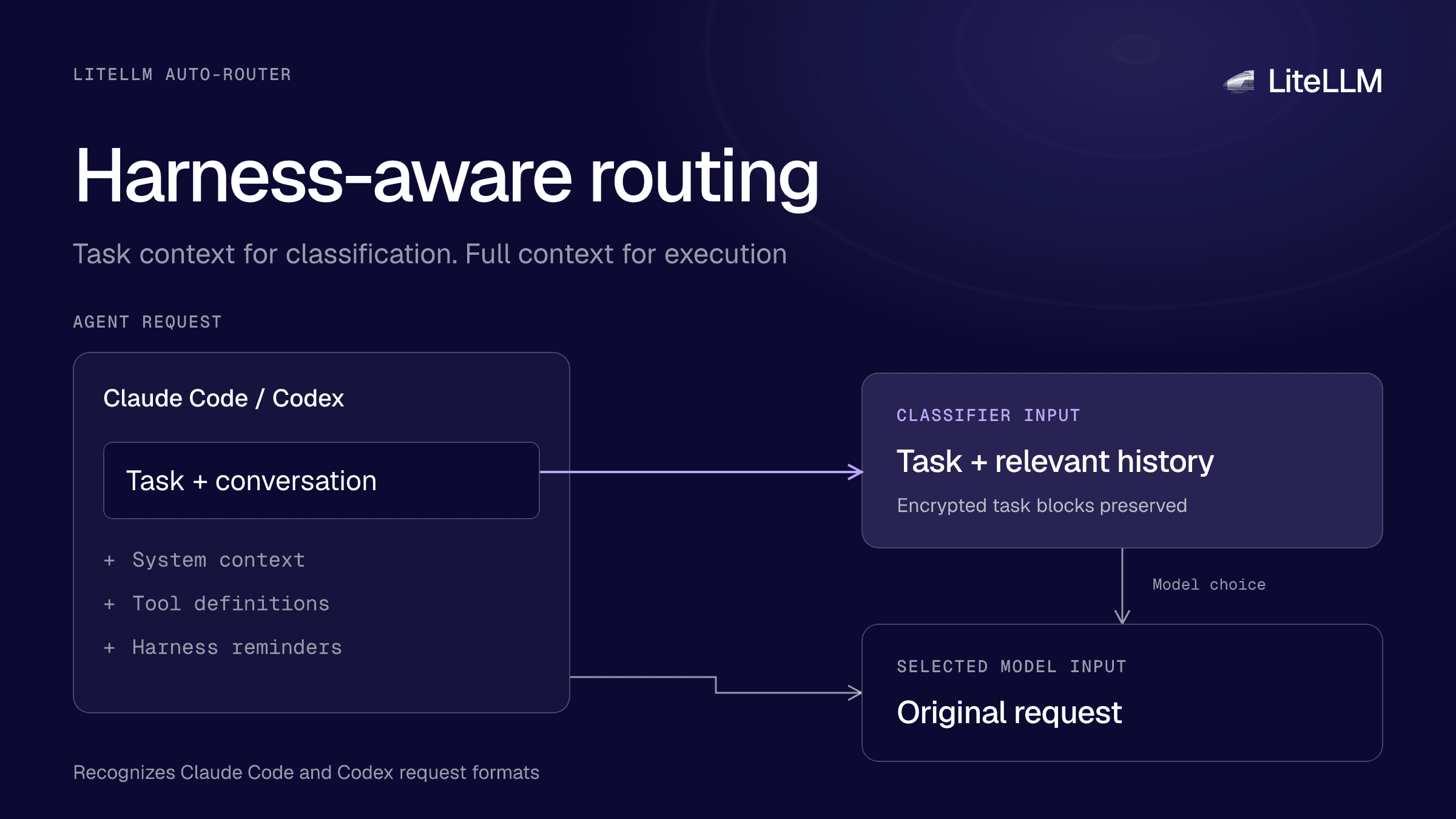
<p>We've updated the Auto-Router to account for how Claude Code and Codex package requests. It now removes more harness context from classification, preserves encrypted delegated tasks, and shows exactly what the classifier received</p>
<!-- -->
<div class="theme-admonition theme-admonition-info admonition_xJq3 alert alert--info"><div class="admonitionHeading_Gvgb"><span class="admonitionIcon_Rf37"><svg viewBox="0 0 14 16"><path fill-rule="evenodd" d="M7 2.3c3.14 0 5.7 2.56 5.7 5.7s-2.56 5.7-5.7 5.7A5.71 5.71 0 0 1 1.3 8c0-3.14 2.56-5.7 5.7-5.7zM7 1C3.14 1 0 4.14 0 8s3.14 7 7 7 7-3.14 7-7-3.14-7-7-7zm1 3H6v5h2V4zm0 6H6v2h2v-2z"></path></svg></span>Help shape the Auto-Router</div><div class="admonitionContent_BuS1"><p>Work with the LiteLLM team to test routing on your production traffic and help shape what we build next</p><a class="button button--primary button--lg" style="background:#2e8555;border-color:#2e8555;color:#fff" href="https://calendar.app.google/i2e7qVEJphHi5S8UA">Apply to Become a Design Partner</a></div></div>
<p>A coding harness sends more than the user's task. Requests also carry environment details, repository instructions, skill catalogs, and reminders. Those can dominate the classifier input or appear after the task as a separate message. Harness-aware routing uses the client identity and request format to find the task that needs a model</p>
<table><thead><tr><th>Update</th><th>What changes</th></tr></thead><tbody><tr><td><a href="https://github.com/BerriAI/litellm/pull/40655" target="_blank" rel="noopener noreferrer">Claude Code classification</a></td><td>Omits caller system text from the classifier input</td></tr><tr><td><a href="https://github.com/BerriAI/litellm/pull/40599" target="_blank" rel="noopener noreferrer">Codex reminder handling</a></td><td>Removes recognized harness blocks while preserving the delegated task</td></tr><tr><td><a href="https://github.com/BerriAI/litellm/pull/40608" target="_blank" rel="noopener noreferrer">Encrypted delegated tasks</a></td><td>Preserves encrypted task blocks in native Responses classifier calls</td></tr><tr><td><a href="https://github.com/BerriAI/litellm/pull/40604" target="_blank" rel="noopener noreferrer">Classifier logs</a></td><td>Separates classifier input, masked source request, and classifier response</td></tr></tbody></table>
<h2 class="anchor anchorWithStickyNavbar_LWe7" id="less-classifier-input-for-claude-code">Less classifier input for Claude Code<a href="https://docs.litellm.ai/blog/auto-router-harness-aware-classification#less-classifier-input-for-claude-code" class="hash-link" aria-label="Direct link to Less classifier input for Claude Code" title="Direct link to Less classifier input for Claude Code">​</a></h2>
<p>In a Claude Code reproduction, a short binary-search question used 2,478 classifier input tokens. Environment details, agent definitions, and the skill catalog accounted for 7,613 characters in the classifier's user payload</p>
<p>For recognized Claude Code requests, the LLM classifier now omits caller system text. The selected model still receives the original system text, and the classifier keeps the current ask, configured prior turns, and conversation-depth signal</p>
<table><thead><tr><th>First classifier call</th><th style="text-align:right">Before</th><th style="text-align:right">After</th></tr></thead><tbody><tr><td>User payload, characters</td><td style="text-align:right">7,675</td><td style="text-align:right">62</td></tr><tr><td>Total input tokens</td><td style="text-align:right">2,478</td><td style="text-align:right">524</td></tr></tbody></table>
<p>That's <strong>about 79% fewer classifier input tokens on this call</strong>. The reproduction used Claude Code 2.1.268, a Haiku 4.5 classifier, and a three-turn session with one delegated subagent. It measures classifier overhead on that first call; total session cost and answer quality need separate evaluation. <a href="https://github.com/BerriAI/litellm/pull/40655" target="_blank" rel="noopener noreferrer">Reproduction and results</a></p>
<p>Task constraints supplied only in Claude Code system messages also stop influencing tier selection. Put constraints that should affect routing in the task itself</p>
<h2 class="anchor anchorWithStickyNavbar_LWe7" id="keep-the-codex-task-in-view">Keep the Codex task in view<a href="https://docs.litellm.ai/blog/auto-router-harness-aware-classification#keep-the-codex-task-in-view" class="hash-link" aria-label="Direct link to Keep the Codex task in view" title="Direct link to Keep the Codex task in view">​</a></h2>
<p>Codex can append environment and repository instructions after a delegated task. Previously, that trailing message could become the classifier's current ask</p>
<p>For recognized Codex user agents, the router now strips complete harness blocks such as <code>&lt;environment_context&gt;</code> and <code>&lt;recommended_plugins&gt;</code>, plus the repository instruction envelope. The delegated task stays available for classification, and the selected model receives the original request</p>
<p>With <code>classification_mode: user_turn</code> and a session identifier, a fresh ask followed by reminder text gets classified. Subsequent assistant or tool continuations reuse its selected model without another classifier call. A new ask remains eligible for classification. <a href="https://github.com/BerriAI/litellm/pull/40599" target="_blank" rel="noopener noreferrer">Behavior and reproduction</a></p>
<p>Custom <code>reminder_markers</code> replace the built-in markers, so include every pair your harness needs when overriding them</p>
<h2 class="anchor anchorWithStickyNavbar_LWe7" id="classify-encrypted-delegated-tasks">Classify encrypted delegated tasks<a href="https://docs.litellm.ai/blog/auto-router-harness-aware-classification#classify-encrypted-delegated-tasks" class="hash-link" aria-label="Direct link to Classify encrypted delegated tasks" title="Direct link to Classify encrypted delegated tasks">​</a></h2>
<p>Some Codex delegated tasks arrive in an <code>agent_message</code> containing <code>encrypted_content</code>. Converting that payload to ordinary text hid the task from the classifier and produced a <code>SIMPLE</code> verdict for a difficult request</p>
<p>The router now preserves the encrypted task in a native Responses classifier call. In the reproduction, the difficult task changed from <code>SIMPLE</code> on <code>gpt-5.6-luna</code> to <code>REASONING</code> on <code>gpt-6-astra</code>. The easy task stayed <code>SIMPLE</code> on <code>gpt-5.6-luna</code>, with both streaming and non-streaming requests tested. <a href="https://github.com/BerriAI/litellm/pull/40608" target="_blank" rel="noopener noreferrer">Reproduction and results</a></p>
<p>This requires a native OpenAI or Azure OpenAI Responses classifier deployment with credentials that can consume the encrypted content. Encrypted tasks bypass the local scoring shortcut in <code>heuristic_first</code> and <code>hybrid</code> modes. Unsupported deployments and decryption errors follow <code>classifier_fallback</code>. The live reproduction used OpenAI; Azure transport was not exercised</p>
<h2 class="anchor anchorWithStickyNavbar_LWe7" id="see-what-the-classifier-received">See what the classifier received<a href="https://docs.litellm.ai/blog/auto-router-harness-aware-classification#see-what-the-classifier-received" class="hash-link" aria-label="Direct link to See what the classifier received" title="Direct link to See what the classifier received">​</a></h2>
<p>Open a request in <strong>Logs</strong>, then select its <strong>Classify</strong> row. New captures show <strong>Classifier input</strong>, <strong>Originating request, credentials masked</strong>, and <strong>Classifier response</strong> separately</p>
<p>This makes it possible to check whether the task reached the classifier and compare its verdict with the original request. Credentials, including Cookie and Set-Cookie headers, are masked in the source copy. Message-logging redaction settings still apply, and older rows retain their existing view. <a href="https://github.com/BerriAI/litellm/pull/40604" target="_blank" rel="noopener noreferrer">Logs update</a></p>
<h2 class="anchor anchorWithStickyNavbar_LWe7" id="try-it-with-your-harness">Try it with your harness<a href="https://docs.litellm.ai/blog/auto-router-harness-aware-classification#try-it-with-your-harness" class="hash-link" aria-label="Direct link to Try it with your harness" title="Direct link to Try it with your harness">​</a></h2>
<p>Use a build containing the linked changes and send Claude Code or Codex traffic through the <a href="https://docs.litellm.ai/docs/proxy/auto_routing">Auto-Router</a>. Preserve the client's <code>User-Agent</code> header so the router can recognize it. Test Claude Code behavior through the real client: the browser routing preview has no client-identity field and uses generic classification behavior</p>
<p>Share what you find in the <a href="https://github.com/BerriAI/litellm/discussions/32168" target="_blank" rel="noopener noreferrer">Auto-Router discussion</a></p>]]></content>
        <author>
            <name>Moe Khalil</name>
            <uri>https://www.linkedin.com/in/moe-khalil-73a2371a1/</uri>
        </author>
        <category label="routing" term="routing"/>
        <category label="complexity-router" term="complexity-router"/>
        <category label="engineering" term="engineering"/>
    </entry>
    <entry>
        <title type="html"><![CDATA[Secure shared AI agents with identity-aware access and spend controls]]></title>
        <id>https://docs.litellm.ai/blog/ai-gateway-identity-and-finops</id>
        <link href="https://docs.litellm.ai/blog/ai-gateway-identity-and-finops"/>
        <updated>2026-09-08T10:00:00.000Z</updated>
        <summary type="html"><![CDATA[How LiteLLM preserves caller identity across shared agents, governs model and MCP access, and enforces independent budgets for each business unit.]]></summary>
        <content type="html"><![CDATA[<p>Shared agents can preserve individual identity, access, and spend controls.</p>
<p>When a finance agent serves multiple business units, platform teams need a consistent way to identify who initiated each request, apply the right model and tool permissions, and attribute spend. LiteLLM keeps this context available across shared-agent workflows so each business unit can operate under its own access and budget policies.</p>
<p>LiteLLM provides one control plane for this workflow across the Agent Gateway, Model Gateway, and MCP Gateway. Teams can share the same agent infrastructure while keeping access, credentials, spend, and audit data tied to the right caller.</p>
<!-- -->
<h2 class="anchor anchorWithStickyNavbar_LWe7" id="one-gateway-for-the-complete-agent-workflow">One gateway for the complete agent workflow<a href="https://docs.litellm.ai/blog/ai-gateway-identity-and-finops#one-gateway-for-the-complete-agent-workflow" class="hash-link" aria-label="Direct link to One gateway for the complete agent workflow" title="Direct link to One gateway for the complete agent workflow">​</a></h2>
<p>A typical agent request crosses four boundaries:</p>
<ol>
<li>A user calls an agent.</li>
<li>The agent calls a model.</li>
<li>The agent calls an MCP tool.</li>
<li>The agent calls another agent.</li>
</ol>
<p>LiteLLM governs each boundary through a single proxy:</p>
<!-- -->
<p>The <a href="https://docs.litellm.ai/docs/a2a">Agent Gateway</a> authenticates callers, controls which users and teams can invoke each agent, and records request, response, latency, and cost data. The Model Gateway routes LLM traffic and applies budgets and rate limits. The MCP Gateway centralizes tool access and upstream authentication.</p>
<p>Together, they let platform teams operate agents as shared services with per-user governance across every request.</p>
<h2 class="anchor anchorWithStickyNavbar_LWe7" id="authenticate-every-call-to-a-shared-agent">Authenticate every call to a shared agent<a href="https://docs.litellm.ai/blog/ai-gateway-identity-and-finops#authenticate-every-call-to-a-shared-agent" class="hash-link" aria-label="Direct link to Authenticate every call to a shared agent" title="Direct link to Authenticate every call to a shared agent">​</a></h2>
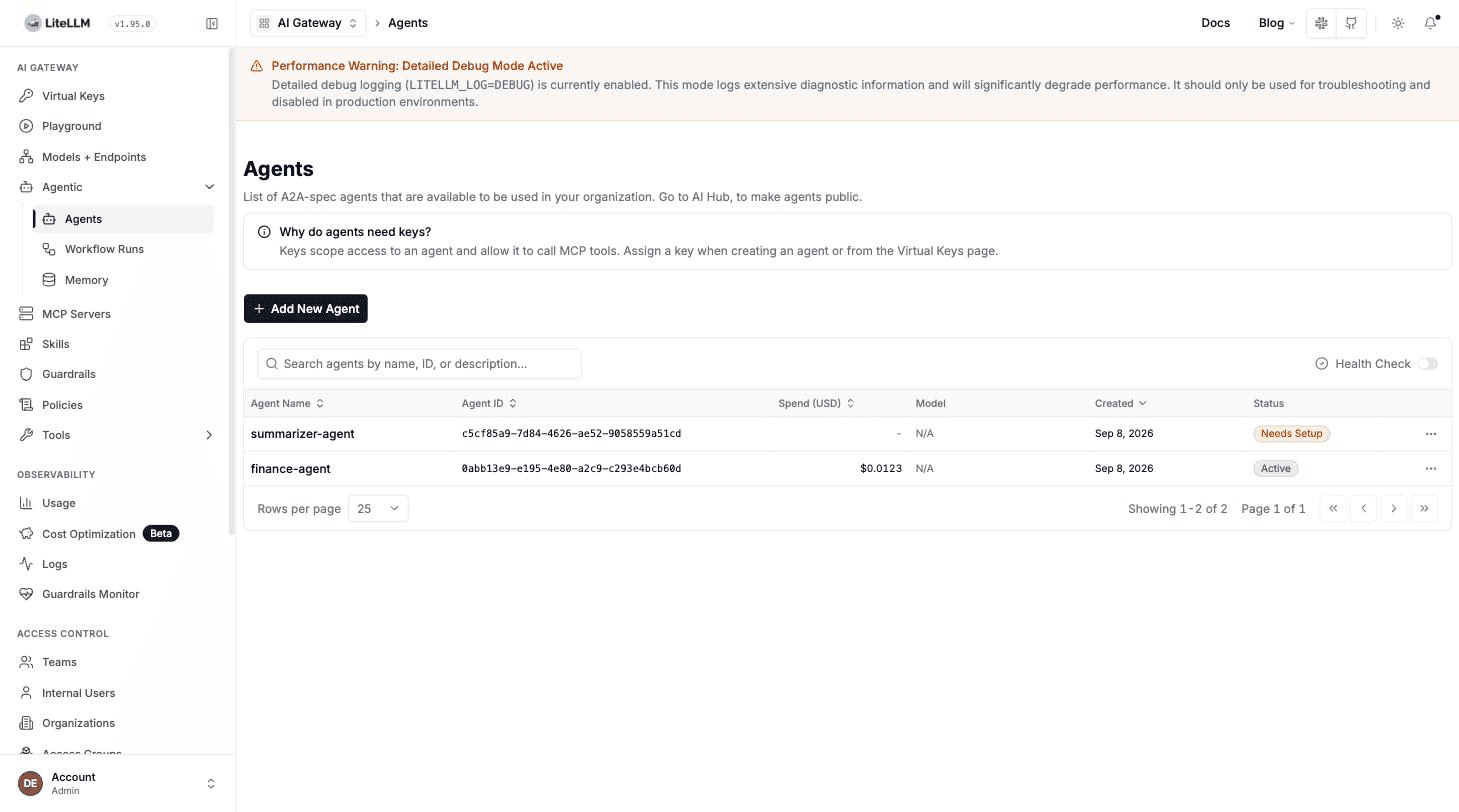
<p>Start by registering each agent in the Agent Gateway. Agents appear in the Admin UI with their status and spend data:</p>
<p><img decoding="async" loading="lazy" alt="Agents tab showing the finance-agent and summarizer-agent registered on the Agent Gateway" src="https://docs.litellm.ai/assets/images/a2a_gateway_poc_agents_tab-666433eea00489a5fa90bde19529dce1.png" width="1459" height="812" class="img_ev3q"></p>
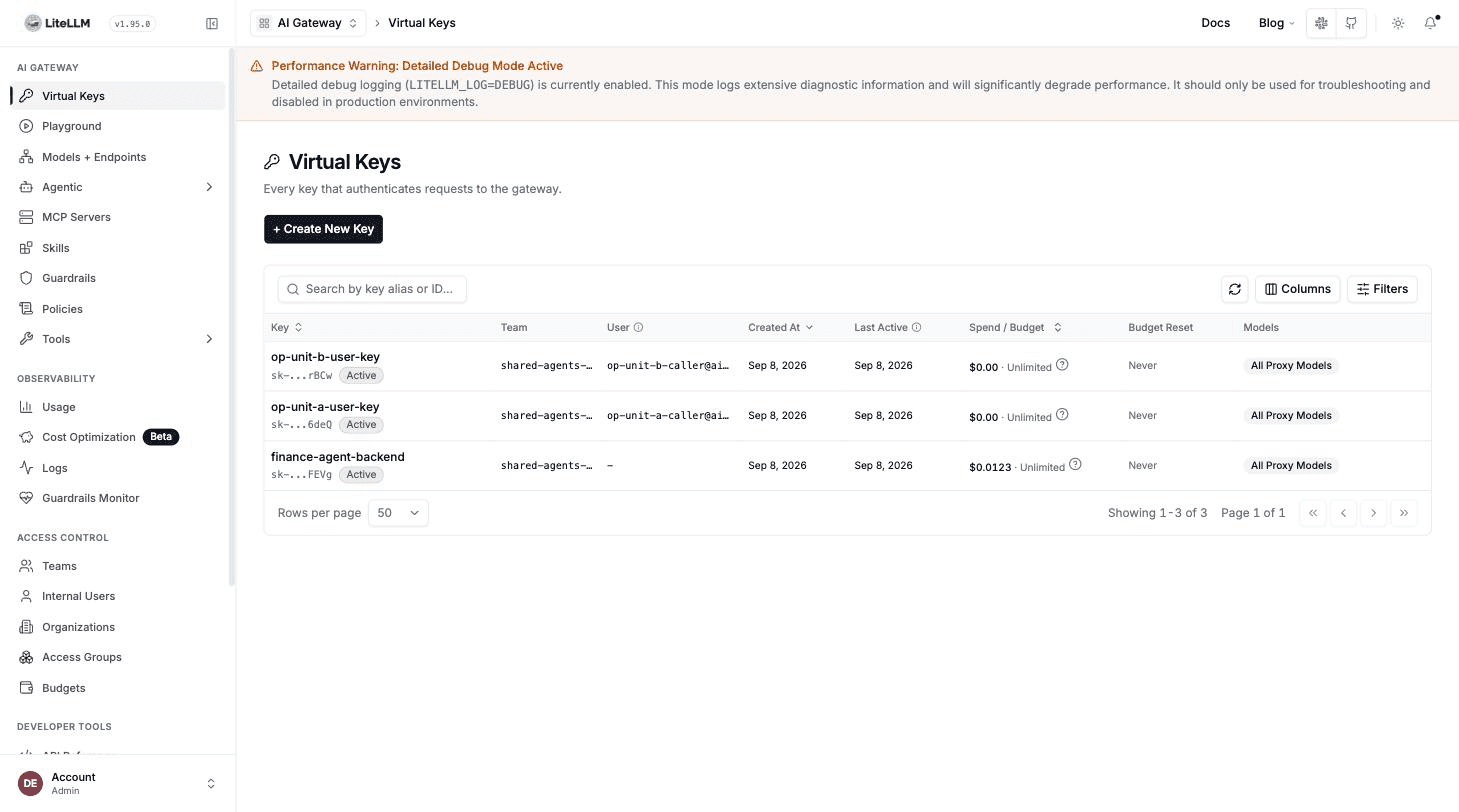
<p>Users can authenticate through OIDC or another supported LiteLLM credential while sharing the same team policy. In this example, two business units belong to <code>shared-agents-team</code>:</p>
<p><img decoding="async" loading="lazy" alt="LiteLLM Admin UI showing op-unit-a and op-unit-b under the shared-agents-team policy" src="https://docs.litellm.ai/assets/images/a2a_gateway_poc_virtual_keys_tab-6634b50084de037998cb5f9798354b3d.png" width="1459" height="812" class="img_ev3q"></p>
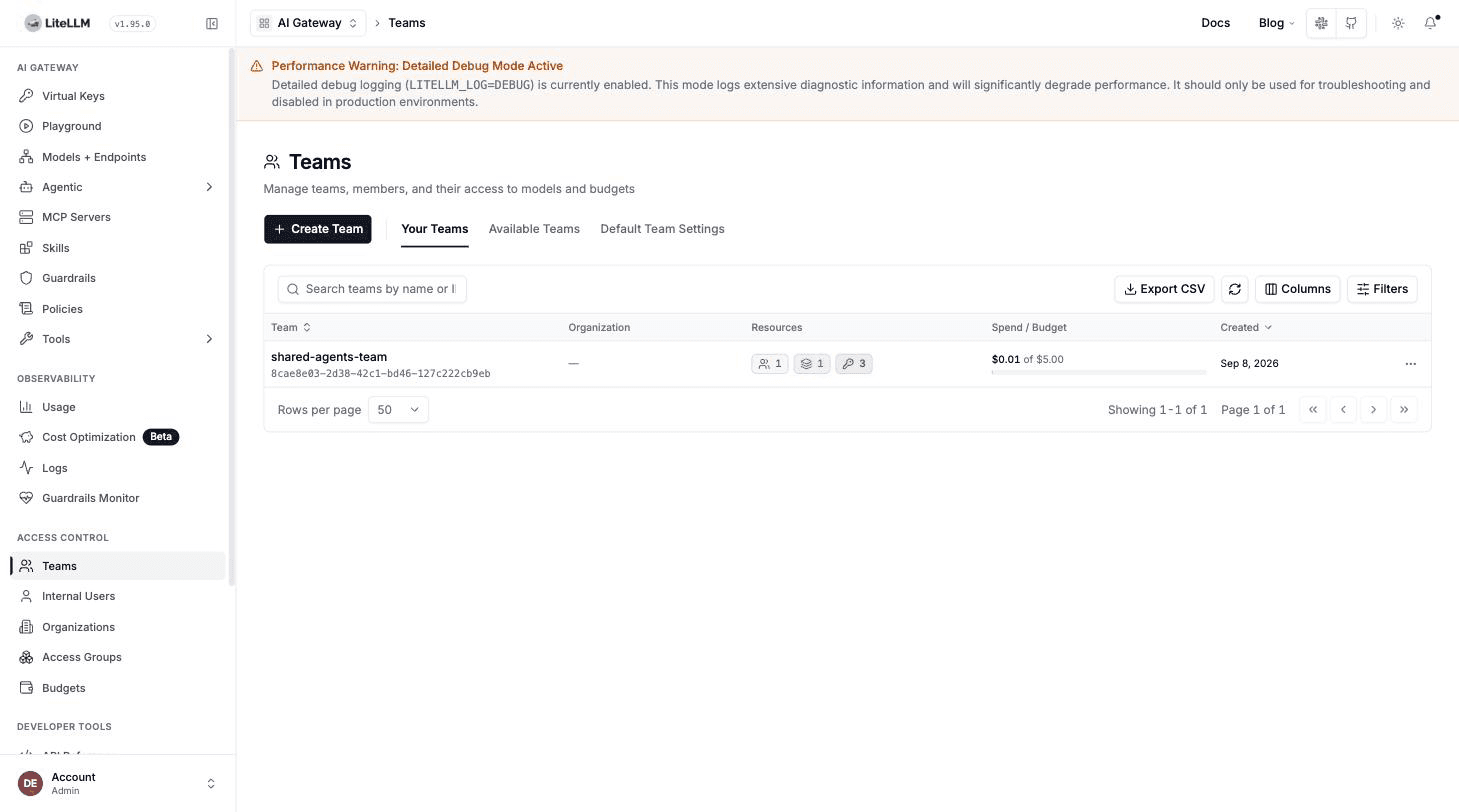
<p>The team's object permissions define which agents and MCP servers its members can access. Both business units use a single finance agent registration with centrally managed upstream credentials.</p>
<p><img decoding="async" loading="lazy" alt="Teams tab showing shared-agents-team with its resources and combined spend against a $5 budget" src="https://docs.litellm.ai/assets/images/a2a_gateway_poc_teams_tab-582e8bde0037cc119ce339898ba1f654.png" width="1459" height="812" class="img_ev3q"></p>
<p>When a request reaches the Agent Gateway, LiteLLM validates the caller's authentication and resolves the associated user and team. The gateway forwards that verified context to the agent as <code>X-LiteLLM-User-Id</code> and <code>X-LiteLLM-Team-Id</code>.</p>
<!-- -->
<p>The agent can use this authenticated context for downstream authorization, attribution, and budget enforcement.</p>
<p>Clients invoke the shared agent through the standard A2A JSON-RPC interface:</p>
<div class="language-bash codeBlockContainer_Ckt0 theme-code-block" style="--prism-color:#000000;--prism-background-color:#ffffff"><div class="codeBlockContent_QJqH"><pre tabindex="0" class="prism-code language-bash codeBlock_bY9V thin-scrollbar" style="color:#000000;background-color:#ffffff"><code class="codeBlockLines_e6Vv"><span class="token-line" style="color:#000000"><span class="token plain">curl -X POST "$LITELLM_BASE_URL/a2a/$AGENT_ID" \</span><br></span><span class="token-line" style="color:#000000"><span class="token plain">  -H "Authorization: Bearer $ACCESS_TOKEN" \</span><br></span><span class="token-line" style="color:#000000"><span class="token plain">  -H "Content-Type: application/json" \</span><br></span><span class="token-line" style="color:#000000"><span class="token plain">  -d '{</span><br></span><span class="token-line" style="color:#000000"><span class="token plain">    "jsonrpc": "2.0",</span><br></span><span class="token-line" style="color:#000000"><span class="token plain">    "id": "request-1",</span><br></span><span class="token-line" style="color:#000000"><span class="token plain">    "method": "message/send",</span><br></span><span class="token-line" style="color:#000000"><span class="token plain">    "params": {</span><br></span><span class="token-line" style="color:#000000"><span class="token plain">      "message": {</span><br></span><span class="token-line" style="color:#000000"><span class="token plain">        "kind": "message",</span><br></span><span class="token-line" style="color:#000000"><span class="token plain">        "messageId": "message-1",</span><br></span><span class="token-line" style="color:#000000"><span class="token plain">        "role": "user",</span><br></span><span class="token-line" style="color:#000000"><span class="token plain">        "parts": [</span><br></span><span class="token-line" style="color:#000000"><span class="token plain">          {"kind": "text", "text": "Give me a one-sentence finance status update."}</span><br></span><span class="token-line" style="color:#000000"><span class="token plain">        ]</span><br></span><span class="token-line" style="color:#000000"><span class="token plain">      }</span><br></span><span class="token-line" style="color:#000000"><span class="token plain">    }</span><br></span><span class="token-line" style="color:#000000"><span class="token plain">  }'</span><br></span></code></pre></div></div>
<h2 class="anchor anchorWithStickyNavbar_LWe7" id="keep-user-attribution-on-model-calls">Keep user attribution on model calls<a href="https://docs.litellm.ai/blog/ai-gateway-identity-and-finops#keep-user-attribution-on-model-calls" class="hash-link" aria-label="Direct link to Keep user attribution on model calls" title="Direct link to Keep user attribution on model calls">​</a></h2>
<p>The finance agent calls the Model Gateway with its own workload identity. This keeps service authentication separate from the end user's authentication.</p>
<p>For per-user attribution, the agent reads the verified <code>X-LiteLLM-User-Id</code> value from the inbound request and supplies it as the <code>user</code> field on its outbound model request. It also forwards LiteLLM trace and agent context headers so calls remain grouped under the same execution and spend is attributed to the correct agent.</p>
<p>This gives LiteLLM two useful dimensions at the same time:</p>
<ul>
<li>The workload identity identifies the agent making the model call.</li>
<li>The <code>user</code> field identifies the customer or business unit whose budget applies.</li>
</ul>
<p>Multiple teams can therefore share one agent and one model route while LiteLLM maintains separate usage and budget records for each caller.</p>
<h2 class="anchor anchorWithStickyNavbar_LWe7" id="apply-each-users-permissions-to-mcp-tools">Apply each user's permissions to MCP tools<a href="https://docs.litellm.ai/blog/ai-gateway-identity-and-finops#apply-each-users-permissions-to-mcp-tools" class="hash-link" aria-label="Direct link to Apply each user's permissions to MCP tools" title="Direct link to Apply each user's permissions to MCP tools">​</a></h2>
<p>The same finance agent accesses tools through the MCP Gateway with centrally managed credentials for upstream systems.</p>
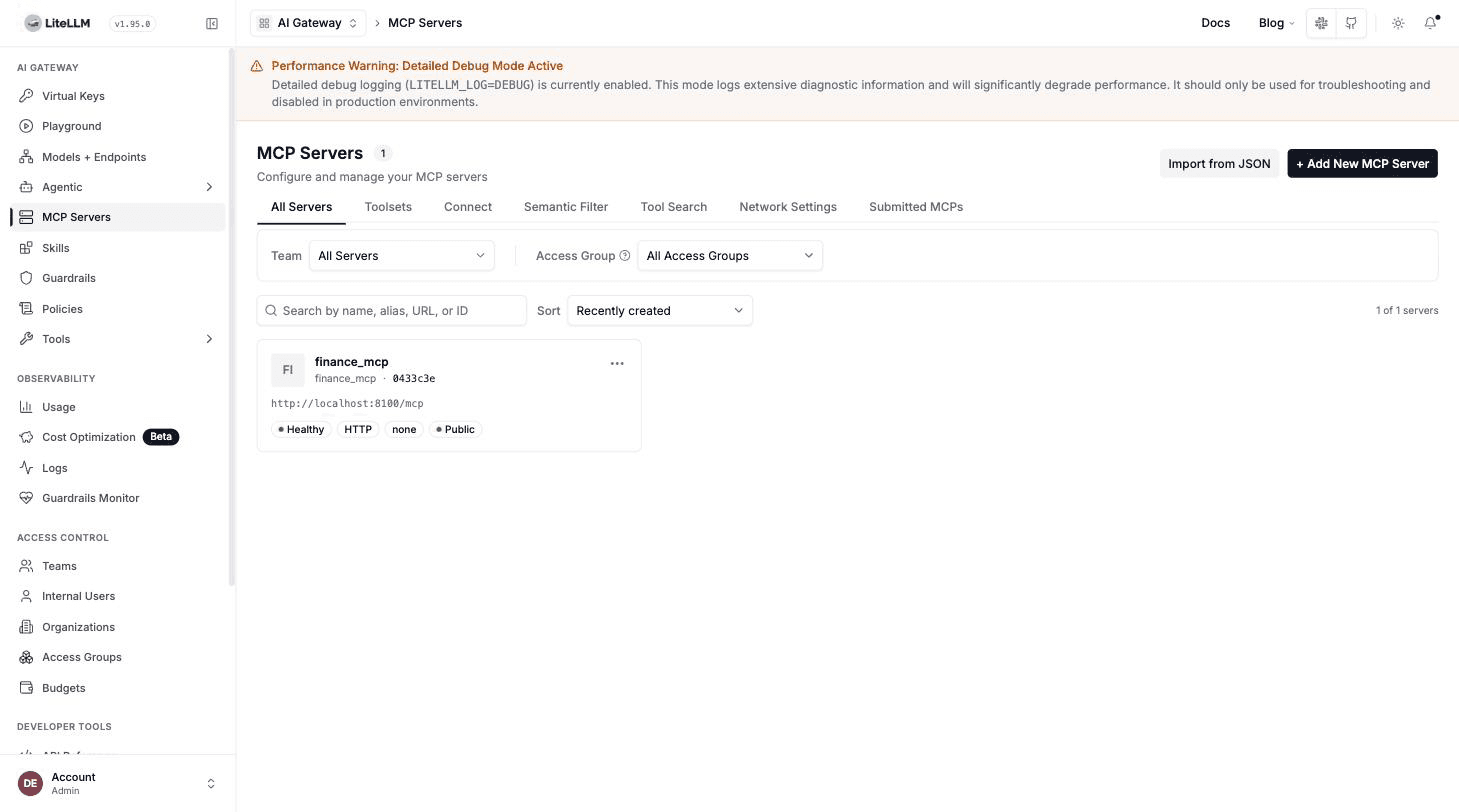
<p>In this example, the finance MCP server exposes two tools:</p>
<ul>
<li><code>get_revenue_summary</code>, available to any authorized caller</li>
<li><code>get_payroll_details</code>, restricted to users with the <code>finance-payroll-access</code> group</li>
</ul>
<p><img decoding="async" loading="lazy" alt="MCP Servers tab showing the finance_mcp server registered on the MCP Gateway" src="https://docs.litellm.ai/assets/images/a2a_gateway_poc_mcp_servers_tab-3a76b785c9bea6c6652ab8618b9635c2.png" width="1459" height="812" class="img_ev3q"></p>
<p>For interactive per-user OAuth, configure the MCP server with <code>auth_type: oauth2</code> and <code>oauth2_flow: authorization_code</code>. The user completes a PKCE sign-in with the organization's identity provider. LiteLLM stores the resulting credential for that user and MCP server, then attaches it to later tool calls for the same user.</p>
<p>The upstream MCP server remains the authorization authority. It evaluates the token's claims and decides whether the user can access payroll details or only the broader revenue summary. LiteLLM centralizes the OAuth flow and credential handling while preserving each user's upstream identity.</p>
<p>See <a href="https://docs.litellm.ai/docs/mcp_oauth">MCP OAuth</a> for configuration options, including machine-to-machine and on-behalf-of flows.</p>
<h2 class="anchor anchorWithStickyNavbar_LWe7" id="keep-user-and-agent-attribution-across-multi-agent-calls">Keep user and agent attribution across multi-agent calls<a href="https://docs.litellm.ai/blog/ai-gateway-identity-and-finops#keep-user-and-agent-attribution-across-multi-agent-calls" class="hash-link" aria-label="Direct link to Keep user and agent attribution across multi-agent calls" title="Direct link to Keep user and agent attribution across multi-agent calls">​</a></h2>
<p>An agent-to-agent workflow includes two useful attribution dimensions:</p>
<ul>
<li>The immediate workload identity, such as the finance agent</li>
<li>The originating user who started the workflow</li>
</ul>
<p>LiteLLM records the immediate workload identity at every gateway hop. When a downstream agent also needs the originating user, the calling agent passes that authenticated user context as application metadata or a supported forwarded header.</p>
<p>Together, these dimensions give platform teams a complete view of the workflow: gateway logs show which agent made each call, while the propagated user context connects the workflow to the business unit that initiated it.</p>
<h2 class="anchor anchorWithStickyNavbar_LWe7" id="enforce-independent-budgets-below-the-shared-team">Enforce independent budgets below the shared team<a href="https://docs.litellm.ai/blog/ai-gateway-identity-and-finops#enforce-independent-budgets-below-the-shared-team" class="hash-link" aria-label="Direct link to Enforce independent budgets below the shared team" title="Direct link to Enforce independent budgets below the shared team">​</a></h2>
<p>Shared infrastructure can support an independent spend limit for every business unit.</p>
<p>LiteLLM supports budgets at multiple levels, including keys, teams, agents, and customers. For a shared-agent deployment, create a customer record for each business unit and pass that customer ID in the model request's <code>user</code> field.</p>
<p>For example:</p>
<ul>
<li><code>op-unit-a</code>: $0.01 budget</li>
<li><code>op-unit-b</code>: $5.00 budget</li>
<li>Both units: the same finance agent and <code>shared-agents-team</code></li>
</ul>
<!-- -->
<p>When one unit reaches its limit, LiteLLM applies that unit's budget policy independently. Other units continue using their own budgets, and the shared team budget provides an aggregate ceiling across them.</p>
<p>This gives FinOps teams both views they need: consolidated spend for the shared service and independent controls for each business unit using it.</p>
<h2 class="anchor anchorWithStickyNavbar_LWe7" id="monitor-identity-and-budgets-in-litellm-logs">Monitor identity and budgets in LiteLLM Logs<a href="https://docs.litellm.ai/blog/ai-gateway-identity-and-finops#monitor-identity-and-budgets-in-litellm-logs" class="hash-link" aria-label="Direct link to Monitor identity and budgets in LiteLLM Logs" title="Direct link to Monitor identity and budgets in LiteLLM Logs">​</a></h2>
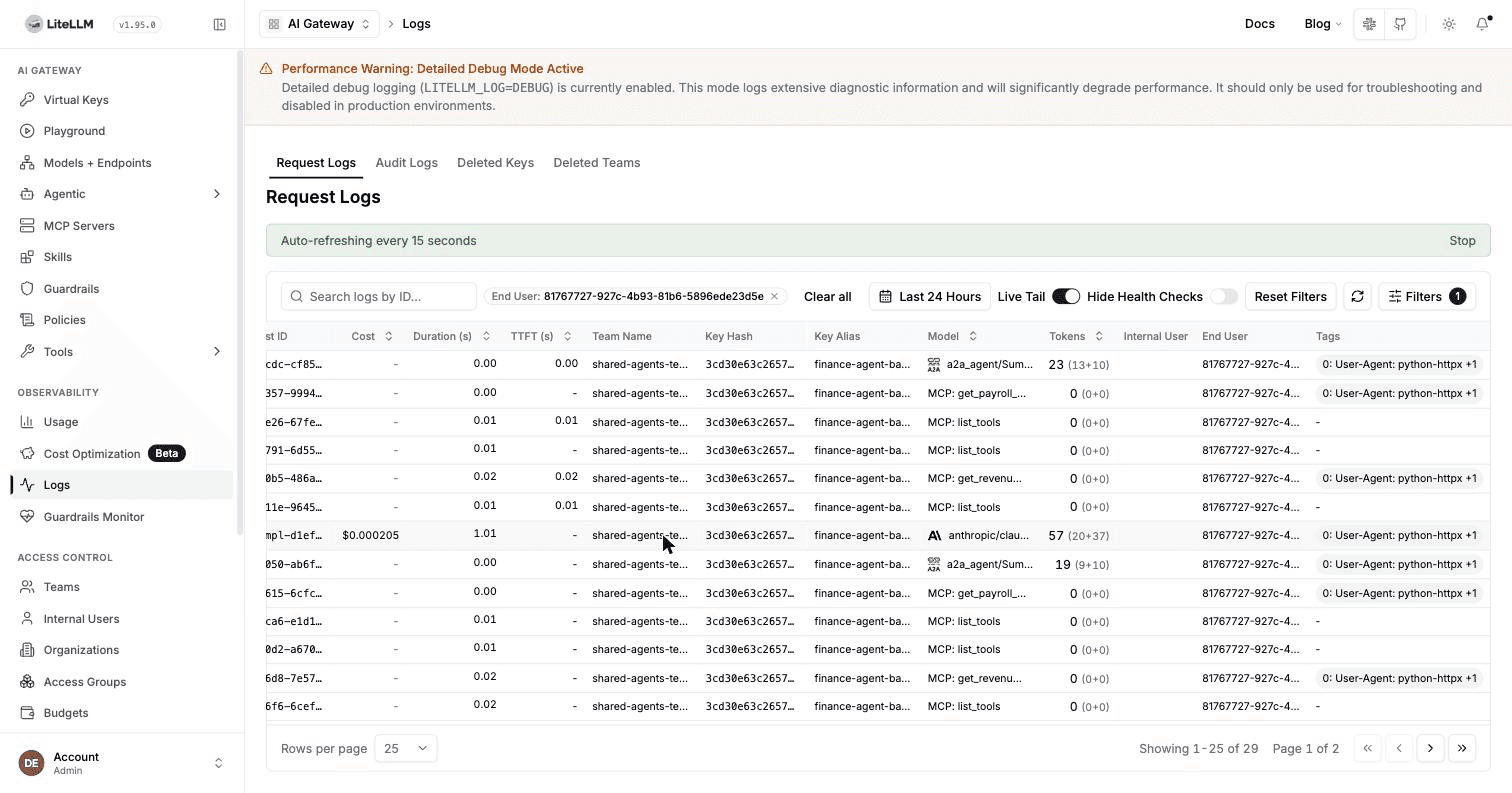
<p>LiteLLM Logs gives platform, security, and FinOps teams a single operational view of shared-agent activity. When an agent carries the authenticated end-user context into its downstream calls, operators can filter by <strong>End User</strong> to follow one business unit across A2A agent invocations, model requests, and MCP tool operations.</p>
<p>Each log row includes the team, model or tool, token usage, cost, duration, and end-user ID. This makes it easy to start with a customer or business unit and trace the resources used throughout its workflow.</p>
<p><img decoding="async" loading="lazy" alt="LiteLLM Request Logs filtered by end user, showing A2A, model, and MCP activity for one business unit" src="https://docs.litellm.ai/assets/images/a2a_gateway_poc_logs_end_user_attribution-9ae2244170c92ae6840b68ab7d4b3dc6.png" width="1512" height="793" class="img_ev3q"></p>
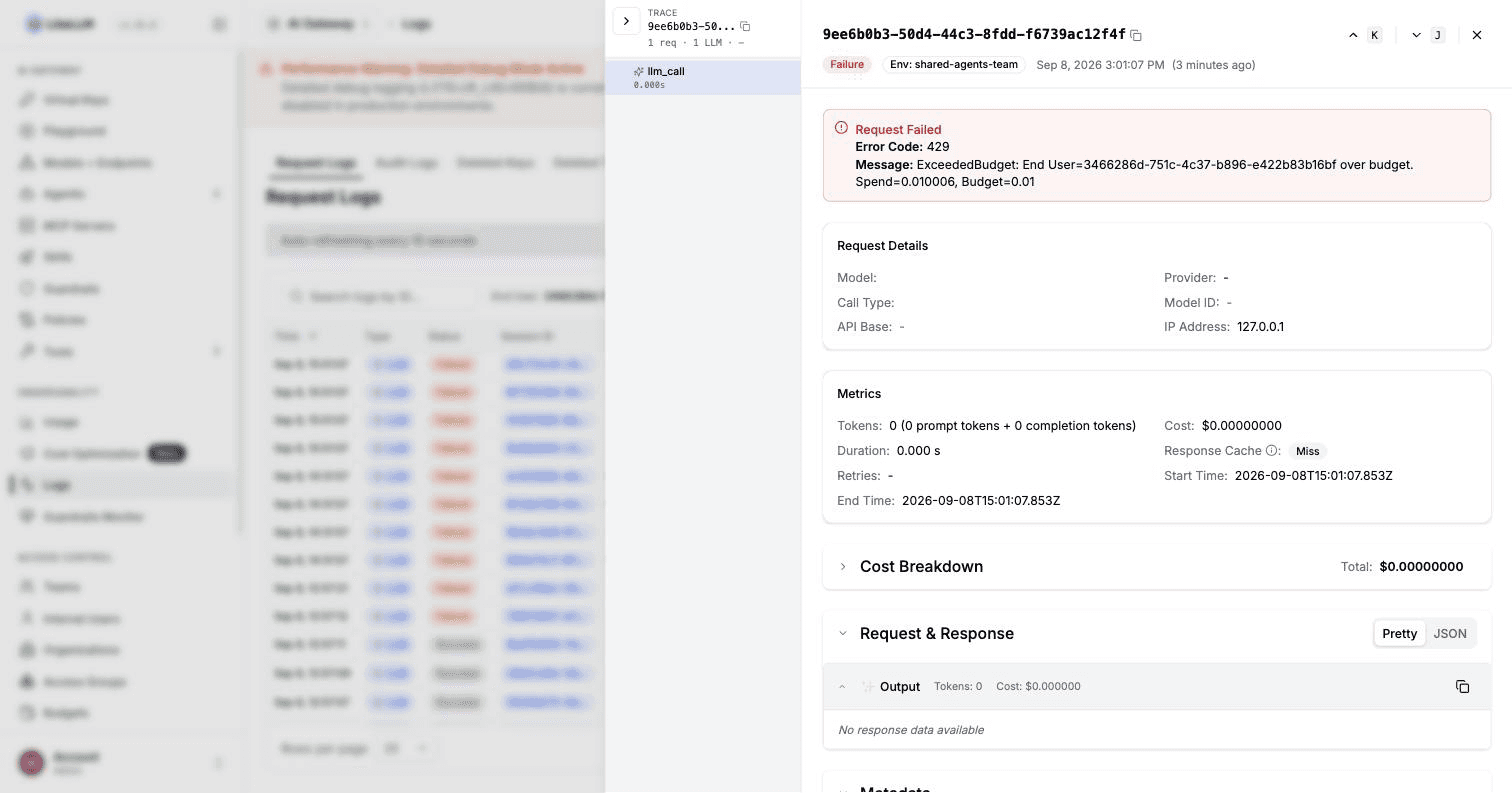
<p>Request details make customer budget enforcement visible. The entry records the <code>429</code> status, the end-user ID, current spend, and configured budget limit. Budget evaluation occurs before model-provider invocation, so the entry shows zero model tokens and cost.</p>
<p><img decoding="async" loading="lazy" alt="LiteLLM request details for a budget enforcement event, including status 429, end-user ID, current spend, and budget limit" src="https://docs.litellm.ai/assets/images/a2a_gateway_poc_logs_budget_exceeded-62fb70a1f5f485cbdcd1534c265b3459.png" width="1512" height="793" class="img_ev3q"></p>
<p>For shared-agent environments, these views answer three common operational questions:</p>
<ul>
<li>Which business unit initiated the workflow?</li>
<li>Which agents, models, and tools handled its requests?</li>
<li>How did the applicable customer budget govern the request?</li>
</ul>
<p>Team and workload attribution support infrastructure-level reporting, while the end-user field provides the business-unit-level detail needed for access reviews, incident investigation, and spend management.</p>
<h2 class="anchor anchorWithStickyNavbar_LWe7" id="a-practical-deployment-pattern">A practical deployment pattern<a href="https://docs.litellm.ai/blog/ai-gateway-identity-and-finops#a-practical-deployment-pattern" class="hash-link" aria-label="Direct link to A practical deployment pattern" title="Direct link to A practical deployment pattern">​</a></h2>
<p>To apply this architecture:</p>
<ol>
<li>Register shared agents in the Agent Gateway.</li>
<li>Grant teams access to the required agents and MCP servers through object permissions.</li>
<li>Configure OIDC or another supported authentication method that resolves end-user identity and team membership.</li>
<li>Read the authenticated inbound user context and pass it as <code>user</code> on model calls.</li>
<li>Configure per-user OAuth for MCP servers that enforce user-specific permissions.</li>
<li>Create customer budgets for each business unit, with an optional aggregate team budget.</li>
<li>Use LiteLLM Logs to audit the user, key, team, agent, latency, and cost for each request.</li>
</ol>
<p>The result is a shared agent platform with clear security and financial boundaries: users access their approved tools and data, spend is attributed to the correct business unit, and each unit is governed independently through one shared agent deployment.</p>
<p>Explore the <a href="https://docs.litellm.ai/docs/a2a">Agent Gateway</a>, <a href="https://docs.litellm.ai/docs/mcp">MCP Gateway</a>, and <a href="https://docs.litellm.ai/docs/proxy/users">budget and rate-limit controls</a> to build this pattern in your LiteLLM deployment.</p>]]></content>
        <author>
            <name>Yassin Kortam</name>
            <uri>https://www.linkedin.com/in/yassink/</uri>
        </author>
        <category label="product" term="product"/>
        <category label="agents" term="agents"/>
        <category label="mcp" term="mcp"/>
        <category label="security" term="security"/>
        <category label="finops" term="finops"/>
    </entry>
    <entry>
        <title type="html"><![CDATA[AutoRouter: Tune Heuristics for Your Traffic]]></title>
        <id>https://docs.litellm.ai/blog/auto-router-heuristic-tuning</id>
        <link href="https://docs.litellm.ai/blog/auto-router-heuristic-tuning"/>
        <updated>2026-09-08T10:00:00.000Z</updated>
        <summary type="html"><![CDATA[Tune AutoRouter heuristic dimensions for specific workloads, improve classification accuracy, and configure tiers from models you already serve.]]></summary>
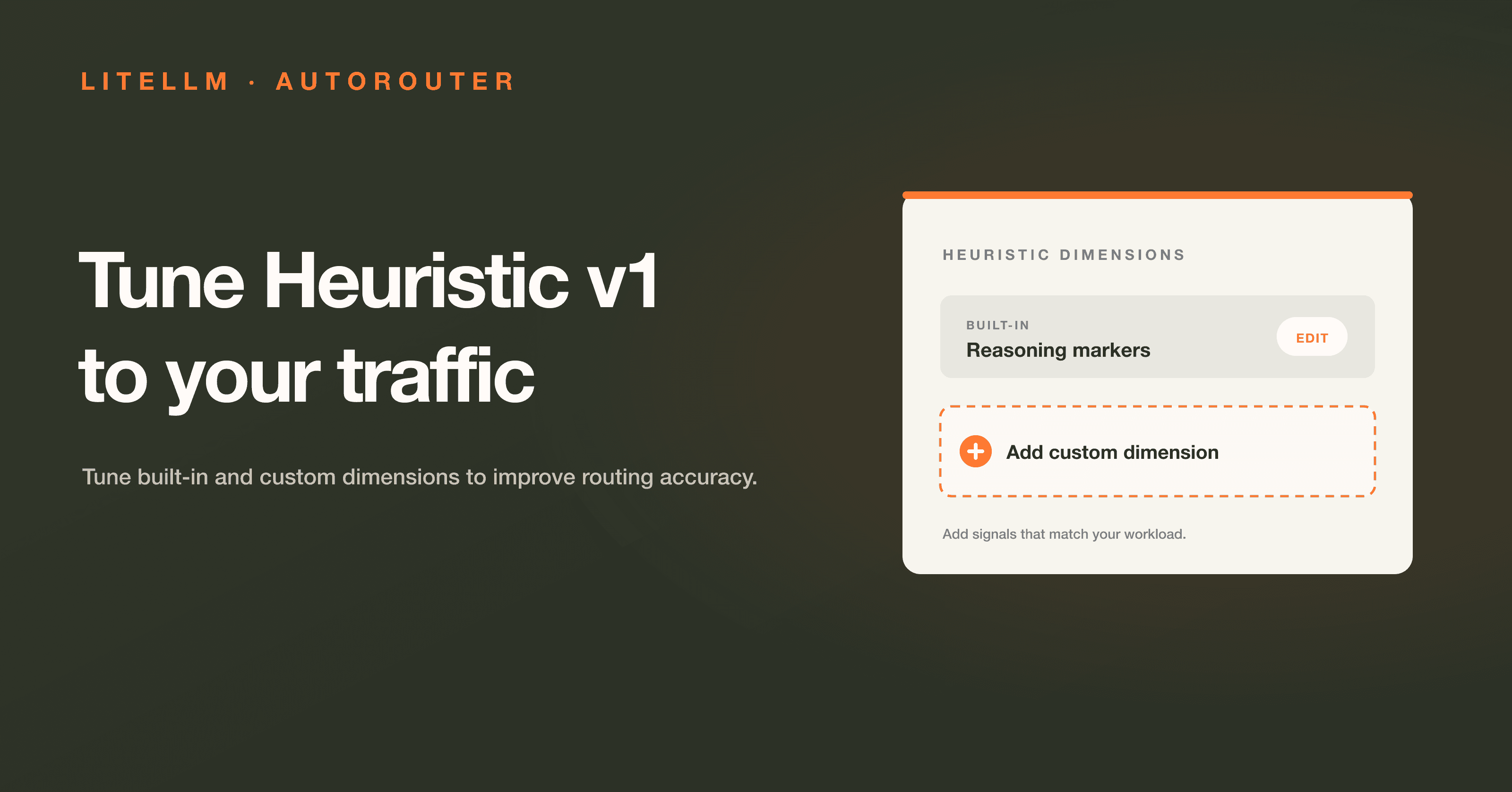
        <content type="html"><![CDATA[<p><img decoding="async" loading="lazy" alt="Tune AutoRouter Heuristic v1 dimensions to improve routing accuracy for your traffic" src="https://docs.litellm.ai/assets/images/hero-5a22e60750e95c7d644862a2ebbb2dd2.png" width="3200" height="1676" class="img_ev3q"></p>
<p>Heuristic v1 scores seven prompt signals, including reasoning language, code, technical terms, and prompt length. You can tune those signals for the traffic your router serves.</p>
<!-- -->
<div class="theme-admonition theme-admonition-info admonition_xJq3 alert alert--info"><div class="admonitionHeading_Gvgb"><span class="admonitionIcon_Rf37"><svg viewBox="0 0 14 16"><path fill-rule="evenodd" d="M7 2.3c3.14 0 5.7 2.56 5.7 5.7s-2.56 5.7-5.7 5.7A5.71 5.71 0 0 1 1.3 8c0-3.14 2.56-5.7 5.7-5.7zM7 1C3.14 1 0 4.14 0 8s3.14 7 7 7 7-3.14 7-7-3.14-7-7-7zm1 3H6v5h2V4zm0 6H6v2h2v-2z"></path></svg></span>🚀 Help shape the Auto-Router</div><div class="admonitionContent_BuS1"><p>Test heuristic tuning on your production traffic with the LiteLLM team and influence the roadmap.</p><a class="button button--primary button--lg" style="background:#2e8555;border-color:#2e8555;color:#fff" href="https://calendar.app.google/i2e7qVEJphHi5S8UA">Apply to Become a Design Partner</a><br><br><p>Share benchmark results in <a href="https://github.com/BerriAI/litellm/discussions/32168" target="_blank" rel="noopener noreferrer">discussion #32168</a>.</p></div></div>
<p>We tested that idea on a balanced 240-prompt mix:</p>
<table><thead><tr><th>Configuration</th><th style="text-align:right">Accuracy</th></tr></thead><tbody><tr><td>Default Heuristic v1</td><td style="text-align:right">90.8%</td></tr><tr><td>Workload-tuned Heuristic v1</td><td style="text-align:right"><strong>95.2%</strong></td></tr><tr><td>All Opus</td><td style="text-align:right">94.9%</td></tr></tbody></table>
<ul>
<li>The tuned configuration cut the classification error rate from <strong>9.2% to 4.8%</strong>, a <strong>48% reduction</strong>.</li>
<li>It slightly exceeded the all-Opus reference on this benchmark.</li>
<li>The model ladder and test set stayed fixed, so tuning the heuristic dimensions drove the change.</li>
</ul>
<p>A useful profile depends on your traffic. Code-heavy workloads and support questions reward different routing choices.</p>
<h2 class="anchor anchorWithStickyNavbar_LWe7" id="tune-the-signals-your-workload-uses">Tune the signals your workload uses<a href="https://docs.litellm.ai/blog/auto-router-heuristic-tuning#tune-the-signals-your-workload-uses" class="hash-link" aria-label="Direct link to Tune the signals your workload uses" title="Direct link to Tune the signals your workload uses">​</a></h2>
<p>You can tune:</p>
<ul>
<li><code>reasoningMarkers</code>, <code>multiStepPatterns</code>, and <code>questionComplexity</code> for reasoning-heavy prompts.</li>
<li><code>codePresence</code> and <code>technicalTerms</code> for code and domain-specific traffic.</li>
<li><code>tokenCount</code> and <code>simpleIndicators</code> for prompt length and low-complexity cues.</li>
<li>A custom dimension for workload-specific vocabulary or structure.</li>
</ul>
<p>For a useful comparison:</p>
<ul>
<li>Start with a held-out sample from your traffic.</li>
<li>Keep the model ladder and test set fixed.</li>
<li>Change one signal family at a time and inspect which prompts move tiers.</li>
<li>Compare accuracy, latency, and tier distribution.</li>
</ul>
<p>The <a href="https://docs.litellm.ai/docs/auto_router/evaluate">shadow evaluation workflow</a> tests a candidate on sampled production traffic without changing the response your user receives.</p>
<h2 class="anchor anchorWithStickyNavbar_LWe7" id="auto-configure-from-models-you-already-have">Auto-configure from models you already have<a href="https://docs.litellm.ai/blog/auto-router-heuristic-tuning#auto-configure-from-models-you-already-have" class="hash-link" aria-label="Direct link to Auto-configure from models you already have" title="Direct link to Auto-configure from models you already have">​</a></h2>
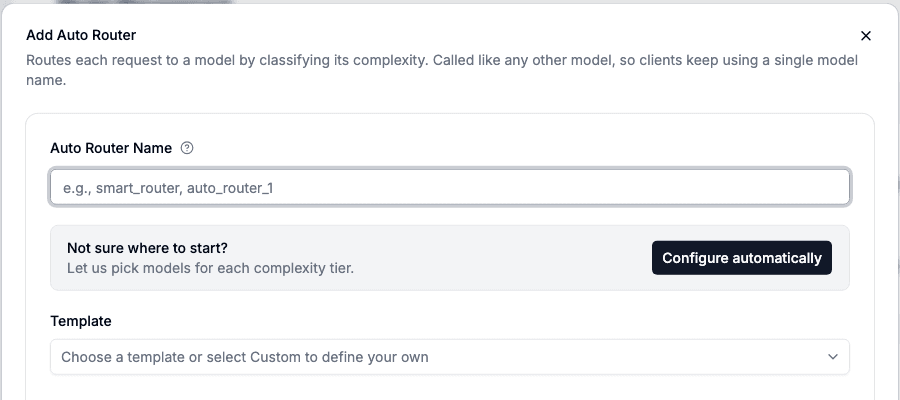
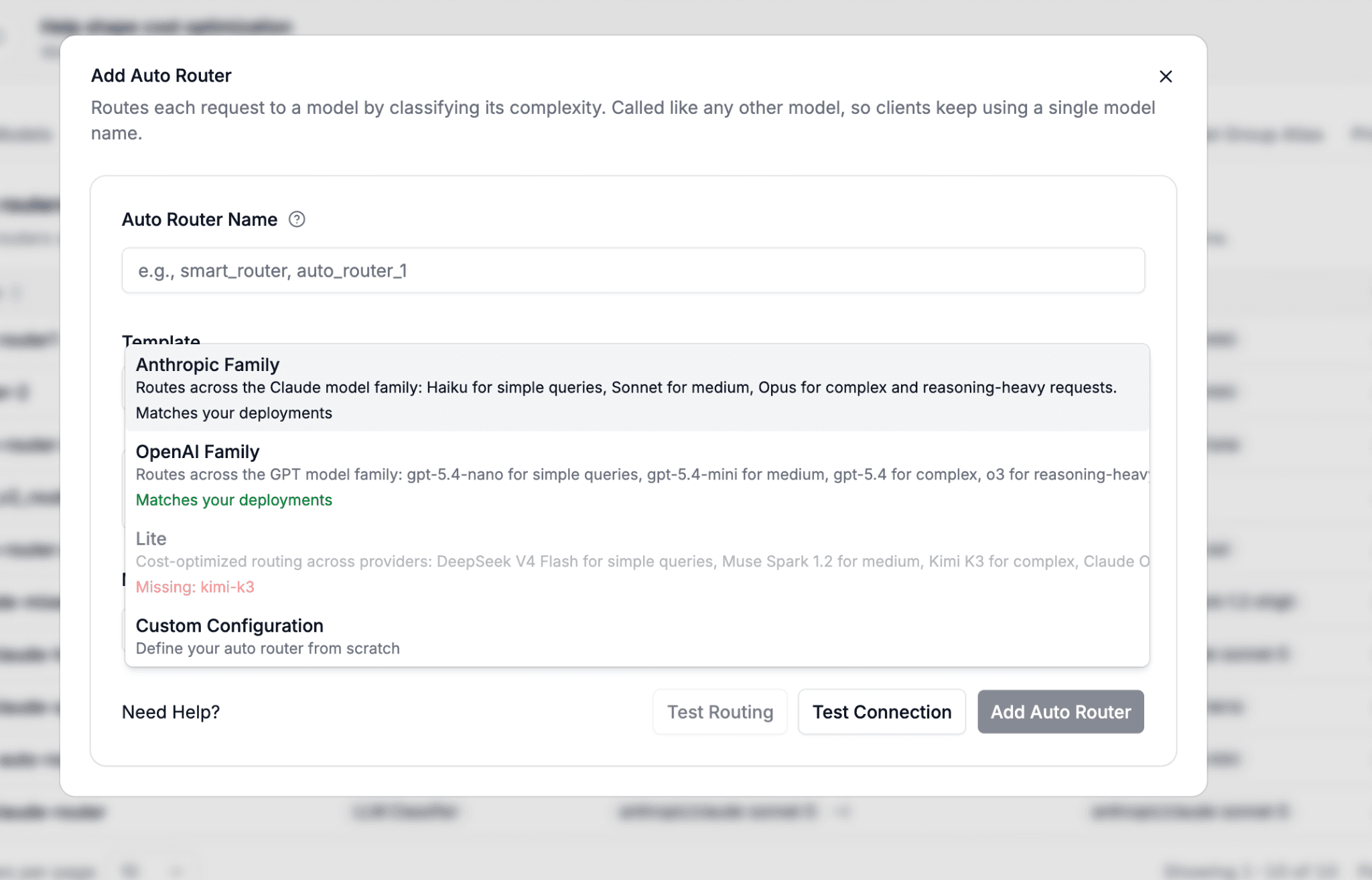
<p>Select <strong>Configure automatically</strong>. LiteLLM checks the models your proxy can access and, using current family presets, picks the best available model for each routing tier.</p>
<ul>
<li>Each tier uses a model from your existing deployments.</li>
<li>The configuration opens for review before you save it.</li>
<li>Anthropic Family uses <strong>Claude Fable 5.1 at high effort</strong> for reasoning traffic.</li>
<li>OpenAI Family uses <strong>GPT-6 Astra at xhigh effort</strong> for reasoning traffic.</li>
</ul>
<p>Deployment names do not need to match the catalog. AutoRouter identifies the provider model behind each deployment.</p>
<p><img decoding="async" loading="lazy" alt="Add Auto Router form with the new Configure automatically button" src="https://docs.litellm.ai/assets/images/auto-configure-button-d29e817c827a0ccbd9e4b49f940bbcc7.png" width="900" height="400" class="img_ev3q"></p>
<h2 class="anchor anchorWithStickyNavbar_LWe7" id="see-llm-classifier-activity-per-1000-turns">See LLM classifier activity per 1,000 turns<a href="https://docs.litellm.ai/blog/auto-router-heuristic-tuning#see-llm-classifier-activity-per-1000-turns" class="hash-link" aria-label="Direct link to See LLM classifier activity per 1,000 turns" title="Direct link to See LLM classifier activity per 1,000 turns">​</a></h2>
<p>You can now separate LLM classifier activity from routed requests:</p>
<ul>
<li>Normalize classifier activity per 1,000 routed turns.</li>
<li>Use sessions, turns, and tier distribution to compare routing changes.</li>
<li>See how often an LLM classifier runs alongside the traffic it routes.</li>
</ul>
<h2 class="anchor anchorWithStickyNavbar_LWe7" id="more-controls-for-agent-traffic">More controls for agent traffic<a href="https://docs.litellm.ai/blog/auto-router-heuristic-tuning#more-controls-for-agent-traffic" class="hash-link" aria-label="Direct link to More controls for agent traffic" title="Direct link to More controls for agent traffic">​</a></h2>
<p>Recent AutoRouter changes also cover long-running agent sessions:</p>
<ul>
<li><strong>A <code>NON_REASONING</code> tier below Simple</strong> handles tool-result relays, acknowledgements, and reformatting work.</li>
<li><strong>Output limits from the selected tier</strong> replace a caller's cap with the chosen model's output ceiling. An explicit per-tier cap still wins.</li>
<li><strong>Classifier timeout protection</strong> opens a circuit breaker after a timeout and uses the configured fallback during the cooldown.</li>
<li><strong>Cross-provider tool history</strong> lets the Messages API replay <code>tool_use</code> history when a session moves between OpenAI and Anthropic tiers.</li>
</ul>
<h2 class="anchor anchorWithStickyNavbar_LWe7" id="try-the-autorouter">Try the AutoRouter<a href="https://docs.litellm.ai/blog/auto-router-heuristic-tuning#try-the-autorouter" class="hash-link" aria-label="Direct link to Try the AutoRouter" title="Direct link to Try the AutoRouter">​</a></h2>
<div class="theme-admonition theme-admonition-info admonition_xJq3 alert alert--info"><div class="admonitionHeading_Gvgb"><span class="admonitionIcon_Rf37"><svg viewBox="0 0 14 16"><path fill-rule="evenodd" d="M7 2.3c3.14 0 5.7 2.56 5.7 5.7s-2.56 5.7-5.7 5.7A5.71 5.71 0 0 1 1.3 8c0-3.14 2.56-5.7 5.7-5.7zM7 1C3.14 1 0 4.14 0 8s3.14 7 7 7 7-3.14 7-7-3.14-7-7-7zm1 3H6v5h2V4zm0 6H6v2h2v-2z"></path></svg></span>info</div><div class="admonitionContent_BuS1"><p>Open <strong>Add Model → Auto Router</strong> and select <strong>Configure automatically</strong>. Review the generated tiers, then test them against your traffic. Share results in <a href="https://github.com/BerriAI/litellm/discussions/32168" target="_blank" rel="noopener noreferrer">discussion #32168</a>, or <a href="https://calendar.app.google/i2e7qVEJphHi5S8UA" target="_blank" rel="noopener noreferrer">apply to be a design partner</a> to work with the LiteLLM team.</p></div></div>
<p>You can also start with a file-based config:</p>
<div class="language-yaml codeBlockContainer_Ckt0 theme-code-block" style="--prism-color:#000000;--prism-background-color:#ffffff"><div class="codeBlockTitle_OeMC">config.yaml</div><div class="codeBlockContent_QJqH"><pre tabindex="0" class="prism-code language-yaml codeBlock_bY9V thin-scrollbar" style="color:#000000;background-color:#ffffff"><code class="codeBlockLines_e6Vv"><span class="token-line" style="color:#000000"><span class="token key atrule">model_list</span><span class="token punctuation" style="color:rgb(4, 81, 165)">:</span><span class="token plain"></span><br></span><span class="token-line" style="color:#000000"><span class="token plain">  </span><span class="token punctuation" style="color:rgb(4, 81, 165)">-</span><span class="token plain"> </span><span class="token key atrule">model_name</span><span class="token punctuation" style="color:rgb(4, 81, 165)">:</span><span class="token plain"> claude</span><span class="token punctuation" style="color:rgb(4, 81, 165)">-</span><span class="token plain">haiku</span><span class="token punctuation" style="color:rgb(4, 81, 165)">-</span><span class="token plain">4</span><span class="token punctuation" style="color:rgb(4, 81, 165)">-</span><span class="token number" style="color:rgb(9, 134, 88)">5</span><span class="token plain"></span><br></span><span class="token-line" style="color:#000000"><span class="token plain">    </span><span class="token key atrule">litellm_params</span><span class="token punctuation" style="color:rgb(4, 81, 165)">:</span><span class="token plain"></span><br></span><span class="token-line" style="color:#000000"><span class="token plain">      </span><span class="token key atrule">model</span><span class="token punctuation" style="color:rgb(4, 81, 165)">:</span><span class="token plain"> anthropic/claude</span><span class="token punctuation" style="color:rgb(4, 81, 165)">-</span><span class="token plain">haiku</span><span class="token punctuation" style="color:rgb(4, 81, 165)">-</span><span class="token plain">4</span><span class="token punctuation" style="color:rgb(4, 81, 165)">-</span><span class="token number" style="color:rgb(9, 134, 88)">5</span><span class="token plain"></span><br></span><span class="token-line" style="color:#000000"><span class="token plain">      </span><span class="token key atrule">api_key</span><span class="token punctuation" style="color:rgb(4, 81, 165)">:</span><span class="token plain"> os.environ/ANTHROPIC_API_KEY</span><br></span><span class="token-line" style="color:#000000"><span class="token plain" style="display:inline-block"></span><br></span><span class="token-line" style="color:#000000"><span class="token plain">  </span><span class="token punctuation" style="color:rgb(4, 81, 165)">-</span><span class="token plain"> </span><span class="token key atrule">model_name</span><span class="token punctuation" style="color:rgb(4, 81, 165)">:</span><span class="token plain"> claude</span><span class="token punctuation" style="color:rgb(4, 81, 165)">-</span><span class="token plain">sonnet</span><span class="token punctuation" style="color:rgb(4, 81, 165)">-</span><span class="token number" style="color:rgb(9, 134, 88)">5</span><span class="token plain"></span><br></span><span class="token-line" style="color:#000000"><span class="token plain">    </span><span class="token key atrule">litellm_params</span><span class="token punctuation" style="color:rgb(4, 81, 165)">:</span><span class="token plain"></span><br></span><span class="token-line" style="color:#000000"><span class="token plain">      </span><span class="token key atrule">model</span><span class="token punctuation" style="color:rgb(4, 81, 165)">:</span><span class="token plain"> anthropic/claude</span><span class="token punctuation" style="color:rgb(4, 81, 165)">-</span><span class="token plain">sonnet</span><span class="token punctuation" style="color:rgb(4, 81, 165)">-</span><span class="token number" style="color:rgb(9, 134, 88)">5</span><span class="token plain"></span><br></span><span class="token-line" style="color:#000000"><span class="token plain">      </span><span class="token key atrule">api_key</span><span class="token punctuation" style="color:rgb(4, 81, 165)">:</span><span class="token plain"> os.environ/ANTHROPIC_API_KEY</span><br></span><span class="token-line" style="color:#000000"><span class="token plain" style="display:inline-block"></span><br></span><span class="token-line" style="color:#000000"><span class="token plain">  </span><span class="token punctuation" style="color:rgb(4, 81, 165)">-</span><span class="token plain"> </span><span class="token key atrule">model_name</span><span class="token punctuation" style="color:rgb(4, 81, 165)">:</span><span class="token plain"> claude</span><span class="token punctuation" style="color:rgb(4, 81, 165)">-</span><span class="token plain">fable</span><span class="token punctuation" style="color:rgb(4, 81, 165)">-</span><span class="token plain">5</span><span class="token punctuation" style="color:rgb(4, 81, 165)">-</span><span class="token plain">1</span><span class="token punctuation" style="color:rgb(4, 81, 165)">-</span><span class="token plain">high</span><br></span><span class="token-line" style="color:#000000"><span class="token plain">    </span><span class="token key atrule">litellm_params</span><span class="token punctuation" style="color:rgb(4, 81, 165)">:</span><span class="token plain"></span><br></span><span class="token-line" style="color:#000000"><span class="token plain">      </span><span class="token key atrule">model</span><span class="token punctuation" style="color:rgb(4, 81, 165)">:</span><span class="token plain"> anthropic/claude</span><span class="token punctuation" style="color:rgb(4, 81, 165)">-</span><span class="token plain">fable</span><span class="token punctuation" style="color:rgb(4, 81, 165)">-</span><span class="token plain">5</span><span class="token punctuation" style="color:rgb(4, 81, 165)">-</span><span class="token number" style="color:rgb(9, 134, 88)">1</span><span class="token plain"></span><br></span><span class="token-line" style="color:#000000"><span class="token plain">      </span><span class="token key atrule">api_key</span><span class="token punctuation" style="color:rgb(4, 81, 165)">:</span><span class="token plain"> os.environ/ANTHROPIC_API_KEY</span><br></span><span class="token-line" style="color:#000000"><span class="token plain">      </span><span class="token key atrule">reasoning_effort</span><span class="token punctuation" style="color:rgb(4, 81, 165)">:</span><span class="token plain"> high</span><br></span><span class="token-line" style="color:#000000"><span class="token plain" style="display:inline-block"></span><br></span><span class="token-line" style="color:#000000"><span class="token plain">  </span><span class="token punctuation" style="color:rgb(4, 81, 165)">-</span><span class="token plain"> </span><span class="token key atrule">model_name</span><span class="token punctuation" style="color:rgb(4, 81, 165)">:</span><span class="token plain"> smart</span><span class="token punctuation" style="color:rgb(4, 81, 165)">-</span><span class="token plain">router</span><br></span><span class="token-line" style="color:#000000"><span class="token plain">    </span><span class="token key atrule">litellm_params</span><span class="token punctuation" style="color:rgb(4, 81, 165)">:</span><span class="token plain"></span><br></span><span class="token-line" style="color:#000000"><span class="token plain">      </span><span class="token key atrule">model</span><span class="token punctuation" style="color:rgb(4, 81, 165)">:</span><span class="token plain"> auto_router/complexity_router</span><br></span><span class="token-line" style="color:#000000"><span class="token plain">      </span><span class="token key atrule">complexity_router_config</span><span class="token punctuation" style="color:rgb(4, 81, 165)">:</span><span class="token plain"></span><br></span><span class="token-line" style="color:#000000"><span class="token plain">        </span><span class="token key atrule">classifier_type</span><span class="token punctuation" style="color:rgb(4, 81, 165)">:</span><span class="token plain"> heuristic</span><br></span><span class="token-line" style="color:#000000"><span class="token plain">        </span><span class="token key atrule">tiers</span><span class="token punctuation" style="color:rgb(4, 81, 165)">:</span><span class="token plain"></span><br></span><span class="token-line" style="color:#000000"><span class="token plain">          </span><span class="token key atrule">SIMPLE</span><span class="token punctuation" style="color:rgb(4, 81, 165)">:</span><span class="token plain"> claude</span><span class="token punctuation" style="color:rgb(4, 81, 165)">-</span><span class="token plain">haiku</span><span class="token punctuation" style="color:rgb(4, 81, 165)">-</span><span class="token plain">4</span><span class="token punctuation" style="color:rgb(4, 81, 165)">-</span><span class="token number" style="color:rgb(9, 134, 88)">5</span><span class="token plain"></span><br></span><span class="token-line" style="color:#000000"><span class="token plain">          </span><span class="token key atrule">MEDIUM</span><span class="token punctuation" style="color:rgb(4, 81, 165)">:</span><span class="token plain"> claude</span><span class="token punctuation" style="color:rgb(4, 81, 165)">-</span><span class="token plain">sonnet</span><span class="token punctuation" style="color:rgb(4, 81, 165)">-</span><span class="token number" style="color:rgb(9, 134, 88)">5</span><span class="token plain"></span><br></span><span class="token-line" style="color:#000000"><span class="token plain">          </span><span class="token key atrule">COMPLEX</span><span class="token punctuation" style="color:rgb(4, 81, 165)">:</span><span class="token plain"> claude</span><span class="token punctuation" style="color:rgb(4, 81, 165)">-</span><span class="token plain">fable</span><span class="token punctuation" style="color:rgb(4, 81, 165)">-</span><span class="token plain">5</span><span class="token punctuation" style="color:rgb(4, 81, 165)">-</span><span class="token plain">1</span><span class="token punctuation" style="color:rgb(4, 81, 165)">-</span><span class="token plain">high</span><br></span><span class="token-line" style="color:#000000"><span class="token plain">          </span><span class="token key atrule">REASONING</span><span class="token punctuation" style="color:rgb(4, 81, 165)">:</span><span class="token plain"> claude</span><span class="token punctuation" style="color:rgb(4, 81, 165)">-</span><span class="token plain">fable</span><span class="token punctuation" style="color:rgb(4, 81, 165)">-</span><span class="token plain">5</span><span class="token punctuation" style="color:rgb(4, 81, 165)">-</span><span class="token plain">1</span><span class="token punctuation" style="color:rgb(4, 81, 165)">-</span><span class="token plain">high</span><br></span><span class="token-line" style="color:#000000"><span class="token plain">      </span><span class="token key atrule">complexity_router_default_model</span><span class="token punctuation" style="color:rgb(4, 81, 165)">:</span><span class="token plain"> claude</span><span class="token punctuation" style="color:rgb(4, 81, 165)">-</span><span class="token plain">sonnet</span><span class="token punctuation" style="color:rgb(4, 81, 165)">-</span><span class="token number" style="color:rgb(9, 134, 88)">5</span><br></span></code></pre></div></div>
<p>Full reference on the <a href="https://docs.litellm.ai/docs/proxy/auto_routing">Auto Routing docs page</a>.</p>]]></content>
        <author>
            <name>Tin Lo</name>
        </author>
        <category label="routing" term="routing"/>
        <category label="complexity-router" term="complexity-router"/>
        <category label="benchmarks" term="benchmarks"/>
        <category label="engineering" term="engineering"/>
        <category label="product" term="product"/>
    </entry>
    <entry>
        <title type="html"><![CDATA[Our Updated SOC 2 Type 2 Report Is Available]]></title>
        <id>https://docs.litellm.ai/blog/soc2-type-2-report</id>
        <link href="https://docs.litellm.ai/blog/soc2-type-2-report"/>
        <updated>2026-09-08T10:00:00.000Z</updated>
        <summary type="html"><![CDATA[LiteLLM's updated SOC 2 Type 2 report is now available through the LiteLLM Trust Center.]]></summary>
        <content type="html"><![CDATA[<p><img decoding="async" loading="lazy" alt="LiteLLM SOC 2 Type 2 report available" src="https://docs.litellm.ai/assets/images/soc2_type_2_report-2ea6eb8b12d9d165015291a53c1c0c1f.png" width="2400" height="1260" class="img_ev3q"></p>
<p>Our updated SOC 2 Type 2 report is ready. You can access it through the <a href="https://trust.litellm.ai/" target="_blank" rel="noopener noreferrer">LiteLLM Trust Center</a>.</p>
<!-- -->
<p>This completes the recertification we <a href="https://docs.litellm.ai/blog/vanta-compliance-recertification">announced in March</a>, run with Vanta and validated by an independent auditor.</p>
<p>If your security team needs the report for a vendor review, send them to <a href="https://trust.litellm.ai/" target="_blank" rel="noopener noreferrer">trust.litellm.ai</a>. For any additional questions, email <a href="mailto:security@berri.ai" target="_blank" rel="noopener noreferrer">security@berri.ai</a>.</p>]]></content>
        <author>
            <name>Krrish Dholakia</name>
            <uri>https://www.linkedin.com/in/krish-d/</uri>
        </author>
        <category label="security" term="security"/>
        <category label="compliance" term="compliance"/>
    </entry>
    <entry>
        <title type="html"><![CDATA[Subtask-Specific Routing: Same Quality, 46% Less Cost]]></title>
        <id>https://docs.litellm.ai/blog/subtask-type-routing</id>
        <link href="https://docs.litellm.ai/blog/subtask-type-routing"/>
        <updated>2026-09-07T10:00:00.000Z</updated>
        <summary type="html"><![CDATA[Routing each agent turn by what the agent is doing, exploring, implementing, or verifying, instead of by how hard the prompt looks. On a SWE-bench Verified subset it matched fixed Claude Opus-5 quality for 46% less, with 86% of turns never touching a frontier model.]]></summary>
        <content type="html"><![CDATA[<p><img decoding="async" loading="lazy" alt="Route by what subtask the agent is doing: 46% lower cost" src="https://docs.litellm.ai/assets/images/hero-850041919b0204b42b8a92925af4824b.png" width="2400" height="1350" class="img_ev3q"></p>
<p><strong>An experimental router that picks a model per agent phase matched fixed Claude Opus-5 quality on a SWE-bench Verified subset for 46% less money.</strong></p>
<!-- -->
<div class="theme-admonition theme-admonition-info admonition_xJq3 alert alert--info"><div class="admonitionHeading_Gvgb"><span class="admonitionIcon_Rf37"><svg viewBox="0 0 14 16"><path fill-rule="evenodd" d="M7 2.3c3.14 0 5.7 2.56 5.7 5.7s-2.56 5.7-5.7 5.7A5.71 5.71 0 0 1 1.3 8c0-3.14 2.56-5.7 5.7-5.7zM7 1C3.14 1 0 4.14 0 8s3.14 7 7 7 7-3.14 7-7-3.14-7-7-7zm1 3H6v5h2V4zm0 6H6v2h2v-2z"></path></svg></span>🚀 Help shape the Auto-Router</div><div class="admonitionContent_BuS1"><p>Get early access, work directly with the LiteLLM team, and influence the roadmap with your production traffic.</p><a class="button button--primary button--lg" style="background:#2e8555;border-color:#2e8555;color:#fff" href="https://calendar.app.google/i2e7qVEJphHi5S8UA">Apply to Become a Design Partner</a><br><br><p>Already testing it? Share your results in <a href="https://github.com/BerriAI/litellm/discussions/32168" target="_blank" rel="noopener noreferrer">discussion #32168</a>.</p></div></div>
<p>Frontier models are good at coding agents. They are also expensive, and most of what an agent does in a session does not need one. An agent spends the bulk of its turns reading files, grepping, and running tests. Only a fraction of the turns are the actual edits, and that is where the hard reasoning lives.</p>
<p>This experiment acts on that observation. Instead of picking one model for a whole session, it looks at what the agent is doing right now and routes each turn to the model that phase deserves.</p>
<h2 class="anchor anchorWithStickyNavbar_LWe7" id="how-it-works">How it works<a href="https://docs.litellm.ai/blog/subtask-type-routing#how-it-works" class="hash-link" aria-label="Direct link to How it works" title="Direct link to How it works">​</a></h2>
<p>Every request an agent sends to the gateway carries its full conversation history, including every tool call it has made so far. The router reads that history and classifies each tool call into one of three phases:</p>
<ul>
<li><strong>Explore</strong>: reading and searching. <code>grep</code>, <code>find</code>, <code>cat</code>, <code>head</code>, <code>git diff</code>, <code>python -c</code> one-liners that inspect state, or dedicated tools like <code>Read</code>, <code>Glob</code>, <code>Grep</code></li>
<li><strong>Implement</strong>: changing files. <code>sed -i</code>, redirects and heredocs, <code>tee</code>, <code>patch</code>, <code>git apply</code>, Python writing to disk, <code>mv</code>/<code>cp</code>/<code>rm</code>, or dedicated tools like <code>Edit</code>, <code>Write</code></li>
<li><strong>Verify</strong>: running the code. <code>pytest</code>, <code>tox</code>, <code>runtests.py</code>, <code>make test</code>, <code>unittest</code>, <code>curl</code> against a live service</li>
</ul>
<p>Tool names are matched case-insensitively and any shell-like tool (<code>bash</code>, <code>shell</code>, <code>exec</code>, <code>terminal</code>) is treated the same way, so the classifier works with Claude Code, mini-SWE-agent, and anything else speaking OpenAI or Anthropic tool calls.</p>
<p>Individual calls are noisy. An agent mid-edit will <code>cat</code> a file to check its work. So the router does not react to single calls: it walks the classified calls as runs and only flips the current phase when a new phase has held for two consecutive calls. The result is a stable signal for what subtask the agent is in, computed in well under a millisecond per request with no extra LLM call and no classifier cost.</p>
<p>That phase then maps to a tier, and each tier has its own model:</p>
<div class="language-yaml codeBlockContainer_Ckt0 theme-code-block" style="--prism-color:#000000;--prism-background-color:#ffffff"><div class="codeBlockTitle_OeMC">config.yaml</div><div class="codeBlockContent_QJqH"><pre tabindex="0" class="prism-code language-yaml codeBlock_bY9V thin-scrollbar" style="color:#000000;background-color:#ffffff"><code class="codeBlockLines_e6Vv"><span class="token-line" style="color:#000000"><span class="token punctuation" style="color:rgb(4, 81, 165)">-</span><span class="token plain"> </span><span class="token key atrule">model_name</span><span class="token punctuation" style="color:rgb(4, 81, 165)">:</span><span class="token plain"> subtask</span><span class="token punctuation" style="color:rgb(4, 81, 165)">-</span><span class="token plain">type</span><span class="token punctuation" style="color:rgb(4, 81, 165)">-</span><span class="token plain">router</span><br></span><span class="token-line" style="color:#000000"><span class="token plain">  </span><span class="token key atrule">litellm_params</span><span class="token punctuation" style="color:rgb(4, 81, 165)">:</span><span class="token plain"></span><br></span><span class="token-line" style="color:#000000"><span class="token plain">    </span><span class="token key atrule">model</span><span class="token punctuation" style="color:rgb(4, 81, 165)">:</span><span class="token plain"> auto_router/complexity_router</span><br></span><span class="token-line" style="color:#000000"><span class="token plain">    </span><span class="token key atrule">complexity_router_default_model</span><span class="token punctuation" style="color:rgb(4, 81, 165)">:</span><span class="token plain"> anthropic/claude</span><span class="token punctuation" style="color:rgb(4, 81, 165)">-</span><span class="token plain">sonnet</span><span class="token punctuation" style="color:rgb(4, 81, 165)">-</span><span class="token number" style="color:rgb(9, 134, 88)">5</span><span class="token plain"></span><br></span><span class="token-line" style="color:#000000"><span class="token plain">    </span><span class="token key atrule">complexity_router_config</span><span class="token punctuation" style="color:rgb(4, 81, 165)">:</span><span class="token plain"></span><br></span><span class="token-line" style="color:#000000"><span class="token plain">      </span><span class="token key atrule">classifier_type</span><span class="token punctuation" style="color:rgb(4, 81, 165)">:</span><span class="token plain"> custom</span><br></span><span class="token-line" style="color:#000000"><span class="token plain">      </span><span class="token key atrule">classifier_plugin</span><span class="token punctuation" style="color:rgb(4, 81, 165)">:</span><span class="token plain"> subtask_type_classifier.subtask_type_classifier</span><br></span><span class="token-line" style="color:#000000"><span class="token plain">      </span><span class="token key atrule">classifier_fallback</span><span class="token punctuation" style="color:rgb(4, 81, 165)">:</span><span class="token plain"> default_model</span><br></span><span class="token-line" style="color:#000000"><span class="token plain">      </span><span class="token key atrule">deployment_affinity</span><span class="token punctuation" style="color:rgb(4, 81, 165)">:</span><span class="token plain"> </span><span class="token boolean important">true</span><span class="token plain"></span><br></span><span class="token-line" style="color:#000000"><span class="token plain">      </span><span class="token key atrule">tiers</span><span class="token punctuation" style="color:rgb(4, 81, 165)">:</span><span class="token plain"></span><br></span><span class="token-line" style="color:#000000"><span class="token plain">        </span><span class="token key atrule">SIMPLE</span><span class="token punctuation" style="color:rgb(4, 81, 165)">:</span><span class="token plain">                          </span><span class="token comment" style="color:rgb(0, 128, 0)"># explore</span><span class="token plain"></span><br></span><span class="token-line" style="color:#000000"><span class="token plain">          </span><span class="token punctuation" style="color:rgb(4, 81, 165)">-</span><span class="token plain"> fireworks_ai/deepseek</span><span class="token punctuation" style="color:rgb(4, 81, 165)">-</span><span class="token plain">v4</span><span class="token punctuation" style="color:rgb(4, 81, 165)">-</span><span class="token plain">flash</span><br></span><span class="token-line" style="color:#000000"><span class="token plain">        </span><span class="token key atrule">MEDIUM</span><span class="token punctuation" style="color:rgb(4, 81, 165)">:</span><span class="token plain">                          </span><span class="token comment" style="color:rgb(0, 128, 0)"># verify</span><span class="token plain"></span><br></span><span class="token-line" style="color:#000000"><span class="token plain">          </span><span class="token punctuation" style="color:rgb(4, 81, 165)">-</span><span class="token plain"> anthropic/claude</span><span class="token punctuation" style="color:rgb(4, 81, 165)">-</span><span class="token plain">haiku</span><span class="token punctuation" style="color:rgb(4, 81, 165)">-</span><span class="token plain">4</span><span class="token punctuation" style="color:rgb(4, 81, 165)">-</span><span class="token number" style="color:rgb(9, 134, 88)">5</span><span class="token plain"></span><br></span><span class="token-line" style="color:#000000"><span class="token plain">        </span><span class="token key atrule">COMPLEX</span><span class="token punctuation" style="color:rgb(4, 81, 165)">:</span><span class="token plain">                         </span><span class="token comment" style="color:rgb(0, 128, 0)"># implement</span><span class="token plain"></span><br></span><span class="token-line" style="color:#000000"><span class="token plain">          </span><span class="token punctuation" style="color:rgb(4, 81, 165)">-</span><span class="token plain"> </span><span class="token key atrule">model_name</span><span class="token punctuation" style="color:rgb(4, 81, 165)">:</span><span class="token plain"> anthropic/claude</span><span class="token punctuation" style="color:rgb(4, 81, 165)">-</span><span class="token plain">opus</span><span class="token punctuation" style="color:rgb(4, 81, 165)">-</span><span class="token number" style="color:rgb(9, 134, 88)">5</span><span class="token plain"></span><br></span><span class="token-line" style="color:#000000"><span class="token plain">            </span><span class="token key atrule">litellm_params</span><span class="token punctuation" style="color:rgb(4, 81, 165)">:</span><span class="token plain"></span><br></span><span class="token-line" style="color:#000000"><span class="token plain">              </span><span class="token key atrule">reasoning_effort</span><span class="token punctuation" style="color:rgb(4, 81, 165)">:</span><span class="token plain"> high</span><br></span></code></pre></div></div>
<p>Exploration goes to a fast, cheap model. Verification, where the model mostly needs to read a test log and decide what to do next, goes to Haiku. Implementation, where the change actually gets written, goes to Opus with high reasoning effort. The opening turns of a session, before any tool call has established a phase, go to the default model, Sonnet.</p>
<h2 class="anchor anchorWithStickyNavbar_LWe7" id="results">Results<a href="https://docs.litellm.ai/blog/subtask-type-routing#results" class="hash-link" aria-label="Direct link to Results" title="Direct link to Results">​</a></h2>
<p>We ran mini-SWE-agent on 12 SWE-bench Verified tasks, once against fixed <code>anthropic/claude-opus-5</code> and once against the router above, and scored both with the official SWE-bench harness. Costs are the sum of every LLM call as reported by the gateway. Fixed Opus only resolved 9 of the 12, so the head-to-head comparison below is restricted to those 9 for a fair fight.</p>
<p>Across the 9 tasks both configurations solved:</p>
<table><thead><tr><th></th><th>Fixed Opus</th><th>Subtask router</th></tr></thead><tbody><tr><td>Tasks resolved</td><td>9 / 9</td><td>9 / 9</td></tr><tr><td>Total LLM cost</td><td>$2.82</td><td>$1.51</td></tr><tr><td>Cost per solved task</td><td>$0.31</td><td>$0.17</td></tr><tr><td>LLM turns</td><td>112</td><td>205</td></tr></tbody></table>
<p>Same quality, <strong>$1.31 saved (46%)</strong>. The router took more turns per task, since the explore model is more incremental than Opus, but each of those turns was cheap enough that the total still came in at roughly half.</p>
<p>Where the money went with the router, over all 382 turns of the full 12-task run:</p>
<table><thead><tr><th>Model</th><th>Turns</th><th>Share of turns</th><th>Cost</th></tr></thead><tbody><tr><td>deepseek-v4-flash (explore)</td><td>277</td><td>73%</td><td>$0.14</td></tr><tr><td>claude-haiku-4-5 (verify)</td><td>38</td><td>10%</td><td>$0.34</td></tr><tr><td>claude-sonnet-5 (opening)</td><td>12</td><td>3%</td><td>$0.08</td></tr><tr><td>claude-opus-5 (implement)</td><td>55</td><td>14%</td><td>$2.56</td></tr></tbody></table>
<p>86% of the agent's turns never touched Opus. The 14% that did were the edits, which is exactly the part of the job a frontier model should own. Worth sitting with the first row: 73% of all turns cost $0.14 in total. Exploration is nearly free once it is on the right model.</p>
<h2 class="anchor anchorWithStickyNavbar_LWe7" id="why-phase-not-difficulty">Why phase, not difficulty<a href="https://docs.litellm.ai/blog/subtask-type-routing#why-phase-not-difficulty" class="hash-link" aria-label="Direct link to Why phase, not difficulty" title="Direct link to Why phase, not difficulty">​</a></h2>
<p>Most auto-routers ask how hard a prompt is, and send an LLM classifier to answer it. In an agent loop that question is almost always answered "hard", because the prompt is a coding task with tools attached, and the classifier costs money on every turn.</p>
<p>Phase routing asks a different question: what is the agent doing right now? That one has a cheap, deterministic answer already sitting in the tool-call history, and unlike difficulty it changes many times within a single task. That is where the savings are.</p>
<p>This is still an experiment. Twelve tasks is a small sample, mini-SWE-agent is a simpler loop than most production agents, and the phase taxonomy is a first cut that will need work on agents whose tool vocabularies look nothing like these. We are running it on more traffic before drawing firmer conclusions</p>]]></content>
        <author>
            <name>Moe Khalil</name>
            <uri>https://www.linkedin.com/in/moe-khalil-73a2371a1/</uri>
        </author>
        <category label="routing" term="routing"/>
        <category label="complexity-router" term="complexity-router"/>
        <category label="cost" term="cost"/>
        <category label="benchmarks" term="benchmarks"/>
        <category label="engineering" term="engineering"/>
    </entry>
    <entry>
        <title type="html"><![CDATA[AutoRouter Per-Hop Compression: Cut LLM Classifier Costs Another 32%]]></title>
        <id>https://docs.litellm.ai/blog/auto-router-per-hop-compression</id>
        <link href="https://docs.litellm.ai/blog/auto-router-per-hop-compression"/>
        <updated>2026-09-05T21:00:00.000Z</updated>
        <summary type="html"><![CDATA[The complexity router's LLM classifier can now use different compression than the model call it routes to. The classifier only needs enough context to route correctly, not to generate an answer. In internal testing, compressing it aggressively cut classification costs a further 32% beyond shared compression, with no change in routing accuracy.]]></summary>
        <content type="html"><![CDATA[<p><img decoding="async" loading="lazy" alt="Per-hop compression: 32% lower classification cost without sacrificing routing quality" src="https://docs.litellm.ai/assets/images/hero-8174cdd358ddd8bf240043b4c621462a.png" width="1672" height="941" class="img_ev3q"></p>
<p><strong>The complexity router's LLM classifier can now be compressed more aggressively than your model calls. In internal testing, that cut classification costs a further 32% beyond what shared compression was already saving, with no change in routing accuracy.</strong></p>
<!-- -->
<div class="theme-admonition theme-admonition-info admonition_xJq3 alert alert--info"><div class="admonitionHeading_Gvgb"><span class="admonitionIcon_Rf37"><svg viewBox="0 0 14 16"><path fill-rule="evenodd" d="M7 2.3c3.14 0 5.7 2.56 5.7 5.7s-2.56 5.7-5.7 5.7A5.71 5.71 0 0 1 1.3 8c0-3.14 2.56-5.7 5.7-5.7zM7 1C3.14 1 0 4.14 0 8s3.14 7 7 7 7-3.14 7-7-3.14-7-7-7zm1 3H6v5h2V4zm0 6H6v2h2v-2z"></path></svg></span>🚀 Help shape the Auto-Router</div><div class="admonitionContent_BuS1"><p>Get early access, work directly with the LiteLLM team, and influence the roadmap with your production traffic.</p><a class="button button--primary button--lg" style="background:#2e8555;border-color:#2e8555;color:#fff" href="https://calendar.app.google/i2e7qVEJphHi5S8UA">Apply to Become a Design Partner</a><br><br><p>Already testing it? Share your results in <a href="https://github.com/BerriAI/litellm/discussions/32168" target="_blank" rel="noopener noreferrer">discussion #32168</a>.</p></div></div>
<h2 class="anchor anchorWithStickyNavbar_LWe7" id="the-problem">The problem<a href="https://docs.litellm.ai/blog/auto-router-per-hop-compression#the-problem" class="hash-link" aria-label="Direct link to The problem" title="Direct link to The problem">​</a></h2>
<p>The complexity router can classify requests a few ways: a free heuristic scorer, keyword rules, or, when you need judgment the heuristics can't capture, an LLM classifier. That last option pays for a second LLM call on every request: one call to decide the tier (SIMPLE to a cheap model, MEDIUM to something in the middle, COMPLEX or REASONING to a frontier model), then a second call to the model that actually answers.</p>
<p>Until now, that classifier call shared its compression setting with the model call it routed to, which meant the classifier's compression was capped by whatever the model call could tolerate. That ceiling is the wrong one. The classifier only needs enough context to answer one question: what tier can handle this. It doesn't need the full conversation history or the detailed background the model call needs to actually produce an answer, so it can be compressed far past the point where the model call would start to suffer.</p>
<h2 class="anchor anchorWithStickyNavbar_LWe7" id="the-solution">The solution<a href="https://docs.litellm.ai/blog/auto-router-per-hop-compression#the-solution" class="hash-link" aria-label="Direct link to The solution" title="Direct link to The solution">​</a></h2>
<p>Two new fields decouple the LLM classifier's compression from the model call's:</p>
<ul>
<li><code>auto_router_routing_compression</code>: the guardrail to compress the classifier's prompt</li>
<li><code>auto_router_model_compression</code>: the guardrail to compress the model's prompt</li>
</ul>
<p>Set the routing compression to be aggressive while the model call compression stays moderate. The same guardrail on both hops runs compression once, never twice. Either field can be <code>none</code> to skip compression for that hop.</p>
<h2 class="anchor anchorWithStickyNavbar_LWe7" id="how-it-works">How it works<a href="https://docs.litellm.ai/blog/auto-router-per-hop-compression#how-it-works" class="hash-link" aria-label="Direct link to How it works" title="Direct link to How it works">​</a></h2>
<p>When you send a request through a complexity router with <code>classifier_type: llm</code> and separate compression settings:</p>
<ol>
<li>The proxy applies the routing-hop compression to a copy of your messages</li>
<li>The classifier sees the compressed version and makes a routing decision</li>
<li>Your original messages get the model-hop compression applied</li>
<li>The routed model receives its own compressed copy</li>
<li>In the logs and API response, you see which compression guardrail ran for each hop</li>
</ol>
<p>If both hops use the same guardrail, the proxy compresses once and reuses the result. If a compression guardrail is unreachable and set to <code>fail_closed</code>, the request fails safely.</p>
<h2 class="anchor anchorWithStickyNavbar_LWe7" id="setting-it-up">Setting it up<a href="https://docs.litellm.ai/blog/auto-router-per-hop-compression#setting-it-up" class="hash-link" aria-label="Direct link to Setting it up" title="Direct link to Setting it up">​</a></h2>
<div class="language-yaml codeBlockContainer_Ckt0 theme-code-block" style="--prism-color:#000000;--prism-background-color:#ffffff"><div class="codeBlockTitle_OeMC">config.yaml</div><div class="codeBlockContent_QJqH"><pre tabindex="0" class="prism-code language-yaml codeBlock_bY9V thin-scrollbar" style="color:#000000;background-color:#ffffff"><code class="codeBlockLines_e6Vv"><span class="token-line" style="color:#000000"><span class="token key atrule">model_list</span><span class="token punctuation" style="color:rgb(4, 81, 165)">:</span><span class="token plain"></span><br></span><span class="token-line" style="color:#000000"><span class="token plain">  </span><span class="token punctuation" style="color:rgb(4, 81, 165)">-</span><span class="token plain"> </span><span class="token key atrule">model_name</span><span class="token punctuation" style="color:rgb(4, 81, 165)">:</span><span class="token plain"> gpt</span><span class="token punctuation" style="color:rgb(4, 81, 165)">-</span><span class="token plain">4o</span><span class="token punctuation" style="color:rgb(4, 81, 165)">-</span><span class="token plain">mini</span><br></span><span class="token-line" style="color:#000000"><span class="token plain">    </span><span class="token key atrule">litellm_params</span><span class="token punctuation" style="color:rgb(4, 81, 165)">:</span><span class="token plain"> </span><span class="token punctuation" style="color:rgb(4, 81, 165)">{</span><span class="token key atrule">model</span><span class="token punctuation" style="color:rgb(4, 81, 165)">:</span><span class="token plain"> openai/gpt</span><span class="token punctuation" style="color:rgb(4, 81, 165)">-</span><span class="token plain">4o</span><span class="token punctuation" style="color:rgb(4, 81, 165)">-</span><span class="token plain">mini</span><span class="token punctuation" style="color:rgb(4, 81, 165)">,</span><span class="token plain"> </span><span class="token key atrule">api_key</span><span class="token punctuation" style="color:rgb(4, 81, 165)">:</span><span class="token plain"> os.environ/OPENAI_API_KEY</span><span class="token punctuation" style="color:rgb(4, 81, 165)">}</span><span class="token plain"></span><br></span><span class="token-line" style="color:#000000"><span class="token plain">  </span><span class="token punctuation" style="color:rgb(4, 81, 165)">-</span><span class="token plain"> </span><span class="token key atrule">model_name</span><span class="token punctuation" style="color:rgb(4, 81, 165)">:</span><span class="token plain"> gpt</span><span class="token punctuation" style="color:rgb(4, 81, 165)">-</span><span class="token plain">4o</span><br></span><span class="token-line" style="color:#000000"><span class="token plain">    </span><span class="token key atrule">litellm_params</span><span class="token punctuation" style="color:rgb(4, 81, 165)">:</span><span class="token plain"> </span><span class="token punctuation" style="color:rgb(4, 81, 165)">{</span><span class="token key atrule">model</span><span class="token punctuation" style="color:rgb(4, 81, 165)">:</span><span class="token plain"> openai/gpt</span><span class="token punctuation" style="color:rgb(4, 81, 165)">-</span><span class="token plain">4o</span><span class="token punctuation" style="color:rgb(4, 81, 165)">,</span><span class="token plain"> </span><span class="token key atrule">api_key</span><span class="token punctuation" style="color:rgb(4, 81, 165)">:</span><span class="token plain"> os.environ/OPENAI_API_KEY</span><span class="token punctuation" style="color:rgb(4, 81, 165)">}</span><span class="token plain"></span><br></span><span class="token-line" style="color:#000000"><span class="token plain">  </span><span class="token punctuation" style="color:rgb(4, 81, 165)">-</span><span class="token plain"> </span><span class="token key atrule">model_name</span><span class="token punctuation" style="color:rgb(4, 81, 165)">:</span><span class="token plain"> gpt</span><span class="token punctuation" style="color:rgb(4, 81, 165)">-</span><span class="token plain">4</span><span class="token punctuation" style="color:rgb(4, 81, 165)">-</span><span class="token plain">turbo</span><br></span><span class="token-line" style="color:#000000"><span class="token plain">    </span><span class="token key atrule">litellm_params</span><span class="token punctuation" style="color:rgb(4, 81, 165)">:</span><span class="token plain"> </span><span class="token punctuation" style="color:rgb(4, 81, 165)">{</span><span class="token key atrule">model</span><span class="token punctuation" style="color:rgb(4, 81, 165)">:</span><span class="token plain"> openai/gpt</span><span class="token punctuation" style="color:rgb(4, 81, 165)">-</span><span class="token plain">4</span><span class="token punctuation" style="color:rgb(4, 81, 165)">-</span><span class="token plain">turbo</span><span class="token punctuation" style="color:rgb(4, 81, 165)">,</span><span class="token plain"> </span><span class="token key atrule">api_key</span><span class="token punctuation" style="color:rgb(4, 81, 165)">:</span><span class="token plain"> os.environ/OPENAI_API_KEY</span><span class="token punctuation" style="color:rgb(4, 81, 165)">}</span><span class="token plain"></span><br></span><span class="token-line" style="color:#000000"><span class="token plain" style="display:inline-block"></span><br></span><span class="token-line" style="color:#000000"><span class="token plain">  </span><span class="token punctuation" style="color:rgb(4, 81, 165)">-</span><span class="token plain"> </span><span class="token key atrule">model_name</span><span class="token punctuation" style="color:rgb(4, 81, 165)">:</span><span class="token plain"> smart</span><span class="token punctuation" style="color:rgb(4, 81, 165)">-</span><span class="token plain">router</span><br></span><span class="token-line" style="color:#000000"><span class="token plain">    </span><span class="token key atrule">litellm_params</span><span class="token punctuation" style="color:rgb(4, 81, 165)">:</span><span class="token plain"></span><br></span><span class="token-line" style="color:#000000"><span class="token plain">      </span><span class="token key atrule">model</span><span class="token punctuation" style="color:rgb(4, 81, 165)">:</span><span class="token plain"> auto_router/complexity_router</span><br></span><span class="token-line" style="color:#000000"><span class="token plain">      </span><span class="token key atrule">complexity_router_config</span><span class="token punctuation" style="color:rgb(4, 81, 165)">:</span><span class="token plain"></span><br></span><span class="token-line" style="color:#000000"><span class="token plain">        </span><span class="token key atrule">tiers</span><span class="token punctuation" style="color:rgb(4, 81, 165)">:</span><span class="token plain"></span><br></span><span class="token-line" style="color:#000000"><span class="token plain">          </span><span class="token key atrule">SIMPLE</span><span class="token punctuation" style="color:rgb(4, 81, 165)">:</span><span class="token plain"> gpt</span><span class="token punctuation" style="color:rgb(4, 81, 165)">-</span><span class="token plain">4o</span><span class="token punctuation" style="color:rgb(4, 81, 165)">-</span><span class="token plain">mini</span><br></span><span class="token-line" style="color:#000000"><span class="token plain">          </span><span class="token key atrule">MEDIUM</span><span class="token punctuation" style="color:rgb(4, 81, 165)">:</span><span class="token plain"> gpt</span><span class="token punctuation" style="color:rgb(4, 81, 165)">-</span><span class="token plain">4o</span><br></span><span class="token-line" style="color:#000000"><span class="token plain">          </span><span class="token key atrule">COMPLEX</span><span class="token punctuation" style="color:rgb(4, 81, 165)">:</span><span class="token plain"> gpt</span><span class="token punctuation" style="color:rgb(4, 81, 165)">-</span><span class="token plain">4</span><span class="token punctuation" style="color:rgb(4, 81, 165)">-</span><span class="token plain">turbo</span><br></span><span class="token-line" style="color:#000000"><span class="token plain">        </span><span class="token key atrule">classifier_type</span><span class="token punctuation" style="color:rgb(4, 81, 165)">:</span><span class="token plain"> llm</span><br></span><span class="token-line" style="color:#000000"><span class="token plain" style="display:inline-block"></span><br></span><span class="token-line" style="color:#000000"><span class="token plain">        </span><span class="token comment" style="color:rgb(0, 128, 0)"># Aggressive compression for the classifier</span><span class="token plain"></span><br></span><span class="token-line" style="color:#000000"><span class="token plain">        </span><span class="token key atrule">auto_router_routing_compression</span><span class="token punctuation" style="color:rgb(4, 81, 165)">:</span><span class="token plain"> headroom</span><span class="token punctuation" style="color:rgb(4, 81, 165)">-</span><span class="token plain">aggressive</span><br></span><span class="token-line" style="color:#000000"><span class="token plain">        </span><span class="token comment" style="color:rgb(0, 128, 0)"># Moderate compression for the model call</span><span class="token plain"></span><br></span><span class="token-line" style="color:#000000"><span class="token plain">        </span><span class="token key atrule">auto_router_model_compression</span><span class="token punctuation" style="color:rgb(4, 81, 165)">:</span><span class="token plain"> headroom</span><span class="token punctuation" style="color:rgb(4, 81, 165)">-</span><span class="token plain">moderate</span><br></span><span class="token-line" style="color:#000000"><span class="token plain" style="display:inline-block"></span><br></span><span class="token-line" style="color:#000000"><span class="token plain"></span><span class="token key atrule">guardrails</span><span class="token punctuation" style="color:rgb(4, 81, 165)">:</span><span class="token plain"></span><br></span><span class="token-line" style="color:#000000"><span class="token plain">  </span><span class="token punctuation" style="color:rgb(4, 81, 165)">-</span><span class="token plain"> </span><span class="token key atrule">guardrail_name</span><span class="token punctuation" style="color:rgb(4, 81, 165)">:</span><span class="token plain"> headroom</span><span class="token punctuation" style="color:rgb(4, 81, 165)">-</span><span class="token plain">aggressive</span><br></span><span class="token-line" style="color:#000000"><span class="token plain">    </span><span class="token key atrule">litellm_params</span><span class="token punctuation" style="color:rgb(4, 81, 165)">:</span><span class="token plain"></span><br></span><span class="token-line" style="color:#000000"><span class="token plain">      </span><span class="token key atrule">guardrail</span><span class="token punctuation" style="color:rgb(4, 81, 165)">:</span><span class="token plain"> headroom</span><br></span><span class="token-line" style="color:#000000"><span class="token plain">      </span><span class="token key atrule">mode</span><span class="token punctuation" style="color:rgb(4, 81, 165)">:</span><span class="token plain"> pre_call</span><br></span><span class="token-line" style="color:#000000"><span class="token plain">      </span><span class="token key atrule">api_base</span><span class="token punctuation" style="color:rgb(4, 81, 165)">:</span><span class="token plain"> https</span><span class="token punctuation" style="color:rgb(4, 81, 165)">:</span><span class="token plain">//api.berri.ai/headroom</span><br></span><span class="token-line" style="color:#000000"><span class="token plain">      </span><span class="token key atrule">model</span><span class="token punctuation" style="color:rgb(4, 81, 165)">:</span><span class="token plain"> o1</span><br></span><span class="token-line" style="color:#000000"><span class="token plain">      </span><span class="token key atrule">tokens_to_retain</span><span class="token punctuation" style="color:rgb(4, 81, 165)">:</span><span class="token plain"> </span><span class="token number" style="color:rgb(9, 134, 88)">200</span><span class="token plain"></span><br></span><span class="token-line" style="color:#000000"><span class="token plain" style="display:inline-block"></span><br></span><span class="token-line" style="color:#000000"><span class="token plain">  </span><span class="token punctuation" style="color:rgb(4, 81, 165)">-</span><span class="token plain"> </span><span class="token key atrule">guardrail_name</span><span class="token punctuation" style="color:rgb(4, 81, 165)">:</span><span class="token plain"> headroom</span><span class="token punctuation" style="color:rgb(4, 81, 165)">-</span><span class="token plain">moderate</span><br></span><span class="token-line" style="color:#000000"><span class="token plain">    </span><span class="token key atrule">litellm_params</span><span class="token punctuation" style="color:rgb(4, 81, 165)">:</span><span class="token plain"></span><br></span><span class="token-line" style="color:#000000"><span class="token plain">      </span><span class="token key atrule">guardrail</span><span class="token punctuation" style="color:rgb(4, 81, 165)">:</span><span class="token plain"> headroom</span><br></span><span class="token-line" style="color:#000000"><span class="token plain">      </span><span class="token key atrule">mode</span><span class="token punctuation" style="color:rgb(4, 81, 165)">:</span><span class="token plain"> pre_call</span><br></span><span class="token-line" style="color:#000000"><span class="token plain">      </span><span class="token key atrule">api_base</span><span class="token punctuation" style="color:rgb(4, 81, 165)">:</span><span class="token plain"> https</span><span class="token punctuation" style="color:rgb(4, 81, 165)">:</span><span class="token plain">//api.berri.ai/headroom</span><br></span><span class="token-line" style="color:#000000"><span class="token plain">      </span><span class="token key atrule">model</span><span class="token punctuation" style="color:rgb(4, 81, 165)">:</span><span class="token plain"> gpt</span><span class="token punctuation" style="color:rgb(4, 81, 165)">-</span><span class="token plain">4o</span><span class="token punctuation" style="color:rgb(4, 81, 165)">-</span><span class="token plain">mini</span><br></span><span class="token-line" style="color:#000000"><span class="token plain">      </span><span class="token key atrule">tokens_to_retain</span><span class="token punctuation" style="color:rgb(4, 81, 165)">:</span><span class="token plain"> </span><span class="token number" style="color:rgb(9, 134, 88)">1000</span><br></span></code></pre></div></div>
<p>In the Admin UI, open a complexity router's Detailed Configuration, then Advanced: Compression. Pick your routing guardrail, choose "Use a different compression" for the model call, and select its guardrail separately.</p>
<p><img decoding="async" loading="lazy" alt="Advanced: Compression, with the routing decision and model call set to different guardrails" src="https://docs.litellm.ai/assets/images/compression-config-00d54310a0bd5ceff489b3134db69428.png" width="1588" height="538" class="img_ev3q"></p>
<div class="theme-admonition theme-admonition-info admonition_xJq3 alert alert--info"><div class="admonitionHeading_Gvgb"><span class="admonitionIcon_Rf37"><svg viewBox="0 0 14 16"><path fill-rule="evenodd" d="M7 2.3c3.14 0 5.7 2.56 5.7 5.7s-2.56 5.7-5.7 5.7A5.71 5.71 0 0 1 1.3 8c0-3.14 2.56-5.7 5.7-5.7zM7 1C3.14 1 0 4.14 0 8s3.14 7 7 7 7-3.14 7-7-3.14-7-7-7zm1 3H6v5h2V4zm0 6H6v2h2v-2z"></path></svg></span>Try it on your traffic</div><div class="admonitionContent_BuS1"><p>Point a shadow-eval job at your busiest team, compare your current config against one with split compression, and tell us what you see in <a href="https://github.com/BerriAI/litellm/discussions/32168" target="_blank" rel="noopener noreferrer">discussion #32168</a>, or</p><a class="button button--primary button--lg" style="background:#2e8555;border-color:#2e8555;color:#fff" href="https://calendar.app.google/i2e7qVEJphHi5S8UA">Apply to Become a Design Partner</a></div></div>]]></content>
        <author>
            <name>Moe Khalil</name>
            <uri>https://www.linkedin.com/in/moe-khalil-73a2371a1/</uri>
        </author>
        <category label="routing" term="routing"/>
        <category label="cost" term="cost"/>
        <category label="compression" term="compression"/>
        <category label="engineering" term="engineering"/>
    </entry>
    <entry>
        <title type="html"><![CDATA[Auto-Router: Escalate a Task That Gets Stuck]]></title>
        <id>https://docs.litellm.ai/blog/auto-router-stall-escalation</id>
        <link href="https://docs.litellm.ai/blog/auto-router-stall-escalation"/>
        <updated>2026-09-04T10:00:00.000Z</updated>
        <summary type="html"><![CDATA[The Auto-Router now reads the assistant's own recent tool calls, notices when an agentic task is stuck in a retry loop, and escalates it one tier automatically, the same bump escalation_keywords already offers.]]></summary>
        <content type="html"><![CDATA[<p><img decoding="async" loading="lazy" alt="Mid-task escalation: the Auto-Router bumps a stuck request to a higher tier" src="https://docs.litellm.ai/assets/images/hero-188360d2336173fa96f1df0e0a09b707.png" width="1782" height="722" class="img_ev3q"></p>
<!-- -->
<div class="theme-admonition theme-admonition-info admonition_xJq3 alert alert--info"><div class="admonitionHeading_Gvgb"><span class="admonitionIcon_Rf37"><svg viewBox="0 0 14 16"><path fill-rule="evenodd" d="M7 2.3c3.14 0 5.7 2.56 5.7 5.7s-2.56 5.7-5.7 5.7A5.71 5.71 0 0 1 1.3 8c0-3.14 2.56-5.7 5.7-5.7zM7 1C3.14 1 0 4.14 0 8s3.14 7 7 7 7-3.14 7-7-3.14-7-7-7zm1 3H6v5h2V4zm0 6H6v2h2v-2z"></path></svg></span>🚀 Help shape the Auto-Router</div><div class="admonitionContent_BuS1"><p>Get early access, work directly with the LiteLLM team, and influence the roadmap with your production traffic.</p><a class="button button--primary button--lg" style="background:#2e8555;border-color:#2e8555;color:#fff" href="https://calendar.app.google/i2e7qVEJphHi5S8UA">Apply to Become a Design Partner</a><br><br><p>Already testing it? Share your results in <a href="https://github.com/BerriAI/litellm/discussions/32168" target="_blank" rel="noopener noreferrer">discussion #32168</a>.</p></div></div>
<p>A cheap model can get stuck mid-task: it calls the same tool with the same arguments three times, or the same call keeps erroring, while the newest message in that history still reads as a harmless follow-up like "can you try a different approach?" Read on its own, that turn classifies SIMPLE every time, so the router sends it right back to the model that was already failing. Until now, the only way out was a person noticing the loop and typing an escalation keyword.</p>
<p><code>stall_escalation_enabled: true</code> gives the router that judgment on its own.</p>
<h2 class="anchor anchorWithStickyNavbar_LWe7" id="how-it-decides">How it decides<a href="https://docs.litellm.ai/blog/auto-router-stall-escalation#how-it-decides" class="hash-link" aria-label="Direct link to How it decides" title="Direct link to How it decides">​</a></h2>
<ul>
<li><strong>Reads the assistant's own tool calls, not the human's messages.</strong> A task counts as stalled once the newest call repeats, or errors, at least <code>stall_escalation_repeat_threshold</code> times across the last <code>stall_escalation_window</code> calls</li>
<li><strong>Anchored on the newest call, not whichever pattern is most common in the window.</strong> A task that tried the same thing three times and then found a different path still has those calls sitting in the window for a few more turns; anchoring on the newest one keeps that history from escalating a task that already recovered</li>
<li><strong>Reads both tool-call shapes.</strong> Anthropic Messages <code>tool_use</code>/<code>tool_result</code> blocks, including <code>is_error</code>, and chat-completions <code>tool_calls</code>/<code>tool</code> messages, which carry no error flag, so those are judged on repetition alone</li>
<li><strong>Stateless.</strong> Detection reruns on every classified turn from that request's own messages, so the bump lasts only as long as the task looks stuck and lifts on its own the moment it doesn't</li>
</ul>
<p>Escalation records <code>stall_escalation</code> in <code>routing_decision.signals</code>, right next to <code>escalation_keywords</code>.</p>
<h2 class="anchor anchorWithStickyNavbar_LWe7" id="in-the-dashboard">In the dashboard<a href="https://docs.litellm.ai/blog/auto-router-stall-escalation#in-the-dashboard" class="hash-link" aria-label="Direct link to In the dashboard" title="Direct link to In the dashboard">​</a></h2>
<p>Auto-Routers get an <strong>Advanced: Stalled Task Escalation</strong> section with the toggle and both knobs:</p>
<p><img decoding="async" loading="lazy" alt="Advanced: Stalled Task Escalation, with the repeat threshold and window set" src="https://docs.litellm.ai/assets/images/stall-escalation-config-73f37ba31681b55ad09e502b14e02570.png" width="767" height="260" class="img_ev3q"></p>
<p>It's rejected together with <code>session_affinity</code> and <code>classification_mode: user_turn</code>. Both replay a held routing decision on most turns instead of classifying, so detection would never see the tool calls it needs, and the toggle greys out with that reason instead of letting you save a config the backend would reject.</p>
<h2 class="anchor anchorWithStickyNavbar_LWe7" id="turning-it-on">Turning it on<a href="https://docs.litellm.ai/blog/auto-router-stall-escalation#turning-it-on" class="hash-link" aria-label="Direct link to Turning it on" title="Direct link to Turning it on">​</a></h2>
<div class="language-yaml codeBlockContainer_Ckt0 theme-code-block" style="--prism-color:#000000;--prism-background-color:#ffffff"><div class="codeBlockContent_QJqH"><pre tabindex="0" class="prism-code language-yaml codeBlock_bY9V thin-scrollbar" style="color:#000000;background-color:#ffffff"><code class="codeBlockLines_e6Vv"><span class="token-line" style="color:#000000"><span class="token key atrule">model_list</span><span class="token punctuation" style="color:rgb(4, 81, 165)">:</span><span class="token plain"></span><br></span><span class="token-line" style="color:#000000"><span class="token plain">  </span><span class="token punctuation" style="color:rgb(4, 81, 165)">-</span><span class="token plain"> </span><span class="token key atrule">model_name</span><span class="token punctuation" style="color:rgb(4, 81, 165)">:</span><span class="token plain"> gpt</span><span class="token punctuation" style="color:rgb(4, 81, 165)">-</span><span class="token plain">4o</span><span class="token punctuation" style="color:rgb(4, 81, 165)">-</span><span class="token plain">mini</span><br></span><span class="token-line" style="color:#000000"><span class="token plain">    </span><span class="token key atrule">litellm_params</span><span class="token punctuation" style="color:rgb(4, 81, 165)">:</span><span class="token plain"> </span><span class="token punctuation" style="color:rgb(4, 81, 165)">{</span><span class="token key atrule">model</span><span class="token punctuation" style="color:rgb(4, 81, 165)">:</span><span class="token plain"> openai/gpt</span><span class="token punctuation" style="color:rgb(4, 81, 165)">-</span><span class="token plain">4o</span><span class="token punctuation" style="color:rgb(4, 81, 165)">-</span><span class="token plain">mini</span><span class="token punctuation" style="color:rgb(4, 81, 165)">,</span><span class="token plain"> </span><span class="token key atrule">api_key</span><span class="token punctuation" style="color:rgb(4, 81, 165)">:</span><span class="token plain"> os.environ/OPENAI_API_KEY</span><span class="token punctuation" style="color:rgb(4, 81, 165)">}</span><span class="token plain"></span><br></span><span class="token-line" style="color:#000000"><span class="token plain">  </span><span class="token punctuation" style="color:rgb(4, 81, 165)">-</span><span class="token plain"> </span><span class="token key atrule">model_name</span><span class="token punctuation" style="color:rgb(4, 81, 165)">:</span><span class="token plain"> gpt</span><span class="token punctuation" style="color:rgb(4, 81, 165)">-</span><span class="token plain">4o</span><br></span><span class="token-line" style="color:#000000"><span class="token plain">    </span><span class="token key atrule">litellm_params</span><span class="token punctuation" style="color:rgb(4, 81, 165)">:</span><span class="token plain"> </span><span class="token punctuation" style="color:rgb(4, 81, 165)">{</span><span class="token key atrule">model</span><span class="token punctuation" style="color:rgb(4, 81, 165)">:</span><span class="token plain"> openai/gpt</span><span class="token punctuation" style="color:rgb(4, 81, 165)">-</span><span class="token plain">4o</span><span class="token punctuation" style="color:rgb(4, 81, 165)">,</span><span class="token plain"> </span><span class="token key atrule">api_key</span><span class="token punctuation" style="color:rgb(4, 81, 165)">:</span><span class="token plain"> os.environ/OPENAI_API_KEY</span><span class="token punctuation" style="color:rgb(4, 81, 165)">}</span><span class="token plain"></span><br></span><span class="token-line" style="color:#000000"><span class="token plain" style="display:inline-block"></span><br></span><span class="token-line" style="color:#000000"><span class="token plain">  </span><span class="token punctuation" style="color:rgb(4, 81, 165)">-</span><span class="token plain"> </span><span class="token key atrule">model_name</span><span class="token punctuation" style="color:rgb(4, 81, 165)">:</span><span class="token plain"> smart</span><span class="token punctuation" style="color:rgb(4, 81, 165)">-</span><span class="token plain">router</span><br></span><span class="token-line" style="color:#000000"><span class="token plain">    </span><span class="token key atrule">litellm_params</span><span class="token punctuation" style="color:rgb(4, 81, 165)">:</span><span class="token plain"></span><br></span><span class="token-line" style="color:#000000"><span class="token plain">      </span><span class="token key atrule">model</span><span class="token punctuation" style="color:rgb(4, 81, 165)">:</span><span class="token plain"> auto_router/complexity_router</span><br></span><span class="token-line" style="color:#000000"><span class="token plain">      </span><span class="token key atrule">complexity_router_config</span><span class="token punctuation" style="color:rgb(4, 81, 165)">:</span><span class="token plain"></span><br></span><span class="token-line" style="color:#000000"><span class="token plain">        </span><span class="token key atrule">tiers</span><span class="token punctuation" style="color:rgb(4, 81, 165)">:</span><span class="token plain"></span><br></span><span class="token-line" style="color:#000000"><span class="token plain">          </span><span class="token key atrule">SIMPLE</span><span class="token punctuation" style="color:rgb(4, 81, 165)">:</span><span class="token plain"> gpt</span><span class="token punctuation" style="color:rgb(4, 81, 165)">-</span><span class="token plain">4o</span><span class="token punctuation" style="color:rgb(4, 81, 165)">-</span><span class="token plain">mini</span><br></span><span class="token-line" style="color:#000000"><span class="token plain">          </span><span class="token key atrule">MEDIUM</span><span class="token punctuation" style="color:rgb(4, 81, 165)">:</span><span class="token plain"> gpt</span><span class="token punctuation" style="color:rgb(4, 81, 165)">-</span><span class="token plain">4o</span><br></span><span class="token-line" style="color:#000000"><span class="token plain" style="display:inline-block"></span><br></span><span class="token-line" style="color:#000000"><span class="token plain">        </span><span class="token comment" style="color:rgb(0, 128, 0)"># off by default: bump a stuck task one tier higher</span><span class="token plain"></span><br></span><span class="token-line" style="color:#000000"><span class="token plain">        </span><span class="token key atrule">stall_escalation_enabled</span><span class="token punctuation" style="color:rgb(4, 81, 165)">:</span><span class="token plain"> </span><span class="token boolean important">true</span><span class="token plain"></span><br></span><span class="token-line" style="color:#000000"><span class="token plain">        </span><span class="token key atrule">stall_escalation_window</span><span class="token punctuation" style="color:rgb(4, 81, 165)">:</span><span class="token plain"> </span><span class="token number" style="color:rgb(9, 134, 88)">6</span><span class="token plain"></span><br></span><span class="token-line" style="color:#000000"><span class="token plain">        </span><span class="token key atrule">stall_escalation_repeat_threshold</span><span class="token punctuation" style="color:rgb(4, 81, 165)">:</span><span class="token plain"> </span><span class="token number" style="color:rgb(9, 134, 88)">3</span><br></span></code></pre></div></div>
<div class="theme-admonition theme-admonition-info admonition_xJq3 alert alert--info"><div class="admonitionHeading_Gvgb"><span class="admonitionIcon_Rf37"><svg viewBox="0 0 14 16"><path fill-rule="evenodd" d="M7 2.3c3.14 0 5.7 2.56 5.7 5.7s-2.56 5.7-5.7 5.7A5.71 5.71 0 0 1 1.3 8c0-3.14 2.56-5.7 5.7-5.7zM7 1C3.14 1 0 4.14 0 8s3.14 7 7 7 7-3.14 7-7-3.14-7-7-7zm1 3H6v5h2V4zm0 6H6v2h2v-2z"></path></svg></span>Try it on your traffic</div><div class="admonitionContent_BuS1"><p>Point a shadow-eval job at your busiest team, compare your current config against one with stall escalation on, and tell us what you see in <a href="https://github.com/BerriAI/litellm/discussions/32168" target="_blank" rel="noopener noreferrer">discussion #32168</a>, or</p><a class="button button--primary button--lg" style="background:#2e8555;border-color:#2e8555;color:#fff" href="https://calendar.app.google/i2e7qVEJphHi5S8UA">Apply to Become a Design Partner</a></div></div>]]></content>
        <author>
            <name>Moe Khalil</name>
            <uri>https://www.linkedin.com/in/moe-khalil-73a2371a1/</uri>
        </author>
        <category label="routing" term="routing"/>
        <category label="complexity-router" term="complexity-router"/>
        <category label="engineering" term="engineering"/>
    </entry>
    <entry>
        <title type="html"><![CDATA[Day 0 Support: GPT-6 Astra]]></title>
        <id>https://docs.litellm.ai/blog/gpt_6_astra</id>
        <link href="https://docs.litellm.ai/blog/gpt_6_astra"/>
        <updated>2026-09-03T11:00:00.000Z</updated>
        <summary type="html"><![CDATA[Day 0 support for OpenAI's GPT-6 Astra on LiteLLM, with pricing, reasoning params, and the Responses API bridge.]]></summary>
        <content type="html"><![CDATA[<p><img decoding="async" loading="lazy" alt="LiteLLM x GPT-6 Astra" src="https://docs.litellm.ai/assets/images/litellm_gpt_6_astra_announcement-89c4f0c429040efb16e5151e796956f9.png" width="4800" height="2508" class="img_ev3q"></p>
<p>LiteLLM now supports <code>gpt-6-astra</code>, OpenAI's next major model. Route traffic to it through the LiteLLM AI Gateway with the same config you use for every other OpenAI model.</p>
<!-- -->
<p>Astra is the first model on the GPT-6 name, and OpenAI's own <a href="https://openai.com/index/ten-advances-in-mathematics-and-theoretical-computer-science/" target="_blank" rel="noopener noreferrer">research post</a> previewed it producing machine-checked proofs for ten open problems in mathematics and theoretical computer science. It scores 98% on FrontierMath Tier 4, 99.9% on ARC-AGI 3, and 100% on ExploitBench, with a 1,050,000-token context window, 128K max output, an April 30 2026 knowledge cutoff, and text and image input. Through the API it behaves like the GPT-5 reasoning line: <code>max_completion_tokens</code> instead of <code>max_tokens</code>, <code>reasoning_effort</code> up to <code>xhigh</code>, no <code>temperature</code> while reasoning is on, prompt caching, and the long-context pricing tier above 272K input tokens.</p>
<div class="theme-admonition theme-admonition-note admonition_xJq3 alert alert--secondary"><div class="admonitionHeading_Gvgb"><span class="admonitionIcon_Rf37"><svg viewBox="0 0 14 16"><path fill-rule="evenodd" d="M6.3 5.69a.942.942 0 0 1-.28-.7c0-.28.09-.52.28-.7.19-.18.42-.28.7-.28.28 0 .52.09.7.28.18.19.28.42.28.7 0 .28-.09.52-.28.7a1 1 0 0 1-.7.3c-.28 0-.52-.11-.7-.3zM8 7.99c-.02-.25-.11-.48-.31-.69-.2-.19-.42-.3-.69-.31H6c-.27.02-.48.13-.69.31-.2.2-.3.44-.31.69h1v3c.02.27.11.5.31.69.2.2.42.31.69.31h1c.27 0 .48-.11.69-.31.2-.19.3-.42.31-.69H8V7.98v.01zM7 2.3c-3.14 0-5.7 2.54-5.7 5.68 0 3.14 2.56 5.7 5.7 5.7s5.7-2.55 5.7-5.7c0-3.15-2.56-5.69-5.7-5.69v.01zM7 .98c3.86 0 7 3.14 7 7s-3.14 7-7 7-7-3.12-7-7 3.14-7 7-7z"></path></svg></span>note</div><div class="admonitionContent_BuS1"><p><strong>Cost tracking works on the version you already run.</strong> Hit the <strong>Reload Model Cost Map</strong> button in the Admin UI (or <code>POST /reload/model_cost_map</code>) to pull the <code>gpt-6-astra</code> pricing from GitHub. This feature is available on <code>v1.76.0</code> and above.</p><p><strong>Parameter handling needs the next release.</strong> The GPT-5 reasoning classifier in LiteLLM matched <code>gpt-5*</code> names only, so on older versions a <code>gpt-6-astra</code> request keeps <code>max_tokens</code> and <code>temperature</code> as sent and OpenAI rejects them. The fix widening it to GPT-6 is on <code>main</code> now and ships in this Saturday's release candidate; until you upgrade, send <code>max_completion_tokens</code> yourself and leave <code>temperature</code> unset.</p></div></div>
<h2 class="anchor anchorWithStickyNavbar_LWe7" id="usage">Usage<a href="https://docs.litellm.ai/blog/gpt_6_astra#usage" class="hash-link" aria-label="Direct link to Usage" title="Direct link to Usage">​</a></h2>
<div class="tabs-container tabList__CuJ"><ul role="tablist" aria-orientation="horizontal" class="tabs"><li role="tab" tabindex="0" aria-selected="true" class="tabs__item tabItem_LNqP tabs__item--active">LiteLLM Proxy</li><li role="tab" tabindex="-1" aria-selected="false" class="tabs__item tabItem_LNqP">LiteLLM Python SDK</li></ul><div class="margin-top--md"><div role="tabpanel" class="tabItem_Ymn6"><p><strong>1. Setup config.yaml</strong></p><div class="language-yaml codeBlockContainer_Ckt0 theme-code-block" style="--prism-color:#000000;--prism-background-color:#ffffff"><div class="codeBlockContent_QJqH"><pre tabindex="0" class="prism-code language-yaml codeBlock_bY9V thin-scrollbar" style="color:#000000;background-color:#ffffff"><code class="codeBlockLines_e6Vv"><span class="token-line" style="color:#000000"><span class="token key atrule">model_list</span><span class="token punctuation" style="color:rgb(4, 81, 165)">:</span><span class="token plain"></span><br></span><span class="token-line" style="color:#000000"><span class="token plain">  </span><span class="token punctuation" style="color:rgb(4, 81, 165)">-</span><span class="token plain"> </span><span class="token key atrule">model_name</span><span class="token punctuation" style="color:rgb(4, 81, 165)">:</span><span class="token plain"> gpt</span><span class="token punctuation" style="color:rgb(4, 81, 165)">-</span><span class="token plain">6</span><span class="token punctuation" style="color:rgb(4, 81, 165)">-</span><span class="token plain">astra</span><br></span><span class="token-line" style="color:#000000"><span class="token plain">    </span><span class="token key atrule">litellm_params</span><span class="token punctuation" style="color:rgb(4, 81, 165)">:</span><span class="token plain"></span><br></span><span class="token-line" style="color:#000000"><span class="token plain">      </span><span class="token key atrule">model</span><span class="token punctuation" style="color:rgb(4, 81, 165)">:</span><span class="token plain"> openai/gpt</span><span class="token punctuation" style="color:rgb(4, 81, 165)">-</span><span class="token plain">6</span><span class="token punctuation" style="color:rgb(4, 81, 165)">-</span><span class="token plain">astra</span><br></span><span class="token-line" style="color:#000000"><span class="token plain">      </span><span class="token key atrule">api_key</span><span class="token punctuation" style="color:rgb(4, 81, 165)">:</span><span class="token plain"> os.environ/OPENAI_API_KEY</span><br></span></code></pre></div></div><p><strong>2. Start the proxy</strong></p><div class="language-bash codeBlockContainer_Ckt0 theme-code-block" style="--prism-color:#000000;--prism-background-color:#ffffff"><div class="codeBlockContent_QJqH"><pre tabindex="0" class="prism-code language-bash codeBlock_bY9V thin-scrollbar" style="color:#000000;background-color:#ffffff"><code class="codeBlockLines_e6Vv"><span class="token-line" style="color:#000000"><span class="token plain">docker run -d \</span><br></span><span class="token-line" style="color:#000000"><span class="token plain">  -p 4000:4000 \</span><br></span><span class="token-line" style="color:#000000"><span class="token plain">  -e OPENAI_API_KEY=$OPENAI_API_KEY \</span><br></span><span class="token-line" style="color:#000000"><span class="token plain">  -v $(pwd)/config.yaml:/app/config.yaml \</span><br></span><span class="token-line" style="color:#000000"><span class="token plain">  ghcr.io/berriai/litellm:main-latest \</span><br></span><span class="token-line" style="color:#000000"><span class="token plain">  --config /app/config.yaml</span><br></span></code></pre></div></div><p><strong>3. Test it</strong></p><div class="language-bash codeBlockContainer_Ckt0 theme-code-block" style="--prism-color:#000000;--prism-background-color:#ffffff"><div class="codeBlockContent_QJqH"><pre tabindex="0" class="prism-code language-bash codeBlock_bY9V thin-scrollbar" style="color:#000000;background-color:#ffffff"><code class="codeBlockLines_e6Vv"><span class="token-line" style="color:#000000"><span class="token plain">curl -X POST "http://0.0.0.0:4000/chat/completions" \</span><br></span><span class="token-line" style="color:#000000"><span class="token plain">  -H "Content-Type: application/json" \</span><br></span><span class="token-line" style="color:#000000"><span class="token plain">  -H "Authorization: Bearer $LITELLM_KEY" \</span><br></span><span class="token-line" style="color:#000000"><span class="token plain">  -d '{</span><br></span><span class="token-line" style="color:#000000"><span class="token plain">    "model": "gpt-6-astra",</span><br></span><span class="token-line" style="color:#000000"><span class="token plain">    "messages": [</span><br></span><span class="token-line" style="color:#000000"><span class="token plain">      {"role": "user", "content": "Prove that there are infinitely many primes."}</span><br></span><span class="token-line" style="color:#000000"><span class="token plain">    ],</span><br></span><span class="token-line" style="color:#000000"><span class="token plain">    "reasoning_effort": "high"</span><br></span><span class="token-line" style="color:#000000"><span class="token plain">  }'</span><br></span></code></pre></div></div></div><div role="tabpanel" class="tabItem_Ymn6" hidden=""><div class="language-python codeBlockContainer_Ckt0 theme-code-block" style="--prism-color:#000000;--prism-background-color:#ffffff"><div class="codeBlockContent_QJqH"><pre tabindex="0" class="prism-code language-python codeBlock_bY9V thin-scrollbar" style="color:#000000;background-color:#ffffff"><code class="codeBlockLines_e6Vv"><span class="token-line" style="color:#000000"><span class="token keyword" style="color:rgb(0, 0, 255)">from</span><span class="token plain"> litellm </span><span class="token keyword" style="color:rgb(0, 0, 255)">import</span><span class="token plain"> completion</span><br></span><span class="token-line" style="color:#000000"><span class="token plain" style="display:inline-block"></span><br></span><span class="token-line" style="color:#000000"><span class="token plain">response </span><span class="token operator" style="color:rgb(0, 0, 0)">=</span><span class="token plain"> completion</span><span class="token punctuation" style="color:rgb(4, 81, 165)">(</span><span class="token plain"></span><br></span><span class="token-line" style="color:#000000"><span class="token plain">    model</span><span class="token operator" style="color:rgb(0, 0, 0)">=</span><span class="token string" style="color:rgb(163, 21, 21)">"openai/gpt-6-astra"</span><span class="token punctuation" style="color:rgb(4, 81, 165)">,</span><span class="token plain"></span><br></span><span class="token-line" style="color:#000000"><span class="token plain">    messages</span><span class="token operator" style="color:rgb(0, 0, 0)">=</span><span class="token punctuation" style="color:rgb(4, 81, 165)">[</span><span class="token plain"></span><br></span><span class="token-line" style="color:#000000"><span class="token plain">        </span><span class="token punctuation" style="color:rgb(4, 81, 165)">{</span><span class="token string" style="color:rgb(163, 21, 21)">"role"</span><span class="token punctuation" style="color:rgb(4, 81, 165)">:</span><span class="token plain"> </span><span class="token string" style="color:rgb(163, 21, 21)">"user"</span><span class="token punctuation" style="color:rgb(4, 81, 165)">,</span><span class="token plain"> </span><span class="token string" style="color:rgb(163, 21, 21)">"content"</span><span class="token punctuation" style="color:rgb(4, 81, 165)">:</span><span class="token plain"> </span><span class="token string" style="color:rgb(163, 21, 21)">"Prove that there are infinitely many primes."</span><span class="token punctuation" style="color:rgb(4, 81, 165)">}</span><span class="token plain"></span><br></span><span class="token-line" style="color:#000000"><span class="token plain">    </span><span class="token punctuation" style="color:rgb(4, 81, 165)">]</span><span class="token punctuation" style="color:rgb(4, 81, 165)">,</span><span class="token plain"></span><br></span><span class="token-line" style="color:#000000"><span class="token plain">    reasoning_effort</span><span class="token operator" style="color:rgb(0, 0, 0)">=</span><span class="token string" style="color:rgb(163, 21, 21)">"high"</span><span class="token punctuation" style="color:rgb(4, 81, 165)">,</span><span class="token plain"></span><br></span><span class="token-line" style="color:#000000"><span class="token plain"></span><span class="token punctuation" style="color:rgb(4, 81, 165)">)</span><span class="token plain"></span><br></span><span class="token-line" style="color:#000000"><span class="token plain" style="display:inline-block"></span><br></span><span class="token-line" style="color:#000000"><span class="token plain"></span><span class="token keyword" style="color:rgb(0, 0, 255)">print</span><span class="token punctuation" style="color:rgb(4, 81, 165)">(</span><span class="token plain">response</span><span class="token punctuation" style="color:rgb(4, 81, 165)">.</span><span class="token plain">choices</span><span class="token punctuation" style="color:rgb(4, 81, 165)">[</span><span class="token number" style="color:rgb(9, 134, 88)">0</span><span class="token punctuation" style="color:rgb(4, 81, 165)">]</span><span class="token punctuation" style="color:rgb(4, 81, 165)">.</span><span class="token plain">message</span><span class="token punctuation" style="color:rgb(4, 81, 165)">.</span><span class="token plain">content</span><span class="token punctuation" style="color:rgb(4, 81, 165)">)</span><br></span></code></pre></div></div></div></div></div>
<h2 class="anchor anchorWithStickyNavbar_LWe7" id="responses-api">Responses API<a href="https://docs.litellm.ai/blog/gpt_6_astra#responses-api" class="hash-link" aria-label="Direct link to Responses API" title="Direct link to Responses API">​</a></h2>
<p>For agentic and multi-turn workflows, use <code>/v1/responses</code> to preserve reasoning state across turns. A <code>litellm.completion()</code> call that combines function tools with active reasoning is bridged to <code>/v1/responses</code> automatically, the same way it is for GPT-5.4 and newer.</p>
<div class="language-bash codeBlockContainer_Ckt0 theme-code-block" style="--prism-color:#000000;--prism-background-color:#ffffff"><div class="codeBlockContent_QJqH"><pre tabindex="0" class="prism-code language-bash codeBlock_bY9V thin-scrollbar" style="color:#000000;background-color:#ffffff"><code class="codeBlockLines_e6Vv"><span class="token-line" style="color:#000000"><span class="token plain">curl -X POST "http://0.0.0.0:4000/v1/responses" \</span><br></span><span class="token-line" style="color:#000000"><span class="token plain">  -H "Content-Type: application/json" \</span><br></span><span class="token-line" style="color:#000000"><span class="token plain">  -H "Authorization: Bearer $LITELLM_KEY" \</span><br></span><span class="token-line" style="color:#000000"><span class="token plain">  -d '{</span><br></span><span class="token-line" style="color:#000000"><span class="token plain">    "model": "gpt-6-astra",</span><br></span><span class="token-line" style="color:#000000"><span class="token plain">    "input": "Plan and write a Python script that scrapes a webpage and summarizes it.",</span><br></span><span class="token-line" style="color:#000000"><span class="token plain">    "reasoning": {"effort": "high"}</span><br></span><span class="token-line" style="color:#000000"><span class="token plain">  }'</span><br></span></code></pre></div></div>
<h2 class="anchor anchorWithStickyNavbar_LWe7" id="pricing">Pricing<a href="https://docs.litellm.ai/blog/gpt_6_astra#pricing" class="hash-link" aria-label="Direct link to Pricing" title="Direct link to Pricing">​</a></h2>
<p>Prices are per 1M tokens (USD), shown as short context (≤272K tokens) / long context (&gt;272K tokens).</p>
<table><thead><tr><th>Model</th><th>Input</th><th>Cached input</th><th>Cache write</th><th>Output</th></tr></thead><tbody><tr><td><code>gpt-6-astra</code></td><td>$10.00 / $20.00</td><td>$1.00 / $2.00</td><td>$12.50 / $25.00</td><td>$50.00 / $75.00</td></tr></tbody></table>
<p>The <code>flex</code> service tier is billed at half the standard rate and <code>priority</code> at double, on both the short and long context tiers, and the Batch API is billed at half the standard input and output rate. Pass <code>service_tier</code> on the request and LiteLLM picks the matching rate. Fast mode costs 2x the applicable rate for up to 2.5x the speed.</p>
<h2 class="anchor anchorWithStickyNavbar_LWe7" id="notes">Notes<a href="https://docs.litellm.ai/blog/gpt_6_astra#notes" class="hash-link" aria-label="Direct link to Notes" title="Direct link to Notes">​</a></h2>
<ul>
<li><code>gpt-6-astra</code> accepts <code>reasoning_effort</code> values <code>low</code>, <code>medium</code>, <code>high</code>, and <code>xhigh</code> on Chat Completions, plus <code>max</code> on the Responses API; <code>none</code> and <code>minimal</code> are rejected, so <code>temperature</code> cannot be used with it.</li>
<li>Availability is rolling out through the API; check your OpenAI account for model access.</li>
<li>See the <a href="https://docs.litellm.ai/docs/providers/openai">OpenAI provider docs</a> for the full parameter reference.</li>
</ul>
<h2 class="anchor anchorWithStickyNavbar_LWe7" id="feedback">Feedback<a href="https://docs.litellm.ai/blog/gpt_6_astra#feedback" class="hash-link" aria-label="Direct link to Feedback" title="Direct link to Feedback">​</a></h2>
<p>Running GPT-6 Astra through LiteLLM and hitting something unexpected? Share it on <a href="https://github.com/BerriAI/litellm/discussions/39633" target="_blank" rel="noopener noreferrer">GitHub discussion #39633</a>.</p>]]></content>
        <author>
            <name>Misbah Syed</name>
            <uri>https://github.com/misbahsy</uri>
        </author>
        <author>
            <name>Mateo Wang</name>
            <uri>https://www.linkedin.com/in/mateo-wang</uri>
        </author>
        <author>
            <name>Krrish Dholakia</name>
            <uri>https://www.linkedin.com/in/krish-d/</uri>
        </author>
        <author>
            <name>Ishaan Jaffer</name>
            <uri>https://www.linkedin.com/in/reffajnaahsi/</uri>
        </author>
        <category label="openai" term="openai"/>
        <category label="gpt-6" term="gpt-6"/>
        <category label="gpt-6-astra" term="gpt-6-astra"/>
        <category label="completion" term="completion"/>
        <category label="day 0 support" term="day 0 support"/>
    </entry>
    <entry>
        <title type="html"><![CDATA[Day 0 support: Meta Muse Spark 1.3]]></title>
        <id>https://docs.litellm.ai/blog/muse_spark_1_3</id>
        <link href="https://docs.litellm.ai/blog/muse_spark_1_3"/>
        <updated>2026-09-02T18:00:00.000Z</updated>
        <summary type="html"><![CDATA[Day 0 support for Meta Muse Spark 1.3 on LiteLLM, with cost tracking for both the standard and contributor tiers.]]></summary>
        <content type="html"><![CDATA[<p><img decoding="async" loading="lazy" alt="LiteLLM x Muse Spark 1.3" src="https://docs.litellm.ai/assets/images/hero-dfaf06db6341992107a8ea774ee2337b.png" width="4800" height="2508" class="img_ev3q"></p>
<p>LiteLLM now offers <code>muse-spark-1.3</code> and <code>muse-spark-1.3-contributor</code> on day 0, through the <code>meta/</code> route on the Meta Model API. Meta ships 1.3 today in Muse Code and the Model API, tuned for long-horizon agentic and coding work, and reports roughly 20% fewer tool calls and 25% fewer tokens than 1.2 internally.</p>
<!-- -->
<h2 class="anchor anchorWithStickyNavbar_LWe7" id="pricing">Pricing<a href="https://docs.litellm.ai/blog/muse_spark_1_3#pricing" class="hash-link" aria-label="Direct link to Pricing" title="Direct link to Pricing">​</a></h2>
<p>Standard pricing is unchanged from 1.2.</p>
<table><thead><tr><th>Per 1M tokens</th><th>Standard</th><th>Contributor</th></tr></thead><tbody><tr><td>Input</td><td>$1.25</td><td>$0.10</td></tr><tr><td>Output</td><td>$4.25</td><td>$0.20</td></tr><tr><td>Cached input</td><td>$0.15</td><td>$0.002</td></tr></tbody></table>
<p>The contributor tier runs 12.5x cheaper on input and 21x cheaper on output, with no end date attached. Rate limits differ as well, 100 RPM on contributor against 3,000 RPM on standard, enforced per team rather than per key. Web search grounding bills $2.50 per 1,000 queries on both.</p>
<h2 class="anchor anchorWithStickyNavbar_LWe7" id="quick-start">Quick Start<a href="https://docs.litellm.ai/blog/muse_spark_1_3#quick-start" class="hash-link" aria-label="Direct link to Quick Start" title="Direct link to Quick Start">​</a></h2>
<div class="tabs-container tabList__CuJ"><ul role="tablist" aria-orientation="horizontal" class="tabs"><li role="tab" tabindex="0" aria-selected="true" class="tabs__item tabItem_LNqP tabs__item--active">SDK</li><li role="tab" tabindex="-1" aria-selected="false" class="tabs__item tabItem_LNqP">PROXY</li></ul><div class="margin-top--md"><div role="tabpanel" class="tabItem_Ymn6"><div class="language-python codeBlockContainer_Ckt0 theme-code-block" style="--prism-color:#000000;--prism-background-color:#ffffff"><div class="codeBlockContent_QJqH"><pre tabindex="0" class="prism-code language-python codeBlock_bY9V thin-scrollbar" style="color:#000000;background-color:#ffffff"><code class="codeBlockLines_e6Vv"><span class="token-line" style="color:#000000"><span class="token keyword" style="color:rgb(0, 0, 255)">from</span><span class="token plain"> litellm </span><span class="token keyword" style="color:rgb(0, 0, 255)">import</span><span class="token plain"> completion</span><br></span><span class="token-line" style="color:#000000"><span class="token plain" style="display:inline-block"></span><br></span><span class="token-line" style="color:#000000"><span class="token plain">response </span><span class="token operator" style="color:rgb(0, 0, 0)">=</span><span class="token plain"> completion</span><span class="token punctuation" style="color:rgb(4, 81, 165)">(</span><span class="token plain"></span><br></span><span class="token-line" style="color:#000000"><span class="token plain">    model</span><span class="token operator" style="color:rgb(0, 0, 0)">=</span><span class="token string" style="color:rgb(163, 21, 21)">"meta/muse-spark-1.3"</span><span class="token punctuation" style="color:rgb(4, 81, 165)">,</span><span class="token plain"></span><br></span><span class="token-line" style="color:#000000"><span class="token plain">    messages</span><span class="token operator" style="color:rgb(0, 0, 0)">=</span><span class="token punctuation" style="color:rgb(4, 81, 165)">[</span><span class="token punctuation" style="color:rgb(4, 81, 165)">{</span><span class="token string" style="color:rgb(163, 21, 21)">"role"</span><span class="token punctuation" style="color:rgb(4, 81, 165)">:</span><span class="token plain"> </span><span class="token string" style="color:rgb(163, 21, 21)">"user"</span><span class="token punctuation" style="color:rgb(4, 81, 165)">,</span><span class="token plain"> </span><span class="token string" style="color:rgb(163, 21, 21)">"content"</span><span class="token punctuation" style="color:rgb(4, 81, 165)">:</span><span class="token plain"> </span><span class="token string" style="color:rgb(163, 21, 21)">"Summarize this article in 3 bullet points."</span><span class="token punctuation" style="color:rgb(4, 81, 165)">}</span><span class="token punctuation" style="color:rgb(4, 81, 165)">]</span><span class="token punctuation" style="color:rgb(4, 81, 165)">,</span><span class="token plain"></span><br></span><span class="token-line" style="color:#000000"><span class="token plain"></span><span class="token punctuation" style="color:rgb(4, 81, 165)">)</span><span class="token plain"></span><br></span><span class="token-line" style="color:#000000"><span class="token plain" style="display:inline-block"></span><br></span><span class="token-line" style="color:#000000"><span class="token plain"></span><span class="token keyword" style="color:rgb(0, 0, 255)">print</span><span class="token punctuation" style="color:rgb(4, 81, 165)">(</span><span class="token plain">response</span><span class="token punctuation" style="color:rgb(4, 81, 165)">.</span><span class="token plain">choices</span><span class="token punctuation" style="color:rgb(4, 81, 165)">[</span><span class="token number" style="color:rgb(9, 134, 88)">0</span><span class="token punctuation" style="color:rgb(4, 81, 165)">]</span><span class="token punctuation" style="color:rgb(4, 81, 165)">.</span><span class="token plain">message</span><span class="token punctuation" style="color:rgb(4, 81, 165)">.</span><span class="token plain">content</span><span class="token punctuation" style="color:rgb(4, 81, 165)">)</span><br></span></code></pre></div></div></div><div role="tabpanel" class="tabItem_Ymn6" hidden=""><p><strong>1. Setup config.yaml</strong></p><div class="language-yaml codeBlockContainer_Ckt0 theme-code-block" style="--prism-color:#000000;--prism-background-color:#ffffff"><div class="codeBlockContent_QJqH"><pre tabindex="0" class="prism-code language-yaml codeBlock_bY9V thin-scrollbar" style="color:#000000;background-color:#ffffff"><code class="codeBlockLines_e6Vv"><span class="token-line" style="color:#000000"><span class="token key atrule">model_list</span><span class="token punctuation" style="color:rgb(4, 81, 165)">:</span><span class="token plain"></span><br></span><span class="token-line" style="color:#000000"><span class="token plain">  </span><span class="token punctuation" style="color:rgb(4, 81, 165)">-</span><span class="token plain"> </span><span class="token key atrule">model_name</span><span class="token punctuation" style="color:rgb(4, 81, 165)">:</span><span class="token plain"> muse</span><span class="token punctuation" style="color:rgb(4, 81, 165)">-</span><span class="token plain">spark</span><span class="token punctuation" style="color:rgb(4, 81, 165)">-</span><span class="token number" style="color:rgb(9, 134, 88)">1.3</span><span class="token plain"></span><br></span><span class="token-line" style="color:#000000"><span class="token plain">    </span><span class="token key atrule">litellm_params</span><span class="token punctuation" style="color:rgb(4, 81, 165)">:</span><span class="token plain"></span><br></span><span class="token-line" style="color:#000000"><span class="token plain">      </span><span class="token key atrule">model</span><span class="token punctuation" style="color:rgb(4, 81, 165)">:</span><span class="token plain"> meta/muse</span><span class="token punctuation" style="color:rgb(4, 81, 165)">-</span><span class="token plain">spark</span><span class="token punctuation" style="color:rgb(4, 81, 165)">-</span><span class="token number" style="color:rgb(9, 134, 88)">1.3</span><span class="token plain"></span><br></span><span class="token-line" style="color:#000000"><span class="token plain">      </span><span class="token key atrule">api_key</span><span class="token punctuation" style="color:rgb(4, 81, 165)">:</span><span class="token plain"> os.environ/META_API_KEY</span><br></span><span class="token-line" style="color:#000000"><span class="token plain" style="display:inline-block"></span><br></span><span class="token-line" style="color:#000000"><span class="token plain">  </span><span class="token comment" style="color:rgb(0, 128, 0)"># Cheaper tier, but Meta may train on your prompts and completions</span><span class="token plain"></span><br></span><span class="token-line" style="color:#000000"><span class="token plain">  </span><span class="token punctuation" style="color:rgb(4, 81, 165)">-</span><span class="token plain"> </span><span class="token key atrule">model_name</span><span class="token punctuation" style="color:rgb(4, 81, 165)">:</span><span class="token plain"> muse</span><span class="token punctuation" style="color:rgb(4, 81, 165)">-</span><span class="token plain">spark</span><span class="token punctuation" style="color:rgb(4, 81, 165)">-</span><span class="token plain">1.3</span><span class="token punctuation" style="color:rgb(4, 81, 165)">-</span><span class="token plain">contributor</span><br></span><span class="token-line" style="color:#000000"><span class="token plain">    </span><span class="token key atrule">litellm_params</span><span class="token punctuation" style="color:rgb(4, 81, 165)">:</span><span class="token plain"></span><br></span><span class="token-line" style="color:#000000"><span class="token plain">      </span><span class="token key atrule">model</span><span class="token punctuation" style="color:rgb(4, 81, 165)">:</span><span class="token plain"> meta/muse</span><span class="token punctuation" style="color:rgb(4, 81, 165)">-</span><span class="token plain">spark</span><span class="token punctuation" style="color:rgb(4, 81, 165)">-</span><span class="token plain">1.3</span><span class="token punctuation" style="color:rgb(4, 81, 165)">-</span><span class="token plain">contributor</span><br></span><span class="token-line" style="color:#000000"><span class="token plain">      </span><span class="token key atrule">api_key</span><span class="token punctuation" style="color:rgb(4, 81, 165)">:</span><span class="token plain"> os.environ/META_API_KEY</span><br></span></code></pre></div></div><p><strong>2. Start proxy</strong></p><div class="language-bash codeBlockContainer_Ckt0 theme-code-block" style="--prism-color:#000000;--prism-background-color:#ffffff"><div class="codeBlockContent_QJqH"><pre tabindex="0" class="prism-code language-bash codeBlock_bY9V thin-scrollbar" style="color:#000000;background-color:#ffffff"><code class="codeBlockLines_e6Vv"><span class="token-line" style="color:#000000"><span class="token plain">litellm --config /path/to/config.yaml</span><br></span></code></pre></div></div><p><strong>3. Make requests</strong></p><div class="language-bash codeBlockContainer_Ckt0 theme-code-block" style="--prism-color:#000000;--prism-background-color:#ffffff"><div class="codeBlockContent_QJqH"><pre tabindex="0" class="prism-code language-bash codeBlock_bY9V thin-scrollbar" style="color:#000000;background-color:#ffffff"><code class="codeBlockLines_e6Vv"><span class="token-line" style="color:#000000"><span class="token plain">curl -X POST http://localhost:4000/v1/chat/completions \</span><br></span><span class="token-line" style="color:#000000"><span class="token plain">  -H "Content-Type: application/json" \</span><br></span><span class="token-line" style="color:#000000"><span class="token plain">  -H "Authorization: Bearer &lt;YOUR-LITELLM-KEY&gt;" \</span><br></span><span class="token-line" style="color:#000000"><span class="token plain">  -d '{</span><br></span><span class="token-line" style="color:#000000"><span class="token plain">    "model": "muse-spark-1.3",</span><br></span><span class="token-line" style="color:#000000"><span class="token plain">    "messages": [{"role": "user", "content": "Hello!"}]</span><br></span><span class="token-line" style="color:#000000"><span class="token plain">  }'</span><br></span></code></pre></div></div></div></div></div>
<h2 class="anchor anchorWithStickyNavbar_LWe7" id="reasoning-modalities-and-audio">Reasoning, modalities, and audio<a href="https://docs.litellm.ai/blog/muse_spark_1_3#reasoning-modalities-and-audio" class="hash-link" aria-label="Direct link to Reasoning, modalities, and audio" title="Direct link to Reasoning, modalities, and audio">​</a></h2>
<p>Muse Spark 1.3 is a reasoning model. LiteLLM passes <code>reasoning_effort</code> through in OpenAI shape, accepting <code>minimal</code>, <code>low</code>, <code>medium</code>, <code>high</code>, and <code>xhigh</code>. Meta's announcement names a higher "max reasoning" mode that is not available yet, so <code>xhigh</code> is the ceiling today. Reasoning tokens bill as output tokens.</p>
<p>Text, image, video, and PDF input work as they did on 1.2, across <code>/v1/chat/completions</code>, <code>/v1/responses</code>, and <a href="https://docs.litellm.ai/docs/anthropic_unified"><code>/v1/messages</code></a>, with a 1,048,576-token context window.</p>
<h2 class="anchor anchorWithStickyNavbar_LWe7" id="feedback">Feedback<a href="https://docs.litellm.ai/blog/muse_spark_1_3#feedback" class="hash-link" aria-label="Direct link to Feedback" title="Direct link to Feedback">​</a></h2>
<p>Running Muse Spark 1.3 through LiteLLM and hitting something unexpected? Share it in <a href="https://github.com/BerriAI/litellm/discussions/39439" target="_blank" rel="noopener noreferrer">GitHub discussions</a>.</p>]]></content>
        <author>
            <name>Misbah Syed</name>
            <uri>https://github.com/misbahsy</uri>
        </author>
        <author>
            <name>Mateo Wang</name>
            <uri>https://www.linkedin.com/in/mateo-wang</uri>
        </author>
        <author>
            <name>Krrish Dholakia</name>
            <uri>https://www.linkedin.com/in/krish-d/</uri>
        </author>
        <author>
            <name>Ishaan Jaffer</name>
            <uri>https://www.linkedin.com/in/reffajnaahsi/</uri>
        </author>
        <category label="meta" term="meta"/>
        <category label="muse-spark-1.3" term="muse-spark-1.3"/>
        <category label="day 0 support" term="day 0 support"/>
        <category label="llms" term="llms"/>
    </entry>
    <entry>
        <title type="html"><![CDATA[Day 0 support: Gemini 3.8 Flash]]></title>
        <id>https://docs.litellm.ai/blog/gemini_3_8_flash</id>
        <link href="https://docs.litellm.ai/blog/gemini_3_8_flash"/>
        <updated>2026-09-02T10:00:00.000Z</updated>
        <summary type="html"><![CDATA[day 0 support for Gemini 3.8 Flash on LiteLLM, with launch pricing tracked across Google AI Studio and Vertex AI.]]></summary>
        <content type="html"><![CDATA[<p><img decoding="async" loading="lazy" alt="LiteLLM x Gemini 3.8 Flash" src="https://docs.litellm.ai/assets/images/hero-338772bd587729cecdcc4e4b05122911.png" width="4800" height="2508" class="img_ev3q"></p>
<p>LiteLLM now supports <code>gemini-3.8-flash</code> on day 0, on both Google AI Studio (<code>gemini/</code>) and Vertex AI (<code>vertex_ai/</code>). Google calls its newest Flash model its primary general-purpose model, with gains over 3.7 Flash on long-horizon software engineering, agentic tasks, and multi-step reasoning, and on DeepSWE v1.1 it outperforms most larger frontier models at a fraction of the cost.</p>
<!-- -->
<div class="theme-admonition theme-admonition-note admonition_xJq3 alert alert--secondary"><div class="admonitionHeading_Gvgb"><span class="admonitionIcon_Rf37"><svg viewBox="0 0 14 16"><path fill-rule="evenodd" d="M6.3 5.69a.942.942 0 0 1-.28-.7c0-.28.09-.52.28-.7.19-.18.42-.28.7-.28.28 0 .52.09.7.28.18.19.28.42.28.7 0 .28-.09.52-.28.7a1 1 0 0 1-.7.3c-.28 0-.52-.11-.7-.3zM8 7.99c-.02-.25-.11-.48-.31-.69-.2-.19-.42-.3-.69-.31H6c-.27.02-.48.13-.69.31-.2.2-.3.44-.31.69h1v3c.02.27.11.5.31.69.2.2.42.31.69.31h1c.27 0 .48-.11.69-.31.2-.19.3-.42.31-.69H8V7.98v.01zM7 2.3c-3.14 0-5.7 2.54-5.7 5.68 0 3.14 2.56 5.7 5.7 5.7s5.7-2.55 5.7-5.7c0-3.15-2.56-5.69-5.7-5.69v.01zM7 .98c3.86 0 7 3.14 7 7s-3.14 7-7 7-7-3.12-7-7 3.14-7 7-7z"></path></svg></span>note</div><div class="admonitionContent_BuS1"><p><strong>No Docker image upgrade needed.</strong> Gemini 3.8 Flash routes through the existing Gemini configs, so any recent LiteLLM version works out of the box for inference. For cost tracking, hit the <strong>Reload Model Cost Map</strong> button in the Admin UI (or <code>POST /reload/model_cost_map</code>) to pull the latest pricing from GitHub. This is available on <code>v1.76.0</code> and above. The <code>gemini-3.8-flash</code> pricing and metadata are also bundled for anyone running with <code>LITELLM_LOCAL_MODEL_COST_MAP=true</code>, starting with the next dev tag, <code>v1.101.0-dev.2</code>, and the <code>v1.101.0-rc.1</code> RC.</p></div></div>
<h2 class="anchor anchorWithStickyNavbar_LWe7" id="launch-pricing">Launch pricing<a href="https://docs.litellm.ai/blog/gemini_3_8_flash#launch-pricing" class="hash-link" aria-label="Direct link to Launch pricing" title="Direct link to Launch pricing">​</a></h2>
<p>Gemini 3.8 Flash launches at a 50% discount that runs through December 31, 2026. Standard pricing applies from January 1, 2027. LiteLLM tracks cost at the promotional rate.</p>
<table><thead><tr><th></th><th>Promotional</th><th>Standard</th></tr></thead><tbody><tr><td>Input</td><td>$0.75 / 1M tokens</td><td>$1.50 / 1M tokens</td></tr><tr><td>Output</td><td>$3.75 / 1M tokens</td><td>$7.50 / 1M tokens</td></tr></tbody></table>
<p>Cache reads, batch, flex, and priority tiers are discounted proportionally.</p>
<h2 class="anchor anchorWithStickyNavbar_LWe7" id="quick-start">Quick Start<a href="https://docs.litellm.ai/blog/gemini_3_8_flash#quick-start" class="hash-link" aria-label="Direct link to Quick Start" title="Direct link to Quick Start">​</a></h2>
<div class="tabs-container tabList__CuJ"><ul role="tablist" aria-orientation="horizontal" class="tabs"><li role="tab" tabindex="0" aria-selected="true" class="tabs__item tabItem_LNqP tabs__item--active">SDK</li><li role="tab" tabindex="-1" aria-selected="false" class="tabs__item tabItem_LNqP">PROXY</li></ul><div class="margin-top--md"><div role="tabpanel" class="tabItem_Ymn6"><div class="language-python codeBlockContainer_Ckt0 theme-code-block" style="--prism-color:#000000;--prism-background-color:#ffffff"><div class="codeBlockContent_QJqH"><pre tabindex="0" class="prism-code language-python codeBlock_bY9V thin-scrollbar" style="color:#000000;background-color:#ffffff"><code class="codeBlockLines_e6Vv"><span class="token-line" style="color:#000000"><span class="token keyword" style="color:rgb(0, 0, 255)">from</span><span class="token plain"> litellm </span><span class="token keyword" style="color:rgb(0, 0, 255)">import</span><span class="token plain"> completion</span><br></span><span class="token-line" style="color:#000000"><span class="token plain" style="display:inline-block"></span><br></span><span class="token-line" style="color:#000000"><span class="token plain">response </span><span class="token operator" style="color:rgb(0, 0, 0)">=</span><span class="token plain"> completion</span><span class="token punctuation" style="color:rgb(4, 81, 165)">(</span><span class="token plain"></span><br></span><span class="token-line" style="color:#000000"><span class="token plain">    model</span><span class="token operator" style="color:rgb(0, 0, 0)">=</span><span class="token string" style="color:rgb(163, 21, 21)">"gemini/gemini-3.8-flash"</span><span class="token punctuation" style="color:rgb(4, 81, 165)">,</span><span class="token plain"></span><br></span><span class="token-line" style="color:#000000"><span class="token plain">    messages</span><span class="token operator" style="color:rgb(0, 0, 0)">=</span><span class="token punctuation" style="color:rgb(4, 81, 165)">[</span><span class="token punctuation" style="color:rgb(4, 81, 165)">{</span><span class="token string" style="color:rgb(163, 21, 21)">"role"</span><span class="token punctuation" style="color:rgb(4, 81, 165)">:</span><span class="token plain"> </span><span class="token string" style="color:rgb(163, 21, 21)">"user"</span><span class="token punctuation" style="color:rgb(4, 81, 165)">,</span><span class="token plain"> </span><span class="token string" style="color:rgb(163, 21, 21)">"content"</span><span class="token punctuation" style="color:rgb(4, 81, 165)">:</span><span class="token plain"> </span><span class="token string" style="color:rgb(163, 21, 21)">"Summarize this article in 3 bullet points."</span><span class="token punctuation" style="color:rgb(4, 81, 165)">}</span><span class="token punctuation" style="color:rgb(4, 81, 165)">]</span><span class="token punctuation" style="color:rgb(4, 81, 165)">,</span><span class="token plain"></span><br></span><span class="token-line" style="color:#000000"><span class="token plain"></span><span class="token punctuation" style="color:rgb(4, 81, 165)">)</span><span class="token plain"></span><br></span><span class="token-line" style="color:#000000"><span class="token plain" style="display:inline-block"></span><br></span><span class="token-line" style="color:#000000"><span class="token plain"></span><span class="token keyword" style="color:rgb(0, 0, 255)">print</span><span class="token punctuation" style="color:rgb(4, 81, 165)">(</span><span class="token plain">response</span><span class="token punctuation" style="color:rgb(4, 81, 165)">.</span><span class="token plain">choices</span><span class="token punctuation" style="color:rgb(4, 81, 165)">[</span><span class="token number" style="color:rgb(9, 134, 88)">0</span><span class="token punctuation" style="color:rgb(4, 81, 165)">]</span><span class="token punctuation" style="color:rgb(4, 81, 165)">.</span><span class="token plain">message</span><span class="token punctuation" style="color:rgb(4, 81, 165)">.</span><span class="token plain">content</span><span class="token punctuation" style="color:rgb(4, 81, 165)">)</span><br></span></code></pre></div></div></div><div role="tabpanel" class="tabItem_Ymn6" hidden=""><p><strong>1. Setup config.yaml</strong></p><div class="language-yaml codeBlockContainer_Ckt0 theme-code-block" style="--prism-color:#000000;--prism-background-color:#ffffff"><div class="codeBlockContent_QJqH"><pre tabindex="0" class="prism-code language-yaml codeBlock_bY9V thin-scrollbar" style="color:#000000;background-color:#ffffff"><code class="codeBlockLines_e6Vv"><span class="token-line" style="color:#000000"><span class="token key atrule">model_list</span><span class="token punctuation" style="color:rgb(4, 81, 165)">:</span><span class="token plain"></span><br></span><span class="token-line" style="color:#000000"><span class="token plain">  </span><span class="token punctuation" style="color:rgb(4, 81, 165)">-</span><span class="token plain"> </span><span class="token key atrule">model_name</span><span class="token punctuation" style="color:rgb(4, 81, 165)">:</span><span class="token plain"> gemini</span><span class="token punctuation" style="color:rgb(4, 81, 165)">-</span><span class="token plain">3.8</span><span class="token punctuation" style="color:rgb(4, 81, 165)">-</span><span class="token plain">flash</span><br></span><span class="token-line" style="color:#000000"><span class="token plain">    </span><span class="token key atrule">litellm_params</span><span class="token punctuation" style="color:rgb(4, 81, 165)">:</span><span class="token plain"></span><br></span><span class="token-line" style="color:#000000"><span class="token plain">      </span><span class="token key atrule">model</span><span class="token punctuation" style="color:rgb(4, 81, 165)">:</span><span class="token plain"> gemini/gemini</span><span class="token punctuation" style="color:rgb(4, 81, 165)">-</span><span class="token plain">3.8</span><span class="token punctuation" style="color:rgb(4, 81, 165)">-</span><span class="token plain">flash</span><br></span><span class="token-line" style="color:#000000"><span class="token plain">      </span><span class="token key atrule">api_key</span><span class="token punctuation" style="color:rgb(4, 81, 165)">:</span><span class="token plain"> os.environ/GEMINI_API_KEY</span><br></span><span class="token-line" style="color:#000000"><span class="token plain" style="display:inline-block"></span><br></span><span class="token-line" style="color:#000000"><span class="token plain">  </span><span class="token comment" style="color:rgb(0, 128, 0)"># Or use Vertex AI</span><span class="token plain"></span><br></span><span class="token-line" style="color:#000000"><span class="token plain">  </span><span class="token punctuation" style="color:rgb(4, 81, 165)">-</span><span class="token plain"> </span><span class="token key atrule">model_name</span><span class="token punctuation" style="color:rgb(4, 81, 165)">:</span><span class="token plain"> vertex</span><span class="token punctuation" style="color:rgb(4, 81, 165)">-</span><span class="token plain">gemini</span><span class="token punctuation" style="color:rgb(4, 81, 165)">-</span><span class="token plain">3.8</span><span class="token punctuation" style="color:rgb(4, 81, 165)">-</span><span class="token plain">flash</span><br></span><span class="token-line" style="color:#000000"><span class="token plain">    </span><span class="token key atrule">litellm_params</span><span class="token punctuation" style="color:rgb(4, 81, 165)">:</span><span class="token plain"></span><br></span><span class="token-line" style="color:#000000"><span class="token plain">      </span><span class="token key atrule">model</span><span class="token punctuation" style="color:rgb(4, 81, 165)">:</span><span class="token plain"> vertex_ai/gemini</span><span class="token punctuation" style="color:rgb(4, 81, 165)">-</span><span class="token plain">3.8</span><span class="token punctuation" style="color:rgb(4, 81, 165)">-</span><span class="token plain">flash</span><br></span><span class="token-line" style="color:#000000"><span class="token plain">      </span><span class="token key atrule">vertex_project</span><span class="token punctuation" style="color:rgb(4, 81, 165)">:</span><span class="token plain"> your</span><span class="token punctuation" style="color:rgb(4, 81, 165)">-</span><span class="token plain">project</span><span class="token punctuation" style="color:rgb(4, 81, 165)">-</span><span class="token plain">id</span><br></span><span class="token-line" style="color:#000000"><span class="token plain">      </span><span class="token key atrule">vertex_location</span><span class="token punctuation" style="color:rgb(4, 81, 165)">:</span><span class="token plain"> us</span><span class="token punctuation" style="color:rgb(4, 81, 165)">-</span><span class="token plain">central1</span><br></span></code></pre></div></div><p><strong>2. Start proxy</strong></p><div class="language-bash codeBlockContainer_Ckt0 theme-code-block" style="--prism-color:#000000;--prism-background-color:#ffffff"><div class="codeBlockContent_QJqH"><pre tabindex="0" class="prism-code language-bash codeBlock_bY9V thin-scrollbar" style="color:#000000;background-color:#ffffff"><code class="codeBlockLines_e6Vv"><span class="token-line" style="color:#000000"><span class="token plain">litellm --config /path/to/config.yaml</span><br></span></code></pre></div></div><p><strong>3. Make requests</strong></p><div class="language-bash codeBlockContainer_Ckt0 theme-code-block" style="--prism-color:#000000;--prism-background-color:#ffffff"><div class="codeBlockContent_QJqH"><pre tabindex="0" class="prism-code language-bash codeBlock_bY9V thin-scrollbar" style="color:#000000;background-color:#ffffff"><code class="codeBlockLines_e6Vv"><span class="token-line" style="color:#000000"><span class="token plain">curl -X POST http://localhost:4000/v1/chat/completions \</span><br></span><span class="token-line" style="color:#000000"><span class="token plain">  -H "Content-Type: application/json" \</span><br></span><span class="token-line" style="color:#000000"><span class="token plain">  -H "Authorization: Bearer &lt;YOUR-LITELLM-KEY&gt;" \</span><br></span><span class="token-line" style="color:#000000"><span class="token plain">  -d '{</span><br></span><span class="token-line" style="color:#000000"><span class="token plain">    "model": "gemini-3.8-flash",</span><br></span><span class="token-line" style="color:#000000"><span class="token plain">    "messages": [{"role": "user", "content": "Hello!"}]</span><br></span><span class="token-line" style="color:#000000"><span class="token plain">  }'</span><br></span></code></pre></div></div></div></div></div>
<h2 class="anchor anchorWithStickyNavbar_LWe7" id="thinking-levels">Thinking levels<a href="https://docs.litellm.ai/blog/gemini_3_8_flash#thinking-levels" class="hash-link" aria-label="Direct link to Thinking levels" title="Direct link to Thinking levels">​</a></h2>
<p>Gemini 3.8 Flash is a reasoning model and thinks by default. LiteLLM maps OpenAI <code>reasoning_effort</code> to Gemini's <code>thinkingLevel</code>, so the same request shape you use for other reasoning models works here.</p>
<div class="language-python codeBlockContainer_Ckt0 theme-code-block" style="--prism-color:#000000;--prism-background-color:#ffffff"><div class="codeBlockContent_QJqH"><pre tabindex="0" class="prism-code language-python codeBlock_bY9V thin-scrollbar" style="color:#000000;background-color:#ffffff"><code class="codeBlockLines_e6Vv"><span class="token-line" style="color:#000000"><span class="token keyword" style="color:rgb(0, 0, 255)">from</span><span class="token plain"> litellm </span><span class="token keyword" style="color:rgb(0, 0, 255)">import</span><span class="token plain"> completion</span><br></span><span class="token-line" style="color:#000000"><span class="token plain" style="display:inline-block"></span><br></span><span class="token-line" style="color:#000000"><span class="token plain">response </span><span class="token operator" style="color:rgb(0, 0, 0)">=</span><span class="token plain"> completion</span><span class="token punctuation" style="color:rgb(4, 81, 165)">(</span><span class="token plain"></span><br></span><span class="token-line" style="color:#000000"><span class="token plain">    model</span><span class="token operator" style="color:rgb(0, 0, 0)">=</span><span class="token string" style="color:rgb(163, 21, 21)">"gemini/gemini-3.8-flash"</span><span class="token punctuation" style="color:rgb(4, 81, 165)">,</span><span class="token plain"></span><br></span><span class="token-line" style="color:#000000"><span class="token plain">    messages</span><span class="token operator" style="color:rgb(0, 0, 0)">=</span><span class="token punctuation" style="color:rgb(4, 81, 165)">[</span><span class="token punctuation" style="color:rgb(4, 81, 165)">{</span><span class="token string" style="color:rgb(163, 21, 21)">"role"</span><span class="token punctuation" style="color:rgb(4, 81, 165)">:</span><span class="token plain"> </span><span class="token string" style="color:rgb(163, 21, 21)">"user"</span><span class="token punctuation" style="color:rgb(4, 81, 165)">,</span><span class="token plain"> </span><span class="token string" style="color:rgb(163, 21, 21)">"content"</span><span class="token punctuation" style="color:rgb(4, 81, 165)">:</span><span class="token plain"> </span><span class="token string" style="color:rgb(163, 21, 21)">"What's 2+2?"</span><span class="token punctuation" style="color:rgb(4, 81, 165)">}</span><span class="token punctuation" style="color:rgb(4, 81, 165)">]</span><span class="token punctuation" style="color:rgb(4, 81, 165)">,</span><span class="token plain"></span><br></span><span class="token-line" style="color:#000000"><span class="token plain">    reasoning_effort</span><span class="token operator" style="color:rgb(0, 0, 0)">=</span><span class="token string" style="color:rgb(163, 21, 21)">"low"</span><span class="token punctuation" style="color:rgb(4, 81, 165)">,</span><span class="token plain"></span><br></span><span class="token-line" style="color:#000000"><span class="token plain"></span><span class="token punctuation" style="color:rgb(4, 81, 165)">)</span><span class="token plain"></span><br></span><span class="token-line" style="color:#000000"><span class="token plain" style="display:inline-block"></span><br></span><span class="token-line" style="color:#000000"><span class="token plain"></span><span class="token keyword" style="color:rgb(0, 0, 255)">print</span><span class="token punctuation" style="color:rgb(4, 81, 165)">(</span><span class="token plain">response</span><span class="token punctuation" style="color:rgb(4, 81, 165)">.</span><span class="token plain">choices</span><span class="token punctuation" style="color:rgb(4, 81, 165)">[</span><span class="token number" style="color:rgb(9, 134, 88)">0</span><span class="token punctuation" style="color:rgb(4, 81, 165)">]</span><span class="token punctuation" style="color:rgb(4, 81, 165)">.</span><span class="token plain">message</span><span class="token punctuation" style="color:rgb(4, 81, 165)">.</span><span class="token plain">content</span><span class="token punctuation" style="color:rgb(4, 81, 165)">)</span><br></span></code></pre></div></div>
<div class="theme-admonition theme-admonition-warning admonition_xJq3 alert alert--warning"><div class="admonitionHeading_Gvgb"><span class="admonitionIcon_Rf37"><svg viewBox="0 0 16 16"><path fill-rule="evenodd" d="M8.893 1.5c-.183-.31-.52-.5-.887-.5s-.703.19-.886.5L.138 13.499a.98.98 0 0 0 0 1.001c.193.31.53.501.886.501h13.964c.367 0 .704-.19.877-.5a1.03 1.03 0 0 0 .01-1.002L8.893 1.5zm.133 11.497H6.987v-2.003h2.039v2.003zm0-3.004H6.987V5.987h2.039v4.006z"></path></svg></span>Known limitation at launch</div><div class="admonitionContent_BuS1"><p>The <code>minimal</code> thinking level is not supported on <code>gemini-3.8-flash</code>, same as on 3.7 Flash. The Gemini API returns a 400 (<code>Thinking level MINIMAL is not supported for this model</code>). The <code>low</code>, <code>medium</code>, and <code>high</code> levels work as expected.</p></div></div>
<h2 class="anchor anchorWithStickyNavbar_LWe7" id="supported-endpoints">Supported Endpoints<a href="https://docs.litellm.ai/blog/gemini_3_8_flash#supported-endpoints" class="hash-link" aria-label="Direct link to Supported Endpoints" title="Direct link to Supported Endpoints">​</a></h2>
<p>LiteLLM provides full end-to-end support for Gemini 3.8 Flash on:</p>
<ul>
<li><code>/v1/chat/completions</code> - OpenAI-compatible chat completions endpoint</li>
<li><code>/v1/responses</code> - OpenAI Responses API endpoint (streaming and non-streaming)</li>
<li><a href="https://docs.litellm.ai/docs/anthropic_unified"><code>/v1/messages</code></a> - Anthropic-compatible messages endpoint</li>
<li><code>/v1/generateContent</code> - <a href="https://docs.litellm.ai/docs/generateContent">Google Gemini API</a> compatible endpoint</li>
</ul>
<p>All endpoints support streaming and non-streaming responses, function calling with thought signatures, multi-turn conversations, and full multimodal input (text, image, audio, video).</p>
<h2 class="anchor anchorWithStickyNavbar_LWe7" id="feedback">Feedback<a href="https://docs.litellm.ai/blog/gemini_3_8_flash#feedback" class="hash-link" aria-label="Direct link to Feedback" title="Direct link to Feedback">​</a></h2>
<p>Running Gemini 3.8 Flash through LiteLLM and hitting something unexpected? Share it on <a href="https://github.com/BerriAI/litellm/discussions/39357" target="_blank" rel="noopener noreferrer">GitHub discussion #39357</a>.</p>]]></content>
        <author>
            <name>Mateo Wang</name>
            <uri>https://www.linkedin.com/in/mateo-wang</uri>
        </author>
        <author>
            <name>Krrish Dholakia</name>
            <uri>https://www.linkedin.com/in/krish-d/</uri>
        </author>
        <author>
            <name>Ishaan Jaffer</name>
            <uri>https://www.linkedin.com/in/reffajnaahsi/</uri>
        </author>
        <category label="gemini" term="gemini"/>
        <category label="gemini-3.8-flash" term="gemini-3.8-flash"/>
        <category label="day 0 support" term="day 0 support"/>
        <category label="llms" term="llms"/>
    </entry>
    <entry>
        <title type="html"><![CDATA[Introducing AutoRouter Heuristic v2: 27% More Tasks Solved at 45% Lower Cost]]></title>
        <id>https://docs.litellm.ai/blog/heuristic-v2</id>
        <link href="https://docs.litellm.ai/blog/heuristic-v2"/>
        <updated>2026-09-02T10:00:00.000Z</updated>
        <summary type="html"><![CDATA[Heuristic v2 is a new classifier for LiteLLM's AutoRouter, pretrained across multiple rounds of graded response data so it ships with zero cold start. On a 21-task Terminal-Bench 2.0 subset it solved 3 more tasks than Heuristic v1, at 45% lower cost per solved task and lower latency.]]></summary>
        <content type="html"><![CDATA[<p><img decoding="async" loading="lazy" alt="Heuristic v2 is cheaper, faster, and better: -45% cost per solved task, -20% median task time, +27% more quality than Heuristic v1, on a 21-task Terminal-Bench 2.0 subset" src="https://docs.litellm.ai/assets/images/hero-5766c81066e5ab90076a1e67bbc5236a.png" width="2400" height="1464" class="img_ev3q"></p>
<p><strong>Heuristic v2, LiteLLM's new AutoRouter classifier, is up to 45% more efficient than Heuristic v1: more tasks solved, at lower cost, in less time.</strong> Only the classifier changed.</p>
<!-- -->
<div class="theme-admonition theme-admonition-info admonition_xJq3 alert alert--info"><div class="admonitionHeading_Gvgb"><span class="admonitionIcon_Rf37"><svg viewBox="0 0 14 16"><path fill-rule="evenodd" d="M7 2.3c3.14 0 5.7 2.56 5.7 5.7s-2.56 5.7-5.7 5.7A5.71 5.71 0 0 1 1.3 8c0-3.14 2.56-5.7 5.7-5.7zM7 1C3.14 1 0 4.14 0 8s3.14 7 7 7 7-3.14 7-7-3.14-7-7-7zm1 3H6v5h2V4zm0 6H6v2h2v-2z"></path></svg></span>🚀 Help shape the Auto-Router</div><div class="admonitionContent_BuS1"><p>Get early access, work directly with the LiteLLM team, and influence the roadmap with your production traffic.</p><a class="button button--primary button--lg" style="background:#2e8555;border-color:#2e8555;color:#fff" href="https://calendar.app.google/i2e7qVEJphHi5S8UA">Apply to Become a Design Partner</a><br><br><p>Already testing it? Share your results in <a href="https://github.com/BerriAI/litellm/discussions/32168" target="_blank" rel="noopener noreferrer">discussion #32168</a>.</p></div></div>
<h2 class="anchor anchorWithStickyNavbar_LWe7" id="key-findings">Key findings<a href="https://docs.litellm.ai/blog/heuristic-v2#key-findings" class="hash-link" aria-label="Direct link to Key findings" title="Direct link to Key findings">​</a></h2>
<ul>
<li><strong>No cold start.</strong> Heuristic v2 ships pretrained across multiple rounds of graded response data, so it already knows which tier to trust before it sees your first prompt</li>
<li><strong>3 more tasks solved.</strong> 14/21 against 11/21, a 27% jump in solve rate on this subset</li>
<li><strong>45% lower cost per solved task.</strong> $0.70 against $1.28, and 30% lower total spend across the run ($9.78 against $14.06)</li>
<li><strong>Faster, too.</strong> Mean LLM call latency fell 10% (13.1s against 14.5s), p90 fell 10% (30.7s against 34.1s), and median task completion time fell from 8m53s to 7m08s</li>
<li><strong>Steadier tier choices mean fewer cache misses.</strong> 87% of input tokens were cache reads, against 82% for Heuristic v1</li>
<li><strong>Just as reliable.</strong> Zero failed requests in either arm, across 933 combined LLM calls</li>
</ul>
<h2 class="anchor anchorWithStickyNavbar_LWe7" id="what-changed">What changed<a href="https://docs.litellm.ai/blog/heuristic-v2#what-changed" class="hash-link" aria-label="Direct link to What changed" title="Direct link to What changed">​</a></h2>
<p>Heuristic v1 scores a prompt's complexity and maps the score to a tier. Heuristic v2 estimates each tier's odds of success on the request and routes to the cheapest tier that clears a probability bar, not the tier that matches a difficulty score.</p>
<div class="language-text codeBlockContainer_Ckt0 theme-code-block" style="--prism-color:#000000;--prism-background-color:#ffffff"><div class="codeBlockContent_QJqH"><pre tabindex="0" class="prism-code language-text codeBlock_bY9V thin-scrollbar" style="color:#000000;background-color:#ffffff"><code class="codeBlockLines_e6Vv"><span class="token-line" style="color:#000000"><span class="token plain">Prompt</span><br></span><span class="token-line" style="color:#000000"><span class="token plain">  -&gt; Detect request type and similarity cohort</span><br></span><span class="token-line" style="color:#000000"><span class="token plain">  -&gt; Estimate success probability for all four tiers</span><br></span><span class="token-line" style="color:#000000"><span class="token plain">  -&gt; Make probabilities monotonic</span><br></span><span class="token-line" style="color:#000000"><span class="token plain">  -&gt; Select the first tier with at least 75% predicted success</span><br></span><span class="token-line" style="color:#000000"><span class="token plain">  -&gt; Route to a model configured in that tier</span><br></span></code></pre></div></div>
<p>The probability estimate blends three levels of evidence:</p>
<ul>
<li><strong>Tier-wide performance:</strong> how the tier does across all requests</li>
<li><strong>Request-type performance:</strong> how it does on this kind of request (code, technical design, analytical reasoning, writing, factual lookup, or general)</li>
<li><strong>Similar-request performance:</strong> how it does on requests that look most like this one</li>
</ul>
<p>Thin evidence defers to the broader estimate; a large sample overrides it. A stronger tier should never look less capable than a weaker one, so the router corrects the four probabilities to be monotonic, then picks the first one that clears the bar:</p>
<div class="language-text codeBlockContainer_Ckt0 theme-code-block" style="--prism-color:#000000;--prism-background-color:#ffffff"><div class="codeBlockContent_QJqH"><pre tabindex="0" class="prism-code language-text codeBlock_bY9V thin-scrollbar" style="color:#000000;background-color:#ffffff"><code class="codeBlockLines_e6Vv"><span class="token-line" style="color:#000000"><span class="token plain">raw:       [0.60, 0.72, 0.69, 0.91]</span><br></span><span class="token-line" style="color:#000000"><span class="token plain">corrected: [0.60, 0.72, 0.72, 0.91]</span><br></span><span class="token-line" style="color:#000000"><span class="token plain">           SIMPLE MEDIUM COMPLEX REASONING</span><br></span></code></pre></div></div>
<p>Same four abstract tiers as before, <code>SIMPLE</code>, <code>MEDIUM</code>, <code>COMPLEX</code>, <code>REASONING</code>. You still decide which models live in each one.</p>
<h2 class="anchor anchorWithStickyNavbar_LWe7" id="pretrained-zero-cold-start">Pretrained, zero cold start<a href="https://docs.litellm.ai/blog/heuristic-v2#pretrained-zero-cold-start" class="hash-link" aria-label="Direct link to Pretrained, zero cold start" title="Direct link to Pretrained, zero cold start">​</a></h2>
<p>Adaptive routing earns its edge by watching your traffic: a Thompson-sampled tier pool loses a few rounds on the wrong model before it learns which one wins. Heuristic v2 skips that step. Its success-probability tables are calibrated across multiple rounds of graded response data before the classifier ever ships, so it already knows which tier to trust before it sees your first prompt, no ramp-up period on your traffic required.</p>
<h2 class="anchor anchorWithStickyNavbar_LWe7" id="results">Results<a href="https://docs.litellm.ai/blog/heuristic-v2#results" class="hash-link" aria-label="Direct link to Results" title="Direct link to Results">​</a></h2>
<table><thead><tr><th>Classifier</th><th style="text-align:right">Solve rate</th><th style="text-align:right">Solved/21</th><th style="text-align:right">Total cost</th><th style="text-align:right">$/solved</th><th style="text-align:right">Mean call latency</th><th style="text-align:right">p90 call latency</th><th style="text-align:right">Median task time</th></tr></thead><tbody><tr><td><strong>Heuristic v2</strong></td><td style="text-align:right"><strong>66.7%</strong></td><td style="text-align:right"><strong>14/21</strong></td><td style="text-align:right"><strong>$9.78</strong></td><td style="text-align:right"><strong>$0.70</strong></td><td style="text-align:right"><strong>13.1s</strong></td><td style="text-align:right"><strong>30.7s</strong></td><td style="text-align:right"><strong>7m08s</strong></td></tr><tr><td>Heuristic v1</td><td style="text-align:right">52.4%</td><td style="text-align:right">11/21</td><td style="text-align:right">$14.06</td><td style="text-align:right">$1.28</td><td style="text-align:right">14.5s</td><td style="text-align:right">34.1s</td><td style="text-align:right">8m53s</td></tr></tbody></table>
<h2 class="anchor anchorWithStickyNavbar_LWe7" id="where-the-savings-come-from">Where the savings come from<a href="https://docs.litellm.ai/blog/heuristic-v2#where-the-savings-come-from" class="hash-link" aria-label="Direct link to Where the savings come from" title="Direct link to Where the savings come from">​</a></h2>
<table><thead><tr><th>Classifier</th><th style="text-align:right">SIMPLE (Haiku)</th><th style="text-align:right">MEDIUM (Sonnet)</th><th style="text-align:right">COMPLEX (Opus)</th><th style="text-align:right">REASONING (Opus, high effort)</th></tr></thead><tbody><tr><td>Heuristic v2</td><td style="text-align:right">45% ($1.61)</td><td style="text-align:right">55% ($8.17)</td><td style="text-align:right">0%</td><td style="text-align:right">0%</td></tr><tr><td>Heuristic v1</td><td style="text-align:right">39% ($1.15)</td><td style="text-align:right">45% ($5.18)</td><td style="text-align:right">15% ($7.43)</td><td style="text-align:right">1% ($0.29)</td></tr></tbody></table>
<p>Heuristic v2 never escalated to Opus on this benchmark. Heuristic v1 sent 16% of turns to Opus, and those turns made up 55% of its total spend. That escalation didn't buy extra solves this run: the four tasks Heuristic v2 solved that v1 missed (<code>adaptive-rejection-sampler</code>, <code>crack-7z-hash</code>, <code>install-windows-3.11</code>, <code>password-recovery</code>) were all solved on Haiku and Sonnet alone. v1 opened one of those four on Opus and still failed it.</p>
<p>Heuristic v1 also switches tiers more often turn to turn, which costs it some prompt-cache hits: 82% of its input tokens were cache reads, against 87% for Heuristic v2.</p>
<h2 class="anchor anchorWithStickyNavbar_LWe7" id="try-it">Try it<a href="https://docs.litellm.ai/blog/heuristic-v2#try-it" class="hash-link" aria-label="Direct link to Try it" title="Direct link to Try it">​</a></h2>
<div class="language-yaml codeBlockContainer_Ckt0 theme-code-block" style="--prism-color:#000000;--prism-background-color:#ffffff"><div class="codeBlockTitle_OeMC">config.yaml</div><div class="codeBlockContent_QJqH"><pre tabindex="0" class="prism-code language-yaml codeBlock_bY9V thin-scrollbar" style="color:#000000;background-color:#ffffff"><code class="codeBlockLines_e6Vv"><span class="token-line" style="color:#000000"><span class="token key atrule">model_list</span><span class="token punctuation" style="color:rgb(4, 81, 165)">:</span><span class="token plain"></span><br></span><span class="token-line" style="color:#000000"><span class="token plain">  </span><span class="token punctuation" style="color:rgb(4, 81, 165)">-</span><span class="token plain"> </span><span class="token key atrule">model_name</span><span class="token punctuation" style="color:rgb(4, 81, 165)">:</span><span class="token plain"> claude</span><span class="token punctuation" style="color:rgb(4, 81, 165)">-</span><span class="token plain">haiku</span><span class="token punctuation" style="color:rgb(4, 81, 165)">-</span><span class="token plain">4</span><span class="token punctuation" style="color:rgb(4, 81, 165)">-</span><span class="token number" style="color:rgb(9, 134, 88)">5</span><span class="token plain"></span><br></span><span class="token-line" style="color:#000000"><span class="token plain">    </span><span class="token key atrule">litellm_params</span><span class="token punctuation" style="color:rgb(4, 81, 165)">:</span><span class="token plain"></span><br></span><span class="token-line" style="color:#000000"><span class="token plain">      </span><span class="token key atrule">model</span><span class="token punctuation" style="color:rgb(4, 81, 165)">:</span><span class="token plain"> anthropic/claude</span><span class="token punctuation" style="color:rgb(4, 81, 165)">-</span><span class="token plain">haiku</span><span class="token punctuation" style="color:rgb(4, 81, 165)">-</span><span class="token plain">4</span><span class="token punctuation" style="color:rgb(4, 81, 165)">-</span><span class="token number" style="color:rgb(9, 134, 88)">5</span><span class="token plain"></span><br></span><span class="token-line" style="color:#000000"><span class="token plain">      </span><span class="token key atrule">api_key</span><span class="token punctuation" style="color:rgb(4, 81, 165)">:</span><span class="token plain"> os.environ/ANTHROPIC_API_KEY</span><br></span><span class="token-line" style="color:#000000"><span class="token plain">  </span><span class="token punctuation" style="color:rgb(4, 81, 165)">-</span><span class="token plain"> </span><span class="token key atrule">model_name</span><span class="token punctuation" style="color:rgb(4, 81, 165)">:</span><span class="token plain"> claude</span><span class="token punctuation" style="color:rgb(4, 81, 165)">-</span><span class="token plain">sonnet</span><span class="token punctuation" style="color:rgb(4, 81, 165)">-</span><span class="token number" style="color:rgb(9, 134, 88)">5</span><span class="token plain"></span><br></span><span class="token-line" style="color:#000000"><span class="token plain">    </span><span class="token key atrule">litellm_params</span><span class="token punctuation" style="color:rgb(4, 81, 165)">:</span><span class="token plain"></span><br></span><span class="token-line" style="color:#000000"><span class="token plain">      </span><span class="token key atrule">model</span><span class="token punctuation" style="color:rgb(4, 81, 165)">:</span><span class="token plain"> anthropic/claude</span><span class="token punctuation" style="color:rgb(4, 81, 165)">-</span><span class="token plain">sonnet</span><span class="token punctuation" style="color:rgb(4, 81, 165)">-</span><span class="token number" style="color:rgb(9, 134, 88)">5</span><span class="token plain"></span><br></span><span class="token-line" style="color:#000000"><span class="token plain">      </span><span class="token key atrule">api_key</span><span class="token punctuation" style="color:rgb(4, 81, 165)">:</span><span class="token plain"> os.environ/ANTHROPIC_API_KEY</span><br></span><span class="token-line" style="color:#000000"><span class="token plain">  </span><span class="token punctuation" style="color:rgb(4, 81, 165)">-</span><span class="token plain"> </span><span class="token key atrule">model_name</span><span class="token punctuation" style="color:rgb(4, 81, 165)">:</span><span class="token plain"> claude</span><span class="token punctuation" style="color:rgb(4, 81, 165)">-</span><span class="token plain">opus</span><span class="token punctuation" style="color:rgb(4, 81, 165)">-</span><span class="token number" style="color:rgb(9, 134, 88)">5</span><span class="token plain"></span><br></span><span class="token-line" style="color:#000000"><span class="token plain">    </span><span class="token key atrule">litellm_params</span><span class="token punctuation" style="color:rgb(4, 81, 165)">:</span><span class="token plain"></span><br></span><span class="token-line" style="color:#000000"><span class="token plain">      </span><span class="token key atrule">model</span><span class="token punctuation" style="color:rgb(4, 81, 165)">:</span><span class="token plain"> anthropic/claude</span><span class="token punctuation" style="color:rgb(4, 81, 165)">-</span><span class="token plain">opus</span><span class="token punctuation" style="color:rgb(4, 81, 165)">-</span><span class="token number" style="color:rgb(9, 134, 88)">5</span><span class="token plain"></span><br></span><span class="token-line" style="color:#000000"><span class="token plain">      </span><span class="token key atrule">api_key</span><span class="token punctuation" style="color:rgb(4, 81, 165)">:</span><span class="token plain"> os.environ/ANTHROPIC_API_KEY</span><br></span><span class="token-line" style="color:#000000"><span class="token plain" style="display:inline-block"></span><br></span><span class="token-line" style="color:#000000"><span class="token plain">  </span><span class="token punctuation" style="color:rgb(4, 81, 165)">-</span><span class="token plain"> </span><span class="token key atrule">model_name</span><span class="token punctuation" style="color:rgb(4, 81, 165)">:</span><span class="token plain"> smart</span><span class="token punctuation" style="color:rgb(4, 81, 165)">-</span><span class="token plain">router</span><br></span><span class="token-line" style="color:#000000"><span class="token plain">    </span><span class="token key atrule">litellm_params</span><span class="token punctuation" style="color:rgb(4, 81, 165)">:</span><span class="token plain"></span><br></span><span class="token-line" style="color:#000000"><span class="token plain">      </span><span class="token key atrule">model</span><span class="token punctuation" style="color:rgb(4, 81, 165)">:</span><span class="token plain"> auto_router/complexity_router</span><br></span><span class="token-line" style="color:#000000"><span class="token plain">      </span><span class="token key atrule">complexity_router_config</span><span class="token punctuation" style="color:rgb(4, 81, 165)">:</span><span class="token plain"></span><br></span><span class="token-line" style="color:#000000"><span class="token plain">        </span><span class="token key atrule">tiers</span><span class="token punctuation" style="color:rgb(4, 81, 165)">:</span><span class="token plain"></span><br></span><span class="token-line" style="color:#000000"><span class="token plain">          </span><span class="token key atrule">SIMPLE</span><span class="token punctuation" style="color:rgb(4, 81, 165)">:</span><span class="token plain">    claude</span><span class="token punctuation" style="color:rgb(4, 81, 165)">-</span><span class="token plain">haiku</span><span class="token punctuation" style="color:rgb(4, 81, 165)">-</span><span class="token plain">4</span><span class="token punctuation" style="color:rgb(4, 81, 165)">-</span><span class="token number" style="color:rgb(9, 134, 88)">5</span><span class="token plain"></span><br></span><span class="token-line" style="color:#000000"><span class="token plain">          </span><span class="token key atrule">MEDIUM</span><span class="token punctuation" style="color:rgb(4, 81, 165)">:</span><span class="token plain">    claude</span><span class="token punctuation" style="color:rgb(4, 81, 165)">-</span><span class="token plain">sonnet</span><span class="token punctuation" style="color:rgb(4, 81, 165)">-</span><span class="token number" style="color:rgb(9, 134, 88)">5</span><span class="token plain"></span><br></span><span class="token-line" style="color:#000000"><span class="token plain">          </span><span class="token key atrule">COMPLEX</span><span class="token punctuation" style="color:rgb(4, 81, 165)">:</span><span class="token plain">   claude</span><span class="token punctuation" style="color:rgb(4, 81, 165)">-</span><span class="token plain">opus</span><span class="token punctuation" style="color:rgb(4, 81, 165)">-</span><span class="token number" style="color:rgb(9, 134, 88)">5</span><span class="token plain"></span><br></span><span class="token-line" style="color:#000000"><span class="token plain">          </span><span class="token key atrule">REASONING</span><span class="token punctuation" style="color:rgb(4, 81, 165)">:</span><span class="token plain"> claude</span><span class="token punctuation" style="color:rgb(4, 81, 165)">-</span><span class="token plain">opus</span><span class="token punctuation" style="color:rgb(4, 81, 165)">-</span><span class="token number" style="color:rgb(9, 134, 88)">5</span><span class="token plain"></span><br></span><span class="token-line" style="color:#000000"><span class="token plain">        </span><span class="token key atrule">classifier_type</span><span class="token punctuation" style="color:rgb(4, 81, 165)">:</span><span class="token plain"> trained_heuristic</span><br></span><span class="token-line" style="color:#000000"><span class="token plain">      </span><span class="token key atrule">complexity_router_default_model</span><span class="token punctuation" style="color:rgb(4, 81, 165)">:</span><span class="token plain"> claude</span><span class="token punctuation" style="color:rgb(4, 81, 165)">-</span><span class="token plain">sonnet</span><span class="token punctuation" style="color:rgb(4, 81, 165)">-</span><span class="token number" style="color:rgb(9, 134, 88)">5</span><br></span></code></pre></div></div>
<div class="theme-admonition theme-admonition-note admonition_xJq3 alert alert--secondary"><div class="admonitionHeading_Gvgb"><span class="admonitionIcon_Rf37"><svg viewBox="0 0 14 16"><path fill-rule="evenodd" d="M6.3 5.69a.942.942 0 0 1-.28-.7c0-.28.09-.52.28-.7.19-.18.42-.28.7-.28.28 0 .52.09.7.28.18.19.28.42.28.7 0 .28-.09.52-.28.7a1 1 0 0 1-.7.3c-.28 0-.52-.11-.7-.3zM8 7.99c-.02-.25-.11-.48-.31-.69-.2-.19-.42-.3-.69-.31H6c-.27.02-.48.13-.69.31-.2.2-.3.44-.31.69h1v3c.02.27.11.5.31.69.2.2.42.31.69.31h1c.27 0 .48-.11.69-.31.2-.19.3-.42.31-.69H8V7.98v.01zM7 2.3c-3.14 0-5.7 2.54-5.7 5.68 0 3.14 2.56 5.7 5.7 5.7s5.7-2.55 5.7-5.7c0-3.15-2.56-5.69-5.7-5.69v.01zM7 .98c3.86 0 7 3.14 7 7s-3.14 7-7 7-7-3.12-7-7 3.14-7 7-7z"></path></svg></span>Free trial scope</div><div class="admonitionContent_BuS1"><p>The free trial covers Heuristic v2 on one auto router. If you want it on more than one, <a href="https://calendar.app.google/i2e7qVEJphHi5S8UA" target="_blank" rel="noopener noreferrer">apply to be a design partner</a> and we'll sort it out with you directly.</p></div></div>
<p>Heuristic v2 makes no LLM classifier call on the request path, and reuses the same tier config as Heuristic v1 or the LLM classifier. Swap <code>classifier_type</code> and compare against your current setup. Full reference on the <a href="https://docs.litellm.ai/docs/proxy/auto_routing">Auto Routing docs page</a>.</p>
<h2 class="anchor anchorWithStickyNavbar_LWe7" id="how-it-was-measured">How it was measured<a href="https://docs.litellm.ai/blog/heuristic-v2#how-it-was-measured" class="hash-link" aria-label="Direct link to How it was measured" title="Direct link to How it was measured">​</a></h2>
<ul>
<li><strong>Benchmark:</strong> a 21-task subset of Terminal-Bench 2.0, both classifiers run concurrently through one LiteLLM proxy, harbor 0.20.0 + terminus-2, <code>max_turns=50</code>, <code>-n 6</code> per arm, 1 trial per task</li>
<li><strong>Tiers:</strong> identical for both arms, SIMPLE to <code>claude-haiku-4-5</code>, MEDIUM to <code>claude-sonnet-5</code>, COMPLEX and REASONING to <code>claude-opus-5</code> at high effort. Only <code>classifier_type</code> differs</li>
<li><strong>Cost:</strong> total USD across all 21 tasks from gateway spend logs</li>
<li><strong>Latency:</strong> per-LLM-call latency measured at the proxy, 437 calls for Heuristic v1 against 496 for Heuristic v2</li>
<li><strong>Caveat:</strong> one run per arm on 21 tasks. Heuristic v1 scored 12-13/21 in two earlier runs against 11/21 here, so a few tasks of run-to-run noise is expected and a 3-task gap is suggestive, not conclusive. Total run wall clock ran longer for Heuristic v2 (46m30s against 37m55s, with 6 tasks per arm running concurrently) because of long-running tasks in the tail and one timeout on <code>chess-best-move</code>; that's a property of this run's slowest tasks, not a per-request latency regression, which is why the headline numbers above are per-call latency and median task time instead</li>
</ul>
<h2 class="anchor anchorWithStickyNavbar_LWe7" id="related-reading">Related reading<a href="https://docs.litellm.ai/blog/heuristic-v2#related-reading" class="hash-link" aria-label="Direct link to Related reading" title="Direct link to Related reading">​</a></h2>
<p><a href="https://docs.litellm.ai/blog/auto-router-terminal-bench-benchmark">Opus-level quality at 27% lower cost</a>, <a href="https://docs.litellm.ai/blog/fusion-terminal-bench-benchmark">LiteLLM Fusion: 56% more tasks solved than Fable 5</a>, and <a href="https://docs.litellm.ai/blog/auto-router-production-savings">what auto-routing saved in production</a>.</p>
<div class="theme-admonition theme-admonition-info admonition_xJq3 alert alert--info"><div class="admonitionHeading_Gvgb"><span class="admonitionIcon_Rf37"><svg viewBox="0 0 14 16"><path fill-rule="evenodd" d="M7 2.3c3.14 0 5.7 2.56 5.7 5.7s-2.56 5.7-5.7 5.7A5.71 5.71 0 0 1 1.3 8c0-3.14 2.56-5.7 5.7-5.7zM7 1C3.14 1 0 4.14 0 8s3.14 7 7 7 7-3.14 7-7-3.14-7-7-7zm1 3H6v5h2V4zm0 6H6v2h2v-2z"></path></svg></span>info</div><div class="admonitionContent_BuS1"><p>Point Heuristic v2 at your own workload and compare it against your current classifier. Share numbers or questions in <a href="https://github.com/BerriAI/litellm/discussions/32168" target="_blank" rel="noopener noreferrer">discussion #32168</a>. To work on this with us directly, <a href="https://calendar.app.google/i2e7qVEJphHi5S8UA" target="_blank" rel="noopener noreferrer">apply to be a design partner</a>.</p></div></div>]]></content>
        <author>
            <name>Tin Lo</name>
        </author>
        <category label="routing" term="routing"/>
        <category label="complexity-router" term="complexity-router"/>
        <category label="cost" term="cost"/>
        <category label="benchmarks" term="benchmarks"/>
        <category label="engineering" term="engineering"/>
        <category label="product" term="product"/>
    </entry>
    <entry>
        <title type="html"><![CDATA[Introducing LiteLLM Fusion: 56% More Tasks Solved Than Fable 5]]></title>
        <id>https://docs.litellm.ai/blog/fusion-terminal-bench-benchmark</id>
        <link href="https://docs.litellm.ai/blog/fusion-terminal-bench-benchmark"/>
        <updated>2026-09-01T14:00:00.000Z</updated>
        <summary type="html"><![CDATA[LiteLLM Auto Router Fusion ran three models on the same task and synthesized their work, solving 14 of 21 Terminal-Bench tasks against 9 for Claude Fable-5 alone. Total spend rose 36%, cost per solved task fell 12%, and turn latency went up 5x.]]></summary>
        <content type="html"><![CDATA[<p><img decoding="async" loading="lazy" alt="LiteLLM Auto Router Fusion solved 14 of 21 tasks against 9 for Fable 5" src="https://docs.litellm.ai/assets/images/lite-fusion-light-e71f12a15c702bc6300a27db97428ab5.png" width="2000" height="1148" class="img_ev3q"></p>
<p><strong>LiteLLM Auto Router Fusion solved 14 of 21 Terminal-Bench tasks; Claude Fable-5 on its own solved 9.</strong> Fusion runs the task on several models in parallel and has one of them synthesize the candidate work into a single answer. Both arms ran the same 21 tasks.</p>
<!-- -->
<div class="theme-admonition theme-admonition-info admonition_xJq3 alert alert--info"><div class="admonitionHeading_Gvgb"><span class="admonitionIcon_Rf37"><svg viewBox="0 0 14 16"><path fill-rule="evenodd" d="M7 2.3c3.14 0 5.7 2.56 5.7 5.7s-2.56 5.7-5.7 5.7A5.71 5.71 0 0 1 1.3 8c0-3.14 2.56-5.7 5.7-5.7zM7 1C3.14 1 0 4.14 0 8s3.14 7 7 7 7-3.14 7-7-3.14-7-7-7zm1 3H6v5h2V4zm0 6H6v2h2v-2z"></path></svg></span>🚀 Help shape the Auto-Router</div><div class="admonitionContent_BuS1"><p>Get early access, work directly with the LiteLLM team, and influence the roadmap with your production traffic.</p><a class="button button--primary button--lg" style="background:#2e8555;border-color:#2e8555;color:#fff" href="https://calendar.app.google/i2e7qVEJphHi5S8UA">Apply to Become a Design Partner</a><br><br><p>Already testing it? Share your results in <a href="https://github.com/BerriAI/litellm/discussions/32168" target="_blank" rel="noopener noreferrer">discussion #32168</a>.</p></div></div>
<h2 class="anchor anchorWithStickyNavbar_LWe7" id="key-findings">Key findings<a href="https://docs.litellm.ai/blog/fusion-terminal-bench-benchmark#key-findings" class="hash-link" aria-label="Direct link to Key findings" title="Direct link to Key findings">​</a></h2>
<ul>
<li><strong>Fusion solved 5 more tasks</strong>, 14/21 against 9/21, a 24 point jump in solve rate on this subset</li>
<li><strong>Total spend rose 36%</strong> ($67.13 to $91.64) while <strong>cost per solved task fell 12%</strong> ($7.46 to $6.55)</li>
<li><strong>The extra models are cheap; the synthesis is not.</strong> Opus-5 and Kimi-K3 together account for $21.27 of the fusion bill. The Fable-5 component alone is $70.37, more than the entire single model arm</li>
<li><strong>Latency is the real cost.</strong> Median turn went from 6s to 30s and p95 from 55s to 237s, with median wall clock per task moving from 5 to 8 minutes</li>
<li><strong>Fusion is not strictly better.</strong> It lost one task the single model solved, and it lost it to a timeout rather than a wrong answer</li>
</ul>
<h2 class="anchor anchorWithStickyNavbar_LWe7" id="results">Results<a href="https://docs.litellm.ai/blog/fusion-terminal-bench-benchmark#results" class="hash-link" aria-label="Direct link to Results" title="Direct link to Results">​</a></h2>
<table><thead><tr><th>Arm</th><th style="text-align:right">Solve rate</th><th style="text-align:right">Solved/n</th><th style="text-align:right">Total cost</th><th style="text-align:right">$/solved</th><th style="text-align:right">Median turn</th><th style="text-align:right">p95 turn</th><th style="text-align:right">Median task wall clock</th><th style="text-align:right">Agent turns</th></tr></thead><tbody><tr><td>Fusion: Fable-5 + Opus-5 + Kimi-K3</td><td style="text-align:right"><strong>66.7%</strong></td><td style="text-align:right"><strong>14/21</strong></td><td style="text-align:right">$91.64</td><td style="text-align:right"><strong>$6.55</strong></td><td style="text-align:right">30s</td><td style="text-align:right">237s</td><td style="text-align:right">8 min</td><td style="text-align:right">169</td></tr><tr><td>Fable-5 only</td><td style="text-align:right">42.9%</td><td style="text-align:right">9/21</td><td style="text-align:right">$67.13</td><td style="text-align:right">$7.46</td><td style="text-align:right">6s</td><td style="text-align:right">55s</td><td style="text-align:right">5 min</td><td style="text-align:right">395</td></tr></tbody></table>
<p>Fusion needed 57% fewer agent turns to get further, because a synthesized answer arrives closer to correct and the agent spends less time iterating. Each of those turns costs roughly 5x more wall clock, so the task still takes longer end to end.</p>
<h2 class="anchor anchorWithStickyNavbar_LWe7" id="where-the-extra-tasks-came-from">Where the extra tasks came from<a href="https://docs.litellm.ai/blog/fusion-terminal-bench-benchmark#where-the-extra-tasks-came-from" class="hash-link" aria-label="Direct link to Where the extra tasks came from" title="Direct link to Where the extra tasks came from">​</a></h2>
<p>Eight tasks were solved by both arms. Fusion added six that the single model missed: <code>chess-best-move</code>, <code>crack-7z-hash</code>, <code>largest-eigenval</code>, <code>llm-inference-batching-scheduler</code>, <code>password-recovery</code>, and <code>write-compressor</code>. Six were solved by neither. The one regression, <code>winning-avg-corewars</code>, timed out under fusion.</p>
<table><thead><tr><th>Task</th><th>Fable-5</th><th>Fusion</th></tr></thead><tbody><tr><td>adaptive-rejection-sampler</td><td>failed</td><td>failed (timeout)</td></tr><tr><td>build-pmars</td><td>solved</td><td>solved</td></tr><tr><td>chess-best-move</td><td>failed (timeout)</td><td><strong>solved</strong></td></tr><tr><td>cobol-modernization</td><td>solved</td><td>solved</td></tr><tr><td>crack-7z-hash</td><td>failed</td><td><strong>solved</strong></td></tr><tr><td>filter-js-from-html</td><td>failed</td><td>failed</td></tr><tr><td>gcode-to-text</td><td>failed (timeout)</td><td>failed (timeout)</td></tr><tr><td>install-windows-3.11</td><td>failed</td><td>failed</td></tr><tr><td>largest-eigenval</td><td>failed</td><td><strong>solved</strong></td></tr><tr><td>llm-inference-batching-scheduler</td><td>failed (timeout)</td><td><strong>solved</strong></td></tr><tr><td>merge-diff-arc-agi-task</td><td>solved</td><td>solved</td></tr><tr><td>multi-source-data-merger</td><td>solved</td><td>solved</td></tr><tr><td>overfull-hbox</td><td>solved</td><td>solved</td></tr><tr><td>password-recovery</td><td>failed</td><td><strong>solved</strong></td></tr><tr><td>polyglot-c-py</td><td>failed</td><td>failed</td></tr><tr><td>prove-plus-comm</td><td>solved</td><td>solved</td></tr><tr><td>pypi-server</td><td>solved</td><td>solved</td></tr><tr><td>sparql-university</td><td>solved</td><td>solved</td></tr><tr><td>train-fasttext</td><td>failed</td><td>failed (timeout)</td></tr><tr><td>winning-avg-corewars</td><td><strong>solved</strong></td><td>failed (timeout)</td></tr><tr><td>write-compressor</td><td>failed</td><td><strong>solved</strong></td></tr></tbody></table>
<p>The six tasks fusion picked up are the ones where a second opinion changes the answer: cracking a hash, finding an eigenvalue, writing a compressor. Different models attack these differently, and the synthesis step gets to pick the line of attack that worked instead of committing to one up front.</p>
<h2 class="anchor anchorWithStickyNavbar_LWe7" id="where-the-money-goes">Where the money goes<a href="https://docs.litellm.ai/blog/fusion-terminal-bench-benchmark#where-the-money-goes" class="hash-link" aria-label="Direct link to Where the money goes" title="Direct link to Where the money goes">​</a></h2>
<table><thead><tr><th>Model</th><th style="text-align:right">Spend in fusion arm</th><th style="text-align:right">Share</th></tr></thead><tbody><tr><td>claude-fable-5</td><td style="text-align:right">$70.37</td><td style="text-align:right">76.8%</td></tr><tr><td>claude-opus-5</td><td style="text-align:right">$17.37</td><td style="text-align:right">19.0%</td></tr><tr><td>kimi-k3</td><td style="text-align:right">$3.90</td><td style="text-align:right">4.3%</td></tr></tbody></table>
<p>Adding Opus-5 and Kimi-K3 as candidate generators cost $21.27 across all 21 tasks. The Fable-5 line item grew past the entire single model baseline because Fable both generates a candidate and synthesizes on 167 of 169 turns. If you want to bring the fusion bill down, the lever is the synthesizer, not the size of the candidate pool.</p>
<h2 class="anchor anchorWithStickyNavbar_LWe7" id="how-it-was-measured">How it was measured<a href="https://docs.litellm.ai/blog/fusion-terminal-bench-benchmark#how-it-was-measured" class="hash-link" aria-label="Direct link to How it was measured" title="Direct link to How it was measured">​</a></h2>
<ul>
<li><strong>Benchmark:</strong> the same 21 task subset of Terminal-Bench 2.0 used in our <a href="https://docs.litellm.ai/blog/auto-router-terminal-bench-benchmark">earlier auto router benchmark</a></li>
<li><strong>Baseline arm:</strong> every request to <code>claude-fable-5</code> at high effort</li>
<li><strong>Fusion arm:</strong> <code>claude-fable-5</code>, <code>claude-opus-5</code>, and <code>kimi-k3</code> each produce candidate work at high effort; <code>claude-fable-5</code> synthesizes the final answer. Synthesis ran on 167 of 169 turns</li>
<li><strong>Cost:</strong> total USD across all 21 tasks from gateway spend logs, including every candidate call and the synthesis call</li>
<li><strong>Failures:</strong> agent timeouts count as failures. The fusion arm hit 5 timeout rows against 3 for the baseline, which is consistent with its higher per turn latency</li>
<li><strong>Provider errors:</strong> failed rows per model group were 7 for Fable-5, 6 for Opus-5, and 4 for Kimi-K3, plus 2 arm level failures on each side. The fusion arm also logged 21 <code>content_filter</code> rows, all on candidate generations</li>
</ul>
<p>One run per arm on 21 tasks is a directional result, not a confidence interval. It says fusion is worth measuring on your own workload; it does not establish a solve rate for Terminal-Bench overall, and these numbers should not be read against the arms in the earlier post, which used a different configuration.</p>
<h2 class="anchor anchorWithStickyNavbar_LWe7" id="when-to-reach-for-it">When to reach for it<a href="https://docs.litellm.ai/blog/fusion-terminal-bench-benchmark#when-to-reach-for-it" class="hash-link" aria-label="Direct link to When to reach for it" title="Direct link to When to reach for it">​</a></h2>
<p>Fusion buys completed tasks with latency and total spend. That trade works when finishing the task is what you are paying for, which covers migrations, hard debugging, offline agent runs, and evaluation harnesses. It does not work behind an interactive request where a 237s p95 turn is visible to a user. If you are already running a frontier model at high effort and still watching tasks fail, the question worth asking is whether a second and third candidate would have solved them, and this subset says that about a quarter of the time it would.</p>
<h2 class="anchor anchorWithStickyNavbar_LWe7" id="try-it">Try it<a href="https://docs.litellm.ai/blog/fusion-terminal-bench-benchmark#try-it" class="hash-link" aria-label="Direct link to Try it" title="Direct link to Try it">​</a></h2>
<div class="theme-admonition theme-admonition-info admonition_xJq3 alert alert--info"><div class="admonitionHeading_Gvgb"><span class="admonitionIcon_Rf37"><svg viewBox="0 0 14 16"><path fill-rule="evenodd" d="M7 2.3c3.14 0 5.7 2.56 5.7 5.7s-2.56 5.7-5.7 5.7A5.71 5.71 0 0 1 1.3 8c0-3.14 2.56-5.7 5.7-5.7zM7 1C3.14 1 0 4.14 0 8s3.14 7 7 7 7-3.14 7-7-3.14-7-7-7zm1 3H6v5h2V4zm0 6H6v2h2v-2z"></path></svg></span>info</div><div class="admonitionContent_BuS1"><p>Point an agent at several models on the same task, synthesize the results, and compare completed tasks per dollar against your current single model. Share numbers or questions in <a href="https://github.com/BerriAI/litellm/discussions/32168" target="_blank" rel="noopener noreferrer">discussion #32168</a>. To work on this with us directly, <a href="https://calendar.app.google/i2e7qVEJphHi5S8UA" target="_blank" rel="noopener noreferrer">apply to be a design partner</a>.</p></div></div>
<p>Related reading: <a href="https://docs.litellm.ai/blog/auto-router-prompt-caching-benchmark">stacking auto-routing on prompt caching</a> and <a href="https://docs.litellm.ai/blog/auto-router-production-savings">what auto-routing saved in production</a>.</p>]]></content>
        <author>
            <name>Tin Lo</name>
        </author>
        <category label="routing" term="routing"/>
        <category label="auto-router" term="auto-router"/>
        <category label="benchmarks" term="benchmarks"/>
        <category label="cost" term="cost"/>
        <category label="engineering" term="engineering"/>
    </entry>
    <entry>
        <title type="html"><![CDATA[Auto-Router: Route on Context Size and Modality]]></title>
        <id>https://docs.litellm.ai/blog/auto-router-more-routing-configurations</id>
        <link href="https://docs.litellm.ai/blog/auto-router-more-routing-configurations"/>
        <updated>2026-09-01T10:00:00.000Z</updated>
        <summary type="html"><![CDATA[The Auto-Router now supports more routing configurations: context-window escalation moves oversized prompts to the cheapest tier that fits them before dispatch, modality routing sends image requests to tiers that can see, classification can run on user turns only, and shadow evaluations can compare several router configs on a team's live traffic.]]></summary>
        <content type="html"><![CDATA[<p><img decoding="async" loading="lazy" alt="Auto-Router: one router, more routing signals; complexity, context size, and modality" src="https://docs.litellm.ai/assets/images/hero-f0bffd88c9f6c659db6e733b866ca5cf.png" width="2400" height="1260" class="img_ev3q"></p>
<p>The Auto-Router picks a model by asking how hard the request is. This release adds the questions that come right after: does the request fit the model we picked, and can that model even see it?</p>
<!-- -->
<div class="theme-admonition theme-admonition-info admonition_xJq3 alert alert--info"><div class="admonitionHeading_Gvgb"><span class="admonitionIcon_Rf37"><svg viewBox="0 0 14 16"><path fill-rule="evenodd" d="M7 2.3c3.14 0 5.7 2.56 5.7 5.7s-2.56 5.7-5.7 5.7A5.71 5.71 0 0 1 1.3 8c0-3.14 2.56-5.7 5.7-5.7zM7 1C3.14 1 0 4.14 0 8s3.14 7 7 7 7-3.14 7-7-3.14-7-7-7zm1 3H6v5h2V4zm0 6H6v2h2v-2z"></path></svg></span>🚀 Help shape the Auto-Router</div><div class="admonitionContent_BuS1"><p>Get early access, work directly with the LiteLLM team, and influence the roadmap with your production traffic.</p><a class="button button--primary button--lg" style="background:#2e8555;border-color:#2e8555;color:#fff" href="https://calendar.app.google/i2e7qVEJphHi5S8UA">Apply to Become a Design Partner</a><br><br><p>Already testing it? Share your results in <a href="https://github.com/BerriAI/litellm/discussions/32168" target="_blank" rel="noopener noreferrer">discussion #32168</a>.</p></div></div>
<p>Complexity tiers don't predict routability. A trivially simple question asked 300k tokens into a coding session still can't go to a small model, and a "what's in this screenshot?" request can't go to a text-only model no matter how easy the question is. The router now checks for both before dispatch, and shadow evaluations let you prove any of these configurations on a team's live traffic before rolling it out.</p>
<h2 class="anchor anchorWithStickyNavbar_LWe7" id="one-router-more-routing-signals">One router, more routing signals<a href="https://docs.litellm.ai/blog/auto-router-more-routing-configurations#one-router-more-routing-signals" class="hash-link" aria-label="Direct link to One router, more routing signals" title="Direct link to One router, more routing signals">​</a></h2>
<table><thead><tr><th>Routing signal</th><th>What it does</th><th>Config key</th><th>Default</th></tr></thead><tbody><tr><td><strong>Complexity</strong></td><td>Classifies the request and picks a tier</td><td><code>tiers</code></td><td>core behavior</td></tr><tr><td><strong>Context size</strong></td><td>Escalates prompts that provably don't fit the decided tier</td><td><code>enable_context_window_escalation</code></td><td><strong>on</strong></td></tr><tr><td><strong>Modality</strong></td><td>Routes image-bearing requests to vision-capable tiers</td><td><code>modality_routing</code></td><td>off, opt-in</td></tr><tr><td><strong>Turn type</strong></td><td>Classifies new user asks only, skipping continuation turns</td><td><code>classification_mode: user_turn</code></td><td><code>every_request</code></td></tr></tbody></table>
<p>Every gate reports what it did. Escalated decisions carry <code>context_escalated</code> or <code>modality_escalation</code> plus the tier the classifier originally picked, so nothing the router does is invisible.</p>
<h2 class="anchor anchorWithStickyNavbar_LWe7" id="context-window-based-routing">Context-window based routing<a href="https://docs.litellm.ai/blog/auto-router-more-routing-configurations#context-window-based-routing" class="hash-link" aria-label="Direct link to Context-window based routing" title="Direct link to Context-window based routing">​</a></h2>
<p>The market-standard answer to "the prompt didn't fit" is reactive: send the request, catch the context-length 400, retry on a bigger model. You pay for the failed call and the latency, on every turn of a long session. When we surveyed how routing products handle this, reactive fallback was the norm; we didn't find one that filters candidates by token count before dispatch.</p>
<p>The Auto-Router now does it pre-dispatch:</p>
<ul>
<li><strong>Estimates the full prompt footprint before sending</strong>, including system prompts and tool definitions; for coding agents like Claude Code those carry most of the payload</li>
<li><strong>Escalates to the cheapest tier that provably fits.</strong> A fitting model group in the decided tier wins first, so you never pay for more model than the prompt requires</li>
<li><strong>Unknown context windows are left alone.</strong> The gate acts only when it can prove a mismatch</li>
<li><strong>Escalated decisions are never session-pinned.</strong> When the session shrinks back down, routing comes back down with it</li>
<li><strong>On by default</strong>, with a safety buffer (<code>context_window_escalation_buffer: 0.95</code>) so prompts near the limit escalate instead of gambling</li>
</ul>
<h2 class="anchor anchorWithStickyNavbar_LWe7" id="modality-based-routing">Modality-based routing<a href="https://docs.litellm.ai/blog/auto-router-more-routing-configurations#modality-based-routing" class="hash-link" aria-label="Direct link to Modality-based routing" title="Direct link to Modality-based routing">​</a></h2>
<p>If your cheap tier is text-only and a request carries an image, the old outcome was a provider-side error after the request had already left the gateway. With <code>modality_routing: true</code>:</p>
<ul>
<li><strong>Images are detected anywhere in the request</strong>: OpenAI <code>image_url</code> and <code>input_image</code> parts, Anthropic <code>image</code> blocks, and images nested inside tool results, the shape real agent screenshots arrive in</li>
<li><strong>The router walks up to the nearest vision-capable tier</strong> from the one the classifier decided</li>
<li><strong>No tier can see? A clear 400 from the gateway</strong>, instead of a confusing provider error</li>
<li><strong>Conservative by design.</strong> Only models explicitly marked as lacking vision are excluded; unknown models stay eligible</li>
<li><strong>Opt-in</strong>, off by default</li>
</ul>
<h2 class="anchor anchorWithStickyNavbar_LWe7" id="classify-when-it-matters">Classify when it matters<a href="https://docs.litellm.ai/blog/auto-router-more-routing-configurations#classify-when-it-matters" class="hash-link" aria-label="Direct link to Classify when it matters" title="Direct link to Classify when it matters">​</a></h2>
<p>Agentic sessions fire many requests per conversation, and most of them (tool results, follow-ups, retries) aren't new questions. With <code>classification_mode: user_turn</code>, the classifier runs only when the newest message is an actual new user ask, and the standing decision carries the continuation turns. Fewer classifier calls, less routing overhead, and steadier model selection mid-task.</p>
<h2 class="anchor anchorWithStickyNavbar_LWe7" id="shadow-evaluate-it-on-a-team-before-anyone-notices">Shadow-evaluate it on a team, before anyone notices<a href="https://docs.litellm.ai/blog/auto-router-more-routing-configurations#shadow-evaluate-it-on-a-team-before-anyone-notices" class="hash-link" aria-label="Direct link to Shadow-evaluate it on a team, before anyone notices" title="Direct link to Shadow-evaluate it on a team, before anyone notices">​</a></h2>
<p><a href="https://docs.litellm.ai/blog/auto-router-shadow-evaluations">Shadow evaluations</a> test the Auto-Router against your live traffic without changing a single user-facing response. Here's what you can do with them now:</p>
<ul>
<li><strong>Target a <code>key</code>, a <code>team</code>, or a <code>user</code>.</strong> JWT-authenticated traffic has no virtual key to point at; team and user targeting makes it evaluable for the first time</li>
<li><strong>Compare several router configs in one job</strong>, against the same sampled traffic</li>
<li><strong>Trust the comparison: sampling is paired.</strong> Every config sees the identical request, so quality and cost differences come from the config, never traffic luck</li>
</ul>
<p>That closes the loop on everything above: draft a config with the new gates on, shadow it against your current router on a real team's traffic, read the paired comparison, promote the winner.</p>
<h2 class="anchor anchorWithStickyNavbar_LWe7" id="turning-it-on">Turning it on<a href="https://docs.litellm.ai/blog/auto-router-more-routing-configurations#turning-it-on" class="hash-link" aria-label="Direct link to Turning it on" title="Direct link to Turning it on">​</a></h2>
<div class="language-yaml codeBlockContainer_Ckt0 theme-code-block" style="--prism-color:#000000;--prism-background-color:#ffffff"><div class="codeBlockContent_QJqH"><pre tabindex="0" class="prism-code language-yaml codeBlock_bY9V thin-scrollbar" style="color:#000000;background-color:#ffffff"><code class="codeBlockLines_e6Vv"><span class="token-line" style="color:#000000"><span class="token key atrule">model_list</span><span class="token punctuation" style="color:rgb(4, 81, 165)">:</span><span class="token plain"></span><br></span><span class="token-line" style="color:#000000"><span class="token plain">  </span><span class="token punctuation" style="color:rgb(4, 81, 165)">-</span><span class="token plain"> </span><span class="token key atrule">model_name</span><span class="token punctuation" style="color:rgb(4, 81, 165)">:</span><span class="token plain"> gpt</span><span class="token punctuation" style="color:rgb(4, 81, 165)">-</span><span class="token plain">4o</span><span class="token punctuation" style="color:rgb(4, 81, 165)">-</span><span class="token plain">mini</span><br></span><span class="token-line" style="color:#000000"><span class="token plain">    </span><span class="token key atrule">litellm_params</span><span class="token punctuation" style="color:rgb(4, 81, 165)">:</span><span class="token plain"> </span><span class="token punctuation" style="color:rgb(4, 81, 165)">{</span><span class="token key atrule">model</span><span class="token punctuation" style="color:rgb(4, 81, 165)">:</span><span class="token plain"> openai/gpt</span><span class="token punctuation" style="color:rgb(4, 81, 165)">-</span><span class="token plain">4o</span><span class="token punctuation" style="color:rgb(4, 81, 165)">-</span><span class="token plain">mini</span><span class="token punctuation" style="color:rgb(4, 81, 165)">,</span><span class="token plain"> </span><span class="token key atrule">api_key</span><span class="token punctuation" style="color:rgb(4, 81, 165)">:</span><span class="token plain"> os.environ/OPENAI_API_KEY</span><span class="token punctuation" style="color:rgb(4, 81, 165)">}</span><span class="token plain"></span><br></span><span class="token-line" style="color:#000000"><span class="token plain">  </span><span class="token punctuation" style="color:rgb(4, 81, 165)">-</span><span class="token plain"> </span><span class="token key atrule">model_name</span><span class="token punctuation" style="color:rgb(4, 81, 165)">:</span><span class="token plain"> gpt</span><span class="token punctuation" style="color:rgb(4, 81, 165)">-</span><span class="token plain">4o</span><br></span><span class="token-line" style="color:#000000"><span class="token plain">    </span><span class="token key atrule">litellm_params</span><span class="token punctuation" style="color:rgb(4, 81, 165)">:</span><span class="token plain"> </span><span class="token punctuation" style="color:rgb(4, 81, 165)">{</span><span class="token key atrule">model</span><span class="token punctuation" style="color:rgb(4, 81, 165)">:</span><span class="token plain"> openai/gpt</span><span class="token punctuation" style="color:rgb(4, 81, 165)">-</span><span class="token plain">4o</span><span class="token punctuation" style="color:rgb(4, 81, 165)">,</span><span class="token plain"> </span><span class="token key atrule">api_key</span><span class="token punctuation" style="color:rgb(4, 81, 165)">:</span><span class="token plain"> os.environ/OPENAI_API_KEY</span><span class="token punctuation" style="color:rgb(4, 81, 165)">}</span><span class="token plain"></span><br></span><span class="token-line" style="color:#000000"><span class="token plain">  </span><span class="token punctuation" style="color:rgb(4, 81, 165)">-</span><span class="token plain"> </span><span class="token key atrule">model_name</span><span class="token punctuation" style="color:rgb(4, 81, 165)">:</span><span class="token plain"> claude</span><span class="token punctuation" style="color:rgb(4, 81, 165)">-</span><span class="token plain">sonnet</span><span class="token punctuation" style="color:rgb(4, 81, 165)">-</span><span class="token number" style="color:rgb(9, 134, 88)">5</span><span class="token plain"></span><br></span><span class="token-line" style="color:#000000"><span class="token plain">    </span><span class="token key atrule">litellm_params</span><span class="token punctuation" style="color:rgb(4, 81, 165)">:</span><span class="token plain"> </span><span class="token punctuation" style="color:rgb(4, 81, 165)">{</span><span class="token key atrule">model</span><span class="token punctuation" style="color:rgb(4, 81, 165)">:</span><span class="token plain"> anthropic/claude</span><span class="token punctuation" style="color:rgb(4, 81, 165)">-</span><span class="token plain">sonnet</span><span class="token punctuation" style="color:rgb(4, 81, 165)">-</span><span class="token number" style="color:rgb(9, 134, 88)">5</span><span class="token punctuation" style="color:rgb(4, 81, 165)">,</span><span class="token plain"> </span><span class="token key atrule">api_key</span><span class="token punctuation" style="color:rgb(4, 81, 165)">:</span><span class="token plain"> os.environ/ANTHROPIC_API_KEY</span><span class="token punctuation" style="color:rgb(4, 81, 165)">}</span><span class="token plain"></span><br></span><span class="token-line" style="color:#000000"><span class="token plain">  </span><span class="token punctuation" style="color:rgb(4, 81, 165)">-</span><span class="token plain"> </span><span class="token key atrule">model_name</span><span class="token punctuation" style="color:rgb(4, 81, 165)">:</span><span class="token plain"> gpt</span><span class="token punctuation" style="color:rgb(4, 81, 165)">-</span><span class="token number" style="color:rgb(9, 134, 88)">5.5</span><span class="token plain"></span><br></span><span class="token-line" style="color:#000000"><span class="token plain">    </span><span class="token key atrule">litellm_params</span><span class="token punctuation" style="color:rgb(4, 81, 165)">:</span><span class="token plain"> </span><span class="token punctuation" style="color:rgb(4, 81, 165)">{</span><span class="token key atrule">model</span><span class="token punctuation" style="color:rgb(4, 81, 165)">:</span><span class="token plain"> openai/gpt</span><span class="token punctuation" style="color:rgb(4, 81, 165)">-</span><span class="token number" style="color:rgb(9, 134, 88)">5.5</span><span class="token punctuation" style="color:rgb(4, 81, 165)">,</span><span class="token plain"> </span><span class="token key atrule">api_key</span><span class="token punctuation" style="color:rgb(4, 81, 165)">:</span><span class="token plain"> os.environ/OPENAI_API_KEY</span><span class="token punctuation" style="color:rgb(4, 81, 165)">}</span><span class="token plain"></span><br></span><span class="token-line" style="color:#000000"><span class="token plain" style="display:inline-block"></span><br></span><span class="token-line" style="color:#000000"><span class="token plain">  </span><span class="token punctuation" style="color:rgb(4, 81, 165)">-</span><span class="token plain"> </span><span class="token key atrule">model_name</span><span class="token punctuation" style="color:rgb(4, 81, 165)">:</span><span class="token plain"> smart</span><span class="token punctuation" style="color:rgb(4, 81, 165)">-</span><span class="token plain">router</span><br></span><span class="token-line" style="color:#000000"><span class="token plain">    </span><span class="token key atrule">litellm_params</span><span class="token punctuation" style="color:rgb(4, 81, 165)">:</span><span class="token plain"></span><br></span><span class="token-line" style="color:#000000"><span class="token plain">      </span><span class="token key atrule">model</span><span class="token punctuation" style="color:rgb(4, 81, 165)">:</span><span class="token plain"> auto_router/complexity_router</span><br></span><span class="token-line" style="color:#000000"><span class="token plain">      </span><span class="token key atrule">complexity_router_config</span><span class="token punctuation" style="color:rgb(4, 81, 165)">:</span><span class="token plain"></span><br></span><span class="token-line" style="color:#000000"><span class="token plain">        </span><span class="token key atrule">tiers</span><span class="token punctuation" style="color:rgb(4, 81, 165)">:</span><span class="token plain"></span><br></span><span class="token-line" style="color:#000000"><span class="token plain">          </span><span class="token key atrule">SIMPLE</span><span class="token punctuation" style="color:rgb(4, 81, 165)">:</span><span class="token plain">    gpt</span><span class="token punctuation" style="color:rgb(4, 81, 165)">-</span><span class="token plain">4o</span><span class="token punctuation" style="color:rgb(4, 81, 165)">-</span><span class="token plain">mini</span><br></span><span class="token-line" style="color:#000000"><span class="token plain">          </span><span class="token key atrule">MEDIUM</span><span class="token punctuation" style="color:rgb(4, 81, 165)">:</span><span class="token plain">    gpt</span><span class="token punctuation" style="color:rgb(4, 81, 165)">-</span><span class="token plain">4o</span><br></span><span class="token-line" style="color:#000000"><span class="token plain">          </span><span class="token key atrule">COMPLEX</span><span class="token punctuation" style="color:rgb(4, 81, 165)">:</span><span class="token plain">   claude</span><span class="token punctuation" style="color:rgb(4, 81, 165)">-</span><span class="token plain">sonnet</span><span class="token punctuation" style="color:rgb(4, 81, 165)">-</span><span class="token number" style="color:rgb(9, 134, 88)">5</span><span class="token plain"></span><br></span><span class="token-line" style="color:#000000"><span class="token plain">          </span><span class="token key atrule">REASONING</span><span class="token punctuation" style="color:rgb(4, 81, 165)">:</span><span class="token plain"> gpt</span><span class="token punctuation" style="color:rgb(4, 81, 165)">-</span><span class="token number" style="color:rgb(9, 134, 88)">5.5</span><span class="token plain"></span><br></span><span class="token-line" style="color:#000000"><span class="token plain" style="display:inline-block"></span><br></span><span class="token-line" style="color:#000000"><span class="token plain">        </span><span class="token comment" style="color:rgb(0, 128, 0)"># on by default: escalate prompts that provably don't fit</span><span class="token plain"></span><br></span><span class="token-line" style="color:#000000"><span class="token plain">        </span><span class="token key atrule">enable_context_window_escalation</span><span class="token punctuation" style="color:rgb(4, 81, 165)">:</span><span class="token plain"> </span><span class="token boolean important">true</span><span class="token plain"></span><br></span><span class="token-line" style="color:#000000"><span class="token plain">        </span><span class="token key atrule">context_window_escalation_buffer</span><span class="token punctuation" style="color:rgb(4, 81, 165)">:</span><span class="token plain"> </span><span class="token number" style="color:rgb(9, 134, 88)">0.95</span><span class="token plain"></span><br></span><span class="token-line" style="color:#000000"><span class="token plain" style="display:inline-block"></span><br></span><span class="token-line" style="color:#000000"><span class="token plain">        </span><span class="token comment" style="color:rgb(0, 128, 0)"># opt-in: route image requests to vision-capable tiers</span><span class="token plain"></span><br></span><span class="token-line" style="color:#000000"><span class="token plain">        </span><span class="token key atrule">modality_routing</span><span class="token punctuation" style="color:rgb(4, 81, 165)">:</span><span class="token plain"> </span><span class="token boolean important">true</span><span class="token plain"></span><br></span><span class="token-line" style="color:#000000"><span class="token plain" style="display:inline-block"></span><br></span><span class="token-line" style="color:#000000"><span class="token plain">        </span><span class="token comment" style="color:rgb(0, 128, 0)"># classify new user asks, carry the decision through continuation turns</span><span class="token plain"></span><br></span><span class="token-line" style="color:#000000"><span class="token plain">        </span><span class="token key atrule">classification_mode</span><span class="token punctuation" style="color:rgb(4, 81, 165)">:</span><span class="token plain"> user_turn</span><br></span><span class="token-line" style="color:#000000"><span class="token plain">      </span><span class="token key atrule">complexity_router_default_model</span><span class="token punctuation" style="color:rgb(4, 81, 165)">:</span><span class="token plain"> gpt</span><span class="token punctuation" style="color:rgb(4, 81, 165)">-</span><span class="token plain">4o</span><br></span></code></pre></div></div>
<p>Context-window escalation is already on; long sessions just stop failing. Modality routing is one line. Both show up in the routing decision, so you can watch exactly when and why each gate fired.</p>
<div class="theme-admonition theme-admonition-info admonition_xJq3 alert alert--info"><div class="admonitionHeading_Gvgb"><span class="admonitionIcon_Rf37"><svg viewBox="0 0 14 16"><path fill-rule="evenodd" d="M7 2.3c3.14 0 5.7 2.56 5.7 5.7s-2.56 5.7-5.7 5.7A5.71 5.71 0 0 1 1.3 8c0-3.14 2.56-5.7 5.7-5.7zM7 1C3.14 1 0 4.14 0 8s3.14 7 7 7 7-3.14 7-7-3.14-7-7-7zm1 3H6v5h2V4zm0 6H6v2h2v-2z"></path></svg></span>Try it on your traffic</div><div class="admonitionContent_BuS1"><p>Point a shadow-eval job at your busiest team, compare your current config against one with the new gates on, and tell us what you see in <a href="https://github.com/BerriAI/litellm/discussions/32168" target="_blank" rel="noopener noreferrer">discussion #32168</a>, or</p><a class="button button--primary button--lg" style="background:#2e8555;border-color:#2e8555;color:#fff" href="https://calendar.app.google/i2e7qVEJphHi5S8UA">Apply to Become a Design Partner</a></div></div>]]></content>
        <author>
            <name>Tin Lo</name>
        </author>
        <category label="routing" term="routing"/>
        <category label="complexity-router" term="complexity-router"/>
        <category label="engineering" term="engineering"/>
    </entry>
    <entry>
        <title type="html"><![CDATA[Day 0 Support: Claude Fable 5.1]]></title>
        <id>https://docs.litellm.ai/blog/claude_fable_5_1</id>
        <link href="https://docs.litellm.ai/blog/claude_fable_5_1"/>
        <updated>2026-09-01T10:00:00.000Z</updated>
        <summary type="html"><![CDATA[Day 0 support for Claude Fable 5.1 on the LiteLLM AI Gateway, with the 0.025x cache read price tracked from the first call.]]></summary>
        <content type="html"><![CDATA[<p><img decoding="async" loading="lazy" alt="LiteLLM x Claude Fable 5.1" src="https://docs.litellm.ai/assets/images/litellm_claude_fable_5_1_announcement-dd783c4bc96339d15895dc7e5d9275fc.png" width="4800" height="2508" class="img_ev3q"></p>
<p>LiteLLM supports <a href="https://www.anthropic.com/claude-fable-and-mythos-5-1" target="_blank" rel="noopener noreferrer">Claude Fable 5.1</a> on Day 0 across Anthropic, Bedrock, Gemini Enterprise Agent Platform, and Azure, with spend, rate limits, fallbacks, and logging in one place.</p>
<!-- -->
<h2 class="anchor anchorWithStickyNavbar_LWe7" id="whats-new-in-fable-51">What's new in Fable 5.1<a href="https://docs.litellm.ai/blog/claude_fable_5_1#whats-new-in-fable-51" class="hash-link" aria-label="Direct link to What's new in Fable 5.1" title="Direct link to What's new in Fable 5.1">​</a></h2>
<p>Pricing, the 1M-token context window, the 128K output ceiling, and always-on adaptive thinking carry over from Fable 5. What changed, in the order it costs a gateway work:</p>
<ul>
<li><strong>Cache reads cost $0.25 / MTok, down from $1.00.</strong> That is 0.025x base input, where every other Claude model sits at 0.1x. LiteLLM reads the rate from the cost map and falls back to base input without it, a 40x overcount.</li>
<li><strong>Forced tool use returns a 400.</strong> Thinking is always on, and a forced call would skip it. LiteLLM maps OpenAI's <code>tool_choice: "required"</code> to Anthropic's <code>any</code>, so a request that worked on Fable 5 fails here unchanged. Keep <code>auto</code> with <code>strict: true</code> for schema-valid JSON, or name the tool in the prompt to force a call.</li>
<li><strong>Thinking blocks are bound to the model that wrote them.</strong> Fable 5.1 reads earlier models' blocks; none of them read its own.</li>
<li><strong>Editing earlier turns invalidates thinking blocks.</strong> Rebuilding <code>system</code> or <code>tools</code> mid-conversation errors with <code>The block is bound to a different conversation</code>, on accounts created from August 31, 2026.</li>
<li><strong>Effort is steerable per message</strong> behind the <code>mid-conversation-output-config-2026-07-01</code> beta header, without invalidating the prompt cache.</li>
</ul>
<p>Anthropic's <a href="https://platform.claude.com/docs/en/models/fable-5-1/whats-new-fable-5-1" target="_blank" rel="noopener noreferrer">what's new page</a> has the benchmarks and capability gains.</p>
<h2 class="anchor anchorWithStickyNavbar_LWe7" id="usage">Usage<a href="https://docs.litellm.ai/blog/claude_fable_5_1#usage" class="hash-link" aria-label="Direct link to Usage" title="Direct link to Usage">​</a></h2>
<div class="tabs-container tabList__CuJ"><ul role="tablist" aria-orientation="horizontal" class="tabs"><li role="tab" tabindex="0" aria-selected="true" class="tabs__item tabItem_LNqP tabs__item--active">Anthropic</li><li role="tab" tabindex="-1" aria-selected="false" class="tabs__item tabItem_LNqP">Bedrock</li><li role="tab" tabindex="-1" aria-selected="false" class="tabs__item tabItem_LNqP">Gemini Enterprise Agent Platform</li><li role="tab" tabindex="-1" aria-selected="false" class="tabs__item tabItem_LNqP">Azure</li></ul><div class="margin-top--md"><div role="tabpanel" class="tabItem_Ymn6"><div class="language-yaml codeBlockContainer_Ckt0 theme-code-block" style="--prism-color:#000000;--prism-background-color:#ffffff"><div class="codeBlockContent_QJqH"><pre tabindex="0" class="prism-code language-yaml codeBlock_bY9V thin-scrollbar" style="color:#000000;background-color:#ffffff"><code class="codeBlockLines_e6Vv"><span class="token-line" style="color:#000000"><span class="token key atrule">model_list</span><span class="token punctuation" style="color:rgb(4, 81, 165)">:</span><span class="token plain"></span><br></span><span class="token-line" style="color:#000000"><span class="token plain">  </span><span class="token punctuation" style="color:rgb(4, 81, 165)">-</span><span class="token plain"> </span><span class="token key atrule">model_name</span><span class="token punctuation" style="color:rgb(4, 81, 165)">:</span><span class="token plain"> claude</span><span class="token punctuation" style="color:rgb(4, 81, 165)">-</span><span class="token plain">fable</span><span class="token punctuation" style="color:rgb(4, 81, 165)">-</span><span class="token plain">5</span><span class="token punctuation" style="color:rgb(4, 81, 165)">-</span><span class="token number" style="color:rgb(9, 134, 88)">1</span><span class="token plain"></span><br></span><span class="token-line" style="color:#000000"><span class="token plain">    </span><span class="token key atrule">litellm_params</span><span class="token punctuation" style="color:rgb(4, 81, 165)">:</span><span class="token plain"></span><br></span><span class="token-line" style="color:#000000"><span class="token plain">      </span><span class="token key atrule">model</span><span class="token punctuation" style="color:rgb(4, 81, 165)">:</span><span class="token plain"> anthropic/claude</span><span class="token punctuation" style="color:rgb(4, 81, 165)">-</span><span class="token plain">fable</span><span class="token punctuation" style="color:rgb(4, 81, 165)">-</span><span class="token plain">5</span><span class="token punctuation" style="color:rgb(4, 81, 165)">-</span><span class="token number" style="color:rgb(9, 134, 88)">1</span><span class="token plain"></span><br></span><span class="token-line" style="color:#000000"><span class="token plain">      </span><span class="token key atrule">api_key</span><span class="token punctuation" style="color:rgb(4, 81, 165)">:</span><span class="token plain"> os.environ/ANTHROPIC_API_KEY</span><br></span></code></pre></div></div></div><div role="tabpanel" class="tabItem_Ymn6" hidden=""><div class="language-yaml codeBlockContainer_Ckt0 theme-code-block" style="--prism-color:#000000;--prism-background-color:#ffffff"><div class="codeBlockContent_QJqH"><pre tabindex="0" class="prism-code language-yaml codeBlock_bY9V thin-scrollbar" style="color:#000000;background-color:#ffffff"><code class="codeBlockLines_e6Vv"><span class="token-line" style="color:#000000"><span class="token key atrule">model_list</span><span class="token punctuation" style="color:rgb(4, 81, 165)">:</span><span class="token plain"></span><br></span><span class="token-line" style="color:#000000"><span class="token plain">  </span><span class="token punctuation" style="color:rgb(4, 81, 165)">-</span><span class="token plain"> </span><span class="token key atrule">model_name</span><span class="token punctuation" style="color:rgb(4, 81, 165)">:</span><span class="token plain"> claude</span><span class="token punctuation" style="color:rgb(4, 81, 165)">-</span><span class="token plain">fable</span><span class="token punctuation" style="color:rgb(4, 81, 165)">-</span><span class="token plain">5</span><span class="token punctuation" style="color:rgb(4, 81, 165)">-</span><span class="token number" style="color:rgb(9, 134, 88)">1</span><span class="token plain"></span><br></span><span class="token-line" style="color:#000000"><span class="token plain">    </span><span class="token key atrule">litellm_params</span><span class="token punctuation" style="color:rgb(4, 81, 165)">:</span><span class="token plain"></span><br></span><span class="token-line" style="color:#000000"><span class="token plain">      </span><span class="token key atrule">model</span><span class="token punctuation" style="color:rgb(4, 81, 165)">:</span><span class="token plain"> bedrock/converse/us.anthropic.claude</span><span class="token punctuation" style="color:rgb(4, 81, 165)">-</span><span class="token plain">fable</span><span class="token punctuation" style="color:rgb(4, 81, 165)">-</span><span class="token plain">5</span><span class="token punctuation" style="color:rgb(4, 81, 165)">-</span><span class="token number" style="color:rgb(9, 134, 88)">1</span><span class="token plain"></span><br></span><span class="token-line" style="color:#000000"><span class="token plain">      </span><span class="token key atrule">aws_access_key_id</span><span class="token punctuation" style="color:rgb(4, 81, 165)">:</span><span class="token plain"> os.environ/AWS_ACCESS_KEY_ID</span><br></span><span class="token-line" style="color:#000000"><span class="token plain">      </span><span class="token key atrule">aws_secret_access_key</span><span class="token punctuation" style="color:rgb(4, 81, 165)">:</span><span class="token plain"> os.environ/AWS_SECRET_ACCESS_KEY</span><br></span><span class="token-line" style="color:#000000"><span class="token plain">      </span><span class="token key atrule">aws_region_name</span><span class="token punctuation" style="color:rgb(4, 81, 165)">:</span><span class="token plain"> us</span><span class="token punctuation" style="color:rgb(4, 81, 165)">-</span><span class="token plain">east</span><span class="token punctuation" style="color:rgb(4, 81, 165)">-</span><span class="token number" style="color:rgb(9, 134, 88)">1</span><br></span></code></pre></div></div><p>Bedrock serves it through inference profiles. <code>us.</code> and <code>eu.</code> carry the 10% regional premium, <code>global.</code> stays at base.</p></div><div role="tabpanel" class="tabItem_Ymn6" hidden=""><div class="language-yaml codeBlockContainer_Ckt0 theme-code-block" style="--prism-color:#000000;--prism-background-color:#ffffff"><div class="codeBlockContent_QJqH"><pre tabindex="0" class="prism-code language-yaml codeBlock_bY9V thin-scrollbar" style="color:#000000;background-color:#ffffff"><code class="codeBlockLines_e6Vv"><span class="token-line" style="color:#000000"><span class="token key atrule">model_list</span><span class="token punctuation" style="color:rgb(4, 81, 165)">:</span><span class="token plain"></span><br></span><span class="token-line" style="color:#000000"><span class="token plain">  </span><span class="token punctuation" style="color:rgb(4, 81, 165)">-</span><span class="token plain"> </span><span class="token key atrule">model_name</span><span class="token punctuation" style="color:rgb(4, 81, 165)">:</span><span class="token plain"> claude</span><span class="token punctuation" style="color:rgb(4, 81, 165)">-</span><span class="token plain">fable</span><span class="token punctuation" style="color:rgb(4, 81, 165)">-</span><span class="token plain">5</span><span class="token punctuation" style="color:rgb(4, 81, 165)">-</span><span class="token number" style="color:rgb(9, 134, 88)">1</span><span class="token plain"></span><br></span><span class="token-line" style="color:#000000"><span class="token plain">    </span><span class="token key atrule">litellm_params</span><span class="token punctuation" style="color:rgb(4, 81, 165)">:</span><span class="token plain"></span><br></span><span class="token-line" style="color:#000000"><span class="token plain">      </span><span class="token key atrule">model</span><span class="token punctuation" style="color:rgb(4, 81, 165)">:</span><span class="token plain"> vertex_ai/claude</span><span class="token punctuation" style="color:rgb(4, 81, 165)">-</span><span class="token plain">fable</span><span class="token punctuation" style="color:rgb(4, 81, 165)">-</span><span class="token plain">5</span><span class="token punctuation" style="color:rgb(4, 81, 165)">-</span><span class="token number" style="color:rgb(9, 134, 88)">1</span><span class="token plain"></span><br></span><span class="token-line" style="color:#000000"><span class="token plain">      </span><span class="token key atrule">vertex_project</span><span class="token punctuation" style="color:rgb(4, 81, 165)">:</span><span class="token plain"> os.environ/VERTEX_PROJECT</span><br></span><span class="token-line" style="color:#000000"><span class="token plain">      </span><span class="token key atrule">vertex_location</span><span class="token punctuation" style="color:rgb(4, 81, 165)">:</span><span class="token plain"> global</span><br></span></code></pre></div></div><p>Google renamed Vertex AI to Gemini Enterprise Agent Platform; the LiteLLM prefix is still <code>vertex_ai/</code>. Pinned regions carry a 10% premium over global, which LiteLLM applies.</p></div><div role="tabpanel" class="tabItem_Ymn6" hidden=""><div class="language-yaml codeBlockContainer_Ckt0 theme-code-block" style="--prism-color:#000000;--prism-background-color:#ffffff"><div class="codeBlockContent_QJqH"><pre tabindex="0" class="prism-code language-yaml codeBlock_bY9V thin-scrollbar" style="color:#000000;background-color:#ffffff"><code class="codeBlockLines_e6Vv"><span class="token-line" style="color:#000000"><span class="token key atrule">model_list</span><span class="token punctuation" style="color:rgb(4, 81, 165)">:</span><span class="token plain"></span><br></span><span class="token-line" style="color:#000000"><span class="token plain">  </span><span class="token punctuation" style="color:rgb(4, 81, 165)">-</span><span class="token plain"> </span><span class="token key atrule">model_name</span><span class="token punctuation" style="color:rgb(4, 81, 165)">:</span><span class="token plain"> claude</span><span class="token punctuation" style="color:rgb(4, 81, 165)">-</span><span class="token plain">fable</span><span class="token punctuation" style="color:rgb(4, 81, 165)">-</span><span class="token plain">5</span><span class="token punctuation" style="color:rgb(4, 81, 165)">-</span><span class="token number" style="color:rgb(9, 134, 88)">1</span><span class="token plain"></span><br></span><span class="token-line" style="color:#000000"><span class="token plain">    </span><span class="token key atrule">litellm_params</span><span class="token punctuation" style="color:rgb(4, 81, 165)">:</span><span class="token plain"></span><br></span><span class="token-line" style="color:#000000"><span class="token plain">      </span><span class="token key atrule">model</span><span class="token punctuation" style="color:rgb(4, 81, 165)">:</span><span class="token plain"> azure_ai/claude</span><span class="token punctuation" style="color:rgb(4, 81, 165)">-</span><span class="token plain">fable</span><span class="token punctuation" style="color:rgb(4, 81, 165)">-</span><span class="token plain">5</span><span class="token punctuation" style="color:rgb(4, 81, 165)">-</span><span class="token number" style="color:rgb(9, 134, 88)">1</span><span class="token plain"></span><br></span><span class="token-line" style="color:#000000"><span class="token plain">      </span><span class="token key atrule">api_key</span><span class="token punctuation" style="color:rgb(4, 81, 165)">:</span><span class="token plain"> os.environ/AZURE_AI_API_KEY</span><br></span><span class="token-line" style="color:#000000"><span class="token plain">      </span><span class="token key atrule">api_base</span><span class="token punctuation" style="color:rgb(4, 81, 165)">:</span><span class="token plain"> os.environ/AZURE_AI_API_BASE  </span><span class="token comment" style="color:rgb(0, 128, 0)"># https://&lt;resource&gt;.services.ai.azure.com</span><br></span></code></pre></div></div></div></div></div>
<div class="language-bash codeBlockContainer_Ckt0 theme-code-block" style="--prism-color:#000000;--prism-background-color:#ffffff"><div class="codeBlockContent_QJqH"><pre tabindex="0" class="prism-code language-bash codeBlock_bY9V thin-scrollbar" style="color:#000000;background-color:#ffffff"><code class="codeBlockLines_e6Vv"><span class="token-line" style="color:#000000"><span class="token plain">curl --location 'http://0.0.0.0:4000/chat/completions' \</span><br></span><span class="token-line" style="color:#000000"><span class="token plain">--header 'Content-Type: application/json' \</span><br></span><span class="token-line" style="color:#000000"><span class="token plain">--header 'Authorization: Bearer $LITELLM_KEY' \</span><br></span><span class="token-line" style="color:#000000"><span class="token plain">--data '{</span><br></span><span class="token-line" style="color:#000000"><span class="token plain">  "model": "claude-fable-5-1",</span><br></span><span class="token-line" style="color:#000000"><span class="token plain">  "messages": [{"role": "user", "content": "what llm are you"}],</span><br></span><span class="token-line" style="color:#000000"><span class="token plain">  "reasoning_effort": "xhigh"</span><br></span><span class="token-line" style="color:#000000"><span class="token plain">}'</span><br></span></code></pre></div></div>
<p><code>reasoning_effort</code> maps to adaptive thinking, the only mode Fable 5.1 accepts. Fixed budgets, assistant prefill, and non-default <code>temperature</code> or <code>top_p</code> return a 400. Pass <code>output_config: {"effort": "max"}</code> for the full ladder <a href="https://docs.litellm.ai/blog/claude_fable_5">Fable 5 uses</a>.</p>
<h2 class="anchor anchorWithStickyNavbar_LWe7" id="feedback">Feedback<a href="https://docs.litellm.ai/blog/claude_fable_5_1#feedback" class="hash-link" aria-label="Direct link to Feedback" title="Direct link to Feedback">​</a></h2>
<p>Hitting something unexpected? Share it on <a href="https://github.com/BerriAI/litellm/discussions/39163" target="_blank" rel="noopener noreferrer">GitHub discussion #39163</a>.</p>]]></content>
        <author>
            <name>Misbah Syed</name>
            <uri>https://github.com/misbahsy</uri>
        </author>
        <author>
            <name>Mateo Wang</name>
            <uri>https://www.linkedin.com/in/mateo-wang</uri>
        </author>
        <author>
            <name>Krrish Dholakia</name>
            <uri>https://www.linkedin.com/in/krish-d/</uri>
        </author>
        <author>
            <name>Ishaan Jaffer</name>
            <uri>https://www.linkedin.com/in/reffajnaahsi/</uri>
        </author>
        <category label="anthropic" term="anthropic"/>
        <category label="claude" term="claude"/>
        <category label="fable 5.1" term="fable 5.1"/>
        <category label="day 0 support" term="day 0 support"/>
    </entry>
    <entry>
        <title type="html"><![CDATA[August Townhall Updates: Security, Stability, and Product]]></title>
        <id>https://docs.litellm.ai/blog/august-townhall-updates</id>
        <link href="https://docs.litellm.ai/blog/august-townhall-updates"/>
        <updated>2026-08-27T12:00:00.000Z</updated>
        <summary type="html"><![CDATA[A recap of the August LiteLLM town hall: 79 security fixes, 375 bug fixes, 142 feature commits, a new Director of Security, the public status dashboard, and Auto-Router results from production.]]></summary>
        <content type="html"><![CDATA[<p>Thank you to everyone who joined our August town hall. We used it to share this month's security and stability work and our latest product updates: <strong>79 security fixes</strong>, <strong>375 bug fixes</strong>, and <strong>142 feature commits</strong>, a new Director of Security, a public status dashboard, and Auto-Router results from production.</p>
<!-- -->
<h2 class="anchor anchorWithStickyNavbar_LWe7" id="security">Security<a href="https://docs.litellm.ai/blog/august-townhall-updates#security" class="hash-link" aria-label="Direct link to Security" title="Direct link to Security">​</a></h2>
<h3 class="anchor anchorWithStickyNavbar_LWe7" id="79-security-fixes-shipped-this-month">79 security fixes shipped this month<a href="https://docs.litellm.ai/blog/august-townhall-updates#79-security-fixes-shipped-this-month" class="hash-link" aria-label="Direct link to 79 security fixes shipped this month" title="Direct link to 79 security fixes shipped this month">​</a></h3>
<p>Here is where they landed:</p>
<table><thead><tr><th>Category</th><th>Fixes</th><th>Share</th></tr></thead><tbody><tr><td>Access control / authz hardening</td><td>25</td><td>32%</td></tr><tr><td>Credential / secret / PII hardening</td><td>23</td><td>29%</td></tr><tr><td>General hardening (unsafe outbound, UI role gating)</td><td>21</td><td>27%</td></tr><tr><td>Quota / budget / rate-limit hardening</td><td>10</td><td>13%</td></tr></tbody></table>
<p>We backport security fixes across the last four minor release lines. If you're on a version older than a month, upgrading to a newer version is recommended. The current release is v1.99.</p>
<p>We also announced that Oliver Jensen has joined as Director of Security; he was most recently CISO at Regrello.</p>
<h3 class="anchor anchorWithStickyNavbar_LWe7" id="whats-next-for-security">What's next for security<a href="https://docs.litellm.ai/blog/august-townhall-updates#whats-next-for-security" class="hash-link" aria-label="Direct link to What's next for security" title="Direct link to What's next for security">​</a></h3>
<p>We're expanding the bug bounty program and hardening the recurring code patterns through the stability sprint.</p>
<h2 class="anchor anchorWithStickyNavbar_LWe7" id="stability">Stability<a href="https://docs.litellm.ai/blog/august-townhall-updates#stability" class="hash-link" aria-label="Direct link to Stability" title="Direct link to Stability">​</a></h2>
<p>In August we shipped <strong>375 bug fixes</strong>.</p>
<table><thead><tr><th>Area</th><th>Fixes</th></tr></thead><tbody><tr><td>Other / SDK</td><td>118</td></tr><tr><td>Proxy Core &amp; Resilience</td><td>88</td></tr><tr><td>UI + Auth / SSO</td><td>66</td></tr><tr><td>Cost, Budgets &amp; Observability</td><td>34</td></tr><tr><td>Providers &amp; Model Transforms</td><td>29</td></tr><tr><td>Streaming / Realtime APIs</td><td>22</td></tr><tr><td>MCP Gateway</td><td>18</td></tr></tbody></table>
<h3 class="anchor anchorWithStickyNavbar_LWe7" id="statuslitellmai-is-live">status.litellm.ai is live<a href="https://docs.litellm.ai/blog/august-townhall-updates#statuslitellmai-is-live" class="hash-link" aria-label="Direct link to status.litellm.ai is live" title="Direct link to status.litellm.ai is live">​</a></h3>
<p>In an effort to increase transparency, we shipped a public dashboard to display what tests actually ran on the release. You can open any recent release and see which tests passed, drill into a specific area like quota management or Claude Code, and go through the full run history. For example, on the 1.98.0rc1 release, 104 Claude Code tests ran and all of them passed before it shipped.</p>
<p><img decoding="async" loading="lazy" alt="status.litellm.ai showing all 677 executed tests passing on the 1.99.0rc1 release, broken down by module" src="https://docs.litellm.ai/assets/images/status-dashboard-a71fc1f8d57927b217631b273f96748d.png" width="1866" height="1354" class="img_ev3q"></p>
<p>Tracked live at <a href="https://status.litellm.ai/" target="_blank" rel="noopener noreferrer">status.litellm.ai</a>. If you have feedback on how we can improve transparency around releases, let us know.</p>
<h3 class="anchor anchorWithStickyNavbar_LWe7" id="what-kinds-of-fixes-shipped">What kinds of fixes shipped<a href="https://docs.litellm.ai/blog/august-townhall-updates#what-kinds-of-fixes-shipped" class="hash-link" aria-label="Direct link to What kinds of fixes shipped" title="Direct link to What kinds of fixes shipped">​</a></h3>
<ul>
<li><strong>Cost tracking and budgets.</strong> Spend logs capture every entry under load, budget resets land on schedule, and cost maps stay accurate as pricing changes roll in.</li>
<li><strong>Batches API.</strong> Multi-pod polling bills each batch exactly once, cost attribution on passthrough batches is correct, and malformed batch uploads get caught before they run.</li>
<li><strong>MCP credential hygiene.</strong> 18 MCP-scoped fixes. Tool calls run under each caller's own credentials, and OAuth sessions stay valid for the full length of a task.</li>
<li><strong>AI gateway auth.</strong> Billing and identity data stay in sync. Cost maps reflect current pricing, spend records persist through traffic spikes, and budgets enforce correctly at renewal and across multi-team splits.</li>
<li><strong>Guardrail masking.</strong> PII and PCI stay masked across spend logs, debug logs, and logging-only responses. Coverage spans every path data can take out of the system.</li>
</ul>
<p>Spend tracking under heavy load was a large area of investment, and it will keep getting attention in the next months.</p>
<h3 class="anchor anchorWithStickyNavbar_LWe7" id="the-target-80-e2e-coverage-in-september">The target: 80% E2E coverage in September<a href="https://docs.litellm.ai/blog/august-townhall-updates#the-target-80-e2e-coverage-in-september" class="hash-link" aria-label="Direct link to The target: 80% E2E coverage in September" title="Direct link to The target: 80% E2E coverage in September">​</a></h3>
<p>End-to-end coverage is at 70% across endpoints today. The goal for September is 80%, holding current velocity on bug fixes while we get there.</p>
<p>Most of that work is catching real customer use cases and getting them into the E2E suite. If there's a scenario you think our testing misses, feel free to let us know.</p>
<h2 class="anchor anchorWithStickyNavbar_LWe7" id="product">Product<a href="https://docs.litellm.ai/blog/august-townhall-updates#product" class="hash-link" aria-label="Direct link to Product" title="Direct link to Product">​</a></h2>
<p><strong>142 feature commits</strong> this month.</p>
<h3 class="anchor anchorWithStickyNavbar_LWe7" id="dark-mode-is-here">Dark mode is here<a href="https://docs.litellm.ai/blog/august-townhall-updates#dark-mode-is-here" class="hash-link" aria-label="Direct link to Dark mode is here" title="Direct link to Dark mode is here">​</a></h3>
<p>Dark mode shipped on the dashboard. Choose dark, light, or follow your system setting.</p>
<p><img decoding="async" loading="lazy" alt="The LiteLLM usage dashboard in dark mode, showing project spend, usage metrics, and daily spend" src="https://docs.litellm.ai/assets/images/dark-mode-ecb2895481ccd36ae462b363559e24cc.png" width="2046" height="1133" class="img_ev3q"></p>
<p>The dashboard is now moved onto one shared component system. The navbar, playground, guardrails, usage, cost tracking, models and endpoints, team and user surfaces, the log details drawer, and the AI Hub, all migrated onto shadcn.</p>
<p>Two engineers did this in under a month, alongside their stability work. The UI looks noticeably different from a month ago as a result.</p>
<h3 class="anchor anchorWithStickyNavbar_LWe7" id="day-0-model-support-in-under-an-hour">Day 0 model support in under an hour<a href="https://docs.litellm.ai/blog/august-townhall-updates#day-0-model-support-in-under-an-hour" class="hash-link" aria-label="Direct link to Day 0 model support in under an hour" title="Direct link to Day 0 model support in under an hour">​</a></h3>
<p>Over the last month and a half we've brought time-to-release for a new model down from a day to under an hour.</p>
<ul>
<li><strong>Gemini 3.7 Flash</strong> (Google) shipped in under an hour.</li>
<li><strong>Grok 4.6</strong> (xAI) on a similar timeline.</li>
</ul>
<p>Both landed August 13, the day each provider launched, and shipped in the v1.98.0 stable release on August 22.</p>
<p>Developers ask for the newest model the day it lands, and we're pushing to make this under an hour.</p>
<h3 class="anchor anchorWithStickyNavbar_LWe7" id="auto-router-51-cost-savings-in-production">Auto-Router: 51% cost savings in production<a href="https://docs.litellm.ai/blog/august-townhall-updates#auto-router-51-cost-savings-in-production" class="hash-link" aria-label="Direct link to Auto-Router: 51% cost savings in production" title="Direct link to Auto-Router: 51% cost savings in production">​</a></h3>
<p>A design partner ran Auto-Router across 450+ users between April 15 and August 9, covering 272,876 requests and 7.08 billion tokens. Spend came in at $12,249 against a $23,985 all-flagship baseline, a 51.1% reduction, with no meaningful quality impact. Savings climbed from 42.9% in May to 60.7% in August as tier maps were tuned on real traffic. 95% of requests never needed the flagship tier.</p>
<h3 class="anchor anchorWithStickyNavbar_LWe7" id="the-classifier-got-smarter">The classifier got smarter<a href="https://docs.litellm.ai/blog/august-townhall-updates#the-classifier-got-smarter" class="hash-link" aria-label="Direct link to The classifier got smarter" title="Direct link to The classifier got smarter">​</a></h3>
<p>Auto-Router now reads the last N turns of a conversation. That change produced a <strong>5.6x improvement in routing accuracy</strong> on referential follow-ups, at no measurable latency cost. It came directly out of community feedback.</p>
<p><img decoding="async" loading="lazy" alt="LiteLLM Auto-Router V2 routing accuracy on complex scenarios, 5.6x more accurate when the classifier reads the last three turns of the conversation" src="https://docs.litellm.ai/assets/images/autorouter-classifier-7f85d531121021d7963ba96867f43774.png" width="2046" height="1069" class="img_ev3q"></p>
<h3 class="anchor anchorWithStickyNavbar_LWe7" id="auto-routing-and-prompt-caching-stack">Auto-routing and prompt caching stack<a href="https://docs.litellm.ai/blog/august-townhall-updates#auto-routing-and-prompt-caching-stack" class="hash-link" aria-label="Direct link to Auto-routing and prompt caching stack" title="Direct link to Auto-routing and prompt caching stack">​</a></h3>
<p>The most common concern we heard was whether auto-routing would break prompt caching, since caching delivers real savings on its own.</p>
<p>It doesn't. The two stack. Router plus caching came in around 50% cheaper than caching alone in our benchmarks.</p>
<p>The reason is TTL. Prompt cache entries live at least five minutes, and when the router switches models as often as it does, you typically come back to a given model inside that window while its cache is still warm. The hit still lands. <a href="https://docs.litellm.ai/blog/auto-router-prompt-caching-benchmark" target="_blank" rel="noopener noreferrer">Full writeup</a>.</p>
<h3 class="anchor anchorWithStickyNavbar_LWe7" id="att-cut-ai-costs-56">AT&amp;T cut AI costs 56%<a href="https://docs.litellm.ai/blog/august-townhall-updates#att-cut-ai-costs-56" class="hash-link" aria-label="Direct link to AT&amp;T cut AI costs 56%" title="Direct link to AT&amp;T cut AI costs 56%">​</a></h3>
<p>AT&amp;T reported a 56% cost reduction on coding and other advanced AI tasks after adopting LiteLLM model routing, with a 2% quality drop. Open-source models handle 40% of their employee queries today, and they plan to take that to 60-70%. Reported by <a href="https://www.pymnts.com/news/artificial-intelligence/2026/att-slashes-ai-costs-by-adopting-model-routers-and-open-source/" target="_blank" rel="noopener noreferrer">PYMNTS</a>.</p>
<h3 class="anchor anchorWithStickyNavbar_LWe7" id="auto-router-benchmarks">Auto-Router benchmarks<a href="https://docs.litellm.ai/blog/august-townhall-updates#auto-router-benchmarks" class="hash-link" aria-label="Direct link to Auto-Router benchmarks" title="Direct link to Auto-Router benchmarks">​</a></h3>
<p>Four benchmarks published this month, each against its own baseline.</p>
<ul>
<li><strong>Claude Code coding tasks.</strong> 40.4% lower cost at 97.1% of top-model quality.</li>
<li><strong>RouterArena.</strong> On a wider, independently graded prompt set, 74.5% lower cost at 87.3% quality.</li>
<li><strong>Prompt caching.</strong> Stacked with caching, the router beats caching alone by up to 69% on cost.</li>
<li><strong>Terminal-Bench 2.0.</strong> Matches the top model's solve rate on real agentic tasks at 27% lower cost.</li>
</ul>
<h3 class="anchor anchorWithStickyNavbar_LWe7" id="what-else-shipped-on-auto-router">What else shipped on Auto-Router<a href="https://docs.litellm.ai/blog/august-townhall-updates#what-else-shipped-on-auto-router" class="hash-link" aria-label="Direct link to What else shipped on Auto-Router" title="Direct link to What else shipped on Auto-Router">​</a></h3>
<ul>
<li>
<p><strong>1-click deploy templates.</strong> Pick a model family instead of configuring tiers by hand. Choose Anthropic or OpenAI and the simple, medium, complex, and reasoning tiers come pre-populated. When a provider adds a new model, we update the configuration so you don't have to. Custom configuration is still there if you want it.</p>
<p><img decoding="async" loading="lazy" alt="Add Auto Router dialog with the Anthropic Family, OpenAI Family, and Lite templates listed, each showing whether it matches your deployments" src="https://docs.litellm.ai/assets/images/autorouter-templates-38e4e5bacadd66f5a3cd690bdd3468a9.png" width="2048" height="1314" class="img_ev3q"></p>
</li>
<li>
<p><strong>Auto-Router dashboard.</strong> A usage tab under Cost Optimization showing savings per session, turns per session, session length, and cache-hit analytics. You can compare multiple auto-routers side by side.</p>
<p><img decoding="async" loading="lazy" alt="Auto-Router usage tab under Cost Optimization, showing total estimated savings, average saved per session, and prompt cache hit rate by bucket" src="https://docs.litellm.ai/assets/images/autorouter-dashboard-a85fa567b14f0abc6c87b9a85bf1fbfc.png" width="2048" height="1184" class="img_ev3q"></p>
</li>
<li>
<p><strong>Shadow evaluations.</strong> The biggest blocker to adoption was wanting to see how the router would perform in production before rolling it out. Now you can sample a percentage of one key's traffic through a router, set a spend budget for the test, and pick your own judge model. In our run, the router matched or beat the current model on 75% of sessions.</p>
<p><img decoding="async" loading="lazy" alt="Shadow eval results showing the router matched or beat the current model on 75% of judged responses, broken down by model compared against and prompt difficulty" src="https://docs.litellm.ai/assets/images/shadow-evals-1716120d260b4db421bed90b11a55241.png" width="2048" height="777" class="img_ev3q"></p>
</li>
</ul>
<h3 class="anchor anchorWithStickyNavbar_LWe7" id="try-auto-router">Try Auto-Router<a href="https://docs.litellm.ai/blog/august-townhall-updates#try-auto-router" class="hash-link" aria-label="Direct link to Try Auto-Router" title="Direct link to Try Auto-Router">​</a></h3>
<ul>
<li><strong>Local CLI:</strong> <a href="https://docs.litellm.ai/docs/learn/autorouter_cli" target="_blank" rel="noopener noreferrer">docs.litellm.ai/docs/learn/autorouter_cli</a></li>
<li><strong>On proxy:</strong> <a href="https://docs.litellm.ai/docs/proxy/auto_routing" target="_blank" rel="noopener noreferrer">docs.litellm.ai/docs/proxy/auto_routing</a></li>
<li><strong>Join the discussion:</strong> <a href="https://github.com/BerriAI/litellm/discussions/32168" target="_blank" rel="noopener noreferrer">GitHub Discussion #32168</a>, pinned in our repo. The community there is actively shaping the roadmap.</li>
</ul>
<h2 class="anchor anchorWithStickyNavbar_LWe7" id="questions-from-the-audience">Questions from the audience<a href="https://docs.litellm.ai/blog/august-townhall-updates#questions-from-the-audience" class="hash-link" aria-label="Direct link to Questions from the audience" title="Direct link to Questions from the audience">​</a></h2>
<p><strong>How are model prices updated, and where does the data come from?</strong>
<code>model_prices_and_context_window.json</code> is the definitive source. We have automations that alert the team when a provider changes pricing. Where we pull each entry from varies, because providers publish this information in different places. When a provider like OpenAI announces a change, we update that provider, then check the other providers' own pages before propagating, so we don't show a discount on Azure that Azure hasn't actually applied.</p>
<p><strong>Is there a fair-share system if one user sends far more traffic than another?</strong>
Yes. Dynamic request limiting supports thresholds and quotas per user today.</p>
<p><strong>SSO is free up to five users. Is that users sending requests, or users logging in?</strong>
It's the number of user accounts created, counted as rows in the internal users table. One key making a large volume of requests doesn't count against it.</p>
<p><strong>Do you need an Auto-Router configured before running a shadow eval?</strong>
Today, yes. Creating a router first is one extra step, and the model-family template makes it quick. Going straight from shadow eval to picking a family, skipping router creation, is a reasonable flow we haven't built yet. If you want to try it and give feedback, we'll pick it up.</p>
<p><strong>How is the cost reduction figure calculated?</strong>
You pick a target model to benchmark against when you create the router. By default we use the most expensive model in your tier.</p>
<p><strong>Are you clearing the GitHub issue and PR backlog?</strong>
The honest answer is that we need to resource open source better. We're hiring engineers dedicated to maintaining the repo, and expect to have more to share in the next two to three weeks.</p>
<h2 class="anchor anchorWithStickyNavbar_LWe7" id="whats-next">What's next<a href="https://docs.litellm.ai/blog/august-townhall-updates#whats-next" class="hash-link" aria-label="Direct link to What's next" title="Direct link to What's next">​</a></h2>
<p>Thanks again for all the questions and feedback. We'll keep sharing concrete progress as this work ships, especially on the September coverage target.</p>
<p>We're also considering bringing customers onto future town halls to talk about their own setups. If that would be useful to you, let us know.</p>
<h2 class="anchor anchorWithStickyNavbar_LWe7" id="were-hiring">We're hiring<a href="https://docs.litellm.ai/blog/august-townhall-updates#were-hiring" class="hash-link" aria-label="Direct link to We're hiring" title="Direct link to We're hiring">​</a></h2>
<p>LiteLLM is the open-source gateway thousands of teams use to run every model behind one API, from startups to the Fortune 500. We move fast: 142 features and 375 fixes shipped this month alone.</p>
<p>We're hiring across the core gateway, including on the security team Oliver is building out and on a dedicated open-source maintenance team. Small team, huge surface area, real ownership from day one. Want in, or know someone great? Reach us at <a href="mailto:recruiting@berri.ai" target="_blank" rel="noopener noreferrer">recruiting@berri.ai</a>.</p>
<p>Reach us at <a href="mailto:support@berri.ai" target="_blank" rel="noopener noreferrer">support@berri.ai</a>, or <a href="mailto:product@berri.ai" target="_blank" rel="noopener noreferrer">product@berri.ai</a> for product feedback.</p>
<p>Thank you for using LiteLLM. <strong>Krrish &amp; Ishaan</strong></p>]]></content>
        <author>
            <name>Krrish Dholakia</name>
            <uri>https://www.linkedin.com/in/krish-d/</uri>
        </author>
        <author>
            <name>Ishaan Jaffer</name>
            <uri>https://www.linkedin.com/in/reffajnaahsi/</uri>
        </author>
        <category label="townhall" term="townhall"/>
        <category label="security" term="security"/>
        <category label="reliability" term="reliability"/>
        <category label="product" term="product"/>
    </entry>
    <entry>
        <title type="html"><![CDATA[Shadow Evaluations: Test the Auto-Router on Your Own Production Traffic]]></title>
        <id>https://docs.litellm.ai/blog/auto-router-shadow-evaluations</id>
        <link href="https://docs.litellm.ai/blog/auto-router-shadow-evaluations"/>
        <updated>2026-08-18T10:00:00.000Z</updated>
        <summary type="html"><![CDATA[Shadow evaluations duplicate a sampled slice of one key's live traffic through an auto-router and have an LLM judge blindly compare the answers. On our own traffic the router matched or beat the current model on 88.1% of judged responses, measured before a single user-facing response changed.]]></summary>
        <content type="html"><![CDATA[<p>We have shown the Auto-Router <a href="https://docs.litellm.ai/blog/auto-router-production-savings">saving 51% in production</a> and <a href="https://docs.litellm.ai/blog/auto-router-prompt-caching-benchmark">69% stacked on prompt caching</a>. The question we hear next is always the same: <strong>"would it hold quality on my traffic?"</strong></p>
<p><img decoding="async" loading="lazy" alt="Shadow Evaluations: test the Auto-Router on your own production traffic" src="https://docs.litellm.ai/assets/images/hero-222e2672cd20efc8bb9ebd061cdf0794.png" width="3200" height="1676" class="img_ev3q"></p>
<!-- -->
<div class="theme-admonition theme-admonition-info admonition_xJq3 alert alert--info"><div class="admonitionHeading_Gvgb"><span class="admonitionIcon_Rf37"><svg viewBox="0 0 14 16"><path fill-rule="evenodd" d="M7 2.3c3.14 0 5.7 2.56 5.7 5.7s-2.56 5.7-5.7 5.7A5.71 5.71 0 0 1 1.3 8c0-3.14 2.56-5.7 5.7-5.7zM7 1C3.14 1 0 4.14 0 8s3.14 7 7 7 7-3.14 7-7-3.14-7-7-7zm1 3H6v5h2V4zm0 6H6v2h2v-2z"></path></svg></span>🚀 Help shape the Auto-Router</div><div class="admonitionContent_BuS1"><p>Get early access, work directly with the LiteLLM team, and influence the roadmap with your production traffic.</p><a class="button button--primary button--lg" style="background:#2e8555;border-color:#2e8555;color:#fff" href="https://calendar.app.google/i2e7qVEJphHi5S8UA">Apply to Become a Design Partner</a></div></div>
<p>Shadow evaluations answer that on your own production traffic, and boil it down to one number. On our own traffic below: <strong>the router matched or beat the current model on 88.1% of judged responses</strong>. Nothing your users see changes while it runs.</p>
<h2 class="anchor anchorWithStickyNavbar_LWe7" id="what-a-shadow-eval-does">What a shadow eval does<a href="https://docs.litellm.ai/blog/auto-router-shadow-evaluations#what-a-shadow-eval-does" class="hash-link" aria-label="Direct link to What a shadow eval does" title="Direct link to What a shadow eval does">​</a></h2>
<ul>
<li><strong>Samples a slice of one key's live traffic</strong>; you pick the percentage</li>
<li><strong>Duplicates each sampled request through the auto-router.</strong> The caller still gets the real response; the shadow response is never served to anyone</li>
<li><strong>A blind LLM judge compares the two answers.</strong> It sees answer A and answer B, never which arm produced them</li>
<li><strong>You get a win rate</strong>: real vs. router, overall and per complexity tier</li>
</ul>
<!-- -->
<h2 class="anchor anchorWithStickyNavbar_LWe7" id="two-questions-it-answers">Two questions it answers<a href="https://docs.litellm.ai/blog/auto-router-shadow-evaluations#two-questions-it-answers" class="hash-link" aria-label="Direct link to Two questions it answers" title="Direct link to Two questions it answers">​</a></h2>
<table><thead><tr><th>Direction</th><th>Question</th><th>Real arm</th><th>Shadow arm</th></tr></thead><tbody><tr><td><code>forward</code></td><td>Should this key adopt the router?</td><td>The model the key calls today</td><td>The router's pick</td></tr><tr><td><code>reverse</code></td><td>Is the router still worth it?</td><td>The router's pick, already serving the key</td><td>A fixed baseline model, e.g. the flagship</td></tr></tbody></table>
<p>In forward mode, a shadow arm at rough parity means the router matches your current model's quality at a fraction of the cost. In reverse mode, the real arm holding its own means the router keeps earning its place.</p>
<h2 class="anchor anchorWithStickyNavbar_LWe7" id="safe-on-production-traffic-by-construction">Safe on production traffic by construction<a href="https://docs.litellm.ai/blog/auto-router-shadow-evaluations#safe-on-production-traffic-by-construction" class="hash-link" aria-label="Direct link to Safe on production traffic by construction" title="Direct link to Safe on production traffic by construction">​</a></h2>
<ul>
<li>The user-facing response is untouched; the shadow arm is a duplicate nobody receives</li>
<li>Only the one key you pick is sampled, at the percentage you set</li>
<li><code>max_turns</code> is a hard sample budget (default 200, max 2,000); the job judges at most that many turns, then completes. Judge spend is bounded at roughly one judge call per turn</li>
<li><code>duration_days</code> auto-stops the job (default 7, max 30); you can stop it earlier at any time</li>
<li>Requests with logging redaction on are never sampled</li>
<li>Works across <code>/chat/completions</code>, <code>/v1/messages</code>, and <code>/v1/responses</code> traffic</li>
</ul>
<h2 class="anchor anchorWithStickyNavbar_LWe7" id="reading-the-results">Reading the results<a href="https://docs.litellm.ai/blog/auto-router-shadow-evaluations#reading-the-results" class="hash-link" aria-label="Direct link to Reading the results" title="Direct link to Reading the results">​</a></h2>
<p>One glance answers the question. A completed job on our own traffic, 143 judged turns for $1.55 of judge spend:</p>
<p><img decoding="async" loading="lazy" alt="Shadow eval results: router matched or beat the current model on 88.1% of 143 judged responses" src="https://docs.litellm.ai/assets/images/results_card-f4b797c46551b139f2c73aed2aff0e73.png" width="2000" height="538" class="img_ev3q"></p>
<p>Ties are the point. The router mostly picks a cheaper model, so every tie is the same quality at a lower price; here only 11.9% of turns preferred the current model, and per-tier slices show exactly where those live.</p>
<p>The job also reports:</p>
<ul>
<li><strong>Win rates</strong>: real wins, shadow wins, and ties, as shares of judged turns</li>
<li><strong>Per complexity tier</strong>, so you can see exactly which tier a quality gap lives in and fix that one tier's model instead of abandoning the router</li>
<li><strong>Average judge confidence</strong> per slice</li>
<li><strong>Judge spend so far</strong>, tracked on the job</li>
</ul>
<p>At 88.1% matched-or-beat, the remaining question is not quality; it is why you are still paying flagship prices for every request.</p>
<h2 class="anchor anchorWithStickyNavbar_LWe7" id="start-a-shadow-evaluation-on-your-own-production-traffic">Start a shadow evaluation on your own production traffic<a href="https://docs.litellm.ai/blog/auto-router-shadow-evaluations#start-a-shadow-evaluation-on-your-own-production-traffic" class="hash-link" aria-label="Direct link to Start a shadow evaluation on your own production traffic" title="Direct link to Start a shadow evaluation on your own production traffic">​</a></h2>
<p>In the UI: <strong>Cost Optimization → Auto Router → Shadow Evals</strong>, pick a key and a router, start. Or over the API:</p>
<div class="language-bash codeBlockContainer_Ckt0 theme-code-block" style="--prism-color:#000000;--prism-background-color:#ffffff"><div class="codeBlockContent_QJqH"><pre tabindex="0" class="prism-code language-bash codeBlock_bY9V thin-scrollbar" style="color:#000000;background-color:#ffffff"><code class="codeBlockLines_e6Vv"><span class="token-line" style="color:#000000"><span class="token plain">curl -X POST 'http://localhost:4000/auto_router/shadow_eval/start' \</span><br></span><span class="token-line" style="color:#000000"><span class="token plain">  -H 'Authorization: Bearer sk-admin' \</span><br></span><span class="token-line" style="color:#000000"><span class="token plain">  -H 'Content-Type: application/json' \</span><br></span><span class="token-line" style="color:#000000"><span class="token plain">  -d '{</span><br></span><span class="token-line" style="color:#000000"><span class="token plain">    "api_key_id": "88dc28..",</span><br></span><span class="token-line" style="color:#000000"><span class="token plain">    "router_name": "claude-auto-latest",</span><br></span><span class="token-line" style="color:#000000"><span class="token plain">    "shadow_percentage": 10</span><br></span><span class="token-line" style="color:#000000"><span class="token plain">  }'</span><br></span></code></pre></div></div>
<p>The judge defaults to <code>anthropic/claude-sonnet-5</code>; a mid-tier judge is the sweet spot, since it only has to compare two answers. Poll <code>GET /auto_router/shadow_eval/{job_id}</code> for live results while the job runs.</p>
<h2 class="anchor anchorWithStickyNavbar_LWe7" id="try-it">Try it<a href="https://docs.litellm.ai/blog/auto-router-shadow-evaluations#try-it" class="hash-link" aria-label="Direct link to Try it" title="Direct link to Try it">​</a></h2>
<div class="theme-admonition theme-admonition-info admonition_xJq3 alert alert--info"><div class="admonitionHeading_Gvgb"><span class="admonitionIcon_Rf37"><svg viewBox="0 0 14 16"><path fill-rule="evenodd" d="M7 2.3c3.14 0 5.7 2.56 5.7 5.7s-2.56 5.7-5.7 5.7A5.71 5.71 0 0 1 1.3 8c0-3.14 2.56-5.7 5.7-5.7zM7 1C3.14 1 0 4.14 0 8s3.14 7 7 7 7-3.14 7-7-3.14-7-7-7zm1 3H6v5h2V4zm0 6H6v2h2v-2z"></path></svg></span>info</div><div class="admonitionContent_BuS1"><p>Start a shadow eval against a key you already run in production and let it judge a week of real traffic. Share numbers or questions in <a href="https://github.com/BerriAI/litellm/discussions/32168" target="_blank" rel="noopener noreferrer">discussion #32168</a>. To work on this with us directly, <a href="https://calendar.app.google/i2e7qVEJphHi5S8UA" target="_blank" rel="noopener noreferrer">apply to be a design partner</a>.</p></div></div>
<div class="language-yaml codeBlockContainer_Ckt0 theme-code-block" style="--prism-color:#000000;--prism-background-color:#ffffff"><div class="codeBlockTitle_OeMC">config.yaml</div><div class="codeBlockContent_QJqH"><pre tabindex="0" class="prism-code language-yaml codeBlock_bY9V thin-scrollbar" style="color:#000000;background-color:#ffffff"><code class="codeBlockLines_e6Vv"><span class="token-line" style="color:#000000"><span class="token key atrule">model_list</span><span class="token punctuation" style="color:rgb(4, 81, 165)">:</span><span class="token plain"></span><br></span><span class="token-line" style="color:#000000"><span class="token plain">  </span><span class="token punctuation" style="color:rgb(4, 81, 165)">-</span><span class="token plain"> </span><span class="token key atrule">model_name</span><span class="token punctuation" style="color:rgb(4, 81, 165)">:</span><span class="token plain"> claude</span><span class="token punctuation" style="color:rgb(4, 81, 165)">-</span><span class="token plain">haiku</span><span class="token punctuation" style="color:rgb(4, 81, 165)">-</span><span class="token plain">4</span><span class="token punctuation" style="color:rgb(4, 81, 165)">-</span><span class="token number" style="color:rgb(9, 134, 88)">5</span><span class="token plain"></span><br></span><span class="token-line" style="color:#000000"><span class="token plain">    </span><span class="token key atrule">litellm_params</span><span class="token punctuation" style="color:rgb(4, 81, 165)">:</span><span class="token plain"></span><br></span><span class="token-line" style="color:#000000"><span class="token plain">      </span><span class="token key atrule">model</span><span class="token punctuation" style="color:rgb(4, 81, 165)">:</span><span class="token plain"> anthropic/claude</span><span class="token punctuation" style="color:rgb(4, 81, 165)">-</span><span class="token plain">haiku</span><span class="token punctuation" style="color:rgb(4, 81, 165)">-</span><span class="token plain">4</span><span class="token punctuation" style="color:rgb(4, 81, 165)">-</span><span class="token number" style="color:rgb(9, 134, 88)">5</span><span class="token plain"></span><br></span><span class="token-line" style="color:#000000"><span class="token plain">      </span><span class="token key atrule">api_key</span><span class="token punctuation" style="color:rgb(4, 81, 165)">:</span><span class="token plain"> os.environ/ANTHROPIC_API_KEY</span><br></span><span class="token-line" style="color:#000000"><span class="token plain">  </span><span class="token punctuation" style="color:rgb(4, 81, 165)">-</span><span class="token plain"> </span><span class="token key atrule">model_name</span><span class="token punctuation" style="color:rgb(4, 81, 165)">:</span><span class="token plain"> claude</span><span class="token punctuation" style="color:rgb(4, 81, 165)">-</span><span class="token plain">sonnet</span><span class="token punctuation" style="color:rgb(4, 81, 165)">-</span><span class="token number" style="color:rgb(9, 134, 88)">5</span><span class="token plain"></span><br></span><span class="token-line" style="color:#000000"><span class="token plain">    </span><span class="token key atrule">litellm_params</span><span class="token punctuation" style="color:rgb(4, 81, 165)">:</span><span class="token plain"></span><br></span><span class="token-line" style="color:#000000"><span class="token plain">      </span><span class="token key atrule">model</span><span class="token punctuation" style="color:rgb(4, 81, 165)">:</span><span class="token plain"> anthropic/claude</span><span class="token punctuation" style="color:rgb(4, 81, 165)">-</span><span class="token plain">sonnet</span><span class="token punctuation" style="color:rgb(4, 81, 165)">-</span><span class="token number" style="color:rgb(9, 134, 88)">5</span><span class="token plain"></span><br></span><span class="token-line" style="color:#000000"><span class="token plain">      </span><span class="token key atrule">api_key</span><span class="token punctuation" style="color:rgb(4, 81, 165)">:</span><span class="token plain"> os.environ/ANTHROPIC_API_KEY</span><br></span><span class="token-line" style="color:#000000"><span class="token plain">  </span><span class="token punctuation" style="color:rgb(4, 81, 165)">-</span><span class="token plain"> </span><span class="token key atrule">model_name</span><span class="token punctuation" style="color:rgb(4, 81, 165)">:</span><span class="token plain"> claude</span><span class="token punctuation" style="color:rgb(4, 81, 165)">-</span><span class="token plain">opus</span><span class="token punctuation" style="color:rgb(4, 81, 165)">-</span><span class="token number" style="color:rgb(9, 134, 88)">5</span><span class="token plain"></span><br></span><span class="token-line" style="color:#000000"><span class="token plain">    </span><span class="token key atrule">litellm_params</span><span class="token punctuation" style="color:rgb(4, 81, 165)">:</span><span class="token plain"></span><br></span><span class="token-line" style="color:#000000"><span class="token plain">      </span><span class="token key atrule">model</span><span class="token punctuation" style="color:rgb(4, 81, 165)">:</span><span class="token plain"> anthropic/claude</span><span class="token punctuation" style="color:rgb(4, 81, 165)">-</span><span class="token plain">opus</span><span class="token punctuation" style="color:rgb(4, 81, 165)">-</span><span class="token number" style="color:rgb(9, 134, 88)">5</span><span class="token plain"></span><br></span><span class="token-line" style="color:#000000"><span class="token plain">      </span><span class="token key atrule">api_key</span><span class="token punctuation" style="color:rgb(4, 81, 165)">:</span><span class="token plain"> os.environ/ANTHROPIC_API_KEY</span><br></span><span class="token-line" style="color:#000000"><span class="token plain" style="display:inline-block"></span><br></span><span class="token-line" style="color:#000000"><span class="token plain">  </span><span class="token punctuation" style="color:rgb(4, 81, 165)">-</span><span class="token plain"> </span><span class="token key atrule">model_name</span><span class="token punctuation" style="color:rgb(4, 81, 165)">:</span><span class="token plain"> claude</span><span class="token punctuation" style="color:rgb(4, 81, 165)">-</span><span class="token plain">auto</span><span class="token punctuation" style="color:rgb(4, 81, 165)">-</span><span class="token plain">latest</span><br></span><span class="token-line" style="color:#000000"><span class="token plain">    </span><span class="token key atrule">litellm_params</span><span class="token punctuation" style="color:rgb(4, 81, 165)">:</span><span class="token plain"></span><br></span><span class="token-line" style="color:#000000"><span class="token plain">      </span><span class="token key atrule">model</span><span class="token punctuation" style="color:rgb(4, 81, 165)">:</span><span class="token plain"> auto_router/complexity_router</span><br></span><span class="token-line" style="color:#000000"><span class="token plain">      </span><span class="token key atrule">complexity_router_config</span><span class="token punctuation" style="color:rgb(4, 81, 165)">:</span><span class="token plain"></span><br></span><span class="token-line" style="color:#000000"><span class="token plain">        </span><span class="token key atrule">tiers</span><span class="token punctuation" style="color:rgb(4, 81, 165)">:</span><span class="token plain"></span><br></span><span class="token-line" style="color:#000000"><span class="token plain">          </span><span class="token key atrule">SIMPLE</span><span class="token punctuation" style="color:rgb(4, 81, 165)">:</span><span class="token plain">    claude</span><span class="token punctuation" style="color:rgb(4, 81, 165)">-</span><span class="token plain">haiku</span><span class="token punctuation" style="color:rgb(4, 81, 165)">-</span><span class="token plain">4</span><span class="token punctuation" style="color:rgb(4, 81, 165)">-</span><span class="token number" style="color:rgb(9, 134, 88)">5</span><span class="token plain"></span><br></span><span class="token-line" style="color:#000000"><span class="token plain">          </span><span class="token key atrule">MEDIUM</span><span class="token punctuation" style="color:rgb(4, 81, 165)">:</span><span class="token plain">    claude</span><span class="token punctuation" style="color:rgb(4, 81, 165)">-</span><span class="token plain">haiku</span><span class="token punctuation" style="color:rgb(4, 81, 165)">-</span><span class="token plain">4</span><span class="token punctuation" style="color:rgb(4, 81, 165)">-</span><span class="token number" style="color:rgb(9, 134, 88)">5</span><span class="token plain"></span><br></span><span class="token-line" style="color:#000000"><span class="token plain">          </span><span class="token key atrule">COMPLEX</span><span class="token punctuation" style="color:rgb(4, 81, 165)">:</span><span class="token plain">   claude</span><span class="token punctuation" style="color:rgb(4, 81, 165)">-</span><span class="token plain">sonnet</span><span class="token punctuation" style="color:rgb(4, 81, 165)">-</span><span class="token number" style="color:rgb(9, 134, 88)">5</span><span class="token plain"></span><br></span><span class="token-line" style="color:#000000"><span class="token plain">          </span><span class="token key atrule">REASONING</span><span class="token punctuation" style="color:rgb(4, 81, 165)">:</span><span class="token plain"> claude</span><span class="token punctuation" style="color:rgb(4, 81, 165)">-</span><span class="token plain">opus</span><span class="token punctuation" style="color:rgb(4, 81, 165)">-</span><span class="token number" style="color:rgb(9, 134, 88)">5</span><span class="token plain"></span><br></span><span class="token-line" style="color:#000000"><span class="token plain">      </span><span class="token key atrule">complexity_router_default_model</span><span class="token punctuation" style="color:rgb(4, 81, 165)">:</span><span class="token plain"> claude</span><span class="token punctuation" style="color:rgb(4, 81, 165)">-</span><span class="token plain">haiku</span><span class="token punctuation" style="color:rgb(4, 81, 165)">-</span><span class="token plain">4</span><span class="token punctuation" style="color:rgb(4, 81, 165)">-</span><span class="token number" style="color:rgb(9, 134, 88)">5</span><br></span></code></pre></div></div>
<p>Full reference, including every shadow eval knob, on the <a href="https://docs.litellm.ai/docs/proxy/auto_routing">Auto Routing docs page</a>.</p>]]></content>
        <author>
            <name>Tin Lo</name>
        </author>
        <category label="routing" term="routing"/>
        <category label="complexity-router" term="complexity-router"/>
        <category label="evals" term="evals"/>
        <category label="quality" term="quality"/>
        <category label="engineering" term="engineering"/>
    </entry>
    <entry>
        <title type="html"><![CDATA[Day 0 support: Gemini 3.7 Flash]]></title>
        <id>https://docs.litellm.ai/blog/gemini_3_7_flash</id>
        <link href="https://docs.litellm.ai/blog/gemini_3_7_flash"/>
        <updated>2026-08-13T10:00:00.000Z</updated>
        <summary type="html"><![CDATA[day 0 support for Gemini 3.7 Flash on LiteLLM, with launch pricing tracked across Google AI Studio and Vertex AI.]]></summary>
        <content type="html"><![CDATA[<p><img decoding="async" loading="lazy" alt="LiteLLM x Gemini 3.7 Flash" src="https://docs.litellm.ai/assets/images/hero-e8c5fa48706299f3be1e0eea539f5246.png" width="4800" height="2508" class="img_ev3q"></p>
<p>LiteLLM now supports <code>gemini-3.7-flash</code> on day 0, on both Google AI Studio (<code>gemini/</code>) and Vertex AI (<code>vertex_ai/</code>). Google's newest Flash model delivers faster responses with meaningfully better quality than 3.6 Flash and scores higher on complex multi-step agentic, coding, and reasoning benchmarks.</p>
<!-- -->
<div class="theme-admonition theme-admonition-note admonition_xJq3 alert alert--secondary"><div class="admonitionHeading_Gvgb"><span class="admonitionIcon_Rf37"><svg viewBox="0 0 14 16"><path fill-rule="evenodd" d="M6.3 5.69a.942.942 0 0 1-.28-.7c0-.28.09-.52.28-.7.19-.18.42-.28.7-.28.28 0 .52.09.7.28.18.19.28.42.28.7 0 .28-.09.52-.28.7a1 1 0 0 1-.7.3c-.28 0-.52-.11-.7-.3zM8 7.99c-.02-.25-.11-.48-.31-.69-.2-.19-.42-.3-.69-.31H6c-.27.02-.48.13-.69.31-.2.2-.3.44-.31.69h1v3c.02.27.11.5.31.69.2.2.42.31.69.31h1c.27 0 .48-.11.69-.31.2-.19.3-.42.31-.69H8V7.98v.01zM7 2.3c-3.14 0-5.7 2.54-5.7 5.68 0 3.14 2.56 5.7 5.7 5.7s5.7-2.55 5.7-5.7c0-3.15-2.56-5.69-5.7-5.69v.01zM7 .98c3.86 0 7 3.14 7 7s-3.14 7-7 7-7-3.12-7-7 3.14-7 7-7z"></path></svg></span>note</div><div class="admonitionContent_BuS1"><p><strong>No Docker image upgrade needed.</strong> Gemini 3.7 Flash routes through the existing Gemini configs, so any recent LiteLLM version works out of the box for inference. For cost tracking, hit the <strong>Reload Model Cost Map</strong> button in the Admin UI (or <code>POST /reload/model_cost_map</code>) to pull the latest pricing from GitHub. This is available on <code>v1.76.0</code> and above. The <code>gemini-3.7-flash</code> pricing and metadata are also bundled starting in <code>v1.98.0-dev.2</code> for anyone running with <code>LITELLM_LOCAL_MODEL_COST_MAP=true</code>.</p></div></div>
<h2 class="anchor anchorWithStickyNavbar_LWe7" id="launch-pricing">Launch pricing<a href="https://docs.litellm.ai/blog/gemini_3_7_flash#launch-pricing" class="hash-link" aria-label="Direct link to Launch pricing" title="Direct link to Launch pricing">​</a></h2>
<p>Gemini 3.7 Flash launches at a 50% discount that runs through December 31, 2026. LiteLLM tracks cost at the promotional rate.</p>
<table><thead><tr><th></th><th>Promotional</th><th>Standard</th></tr></thead><tbody><tr><td>Input</td><td>$0.75 / 1M tokens</td><td>$1.50 / 1M tokens</td></tr><tr><td>Output</td><td>$3.75 / 1M tokens</td><td>$7.50 / 1M tokens</td></tr></tbody></table>
<p>Cache reads, batch, flex, and priority tiers are discounted proportionally.</p>
<h2 class="anchor anchorWithStickyNavbar_LWe7" id="quick-start">Quick Start<a href="https://docs.litellm.ai/blog/gemini_3_7_flash#quick-start" class="hash-link" aria-label="Direct link to Quick Start" title="Direct link to Quick Start">​</a></h2>
<div class="tabs-container tabList__CuJ"><ul role="tablist" aria-orientation="horizontal" class="tabs"><li role="tab" tabindex="0" aria-selected="true" class="tabs__item tabItem_LNqP tabs__item--active">SDK</li><li role="tab" tabindex="-1" aria-selected="false" class="tabs__item tabItem_LNqP">PROXY</li></ul><div class="margin-top--md"><div role="tabpanel" class="tabItem_Ymn6"><div class="language-python codeBlockContainer_Ckt0 theme-code-block" style="--prism-color:#000000;--prism-background-color:#ffffff"><div class="codeBlockContent_QJqH"><pre tabindex="0" class="prism-code language-python codeBlock_bY9V thin-scrollbar" style="color:#000000;background-color:#ffffff"><code class="codeBlockLines_e6Vv"><span class="token-line" style="color:#000000"><span class="token keyword" style="color:rgb(0, 0, 255)">from</span><span class="token plain"> litellm </span><span class="token keyword" style="color:rgb(0, 0, 255)">import</span><span class="token plain"> completion</span><br></span><span class="token-line" style="color:#000000"><span class="token plain" style="display:inline-block"></span><br></span><span class="token-line" style="color:#000000"><span class="token plain">response </span><span class="token operator" style="color:rgb(0, 0, 0)">=</span><span class="token plain"> completion</span><span class="token punctuation" style="color:rgb(4, 81, 165)">(</span><span class="token plain"></span><br></span><span class="token-line" style="color:#000000"><span class="token plain">    model</span><span class="token operator" style="color:rgb(0, 0, 0)">=</span><span class="token string" style="color:rgb(163, 21, 21)">"gemini/gemini-3.7-flash"</span><span class="token punctuation" style="color:rgb(4, 81, 165)">,</span><span class="token plain"></span><br></span><span class="token-line" style="color:#000000"><span class="token plain">    messages</span><span class="token operator" style="color:rgb(0, 0, 0)">=</span><span class="token punctuation" style="color:rgb(4, 81, 165)">[</span><span class="token punctuation" style="color:rgb(4, 81, 165)">{</span><span class="token string" style="color:rgb(163, 21, 21)">"role"</span><span class="token punctuation" style="color:rgb(4, 81, 165)">:</span><span class="token plain"> </span><span class="token string" style="color:rgb(163, 21, 21)">"user"</span><span class="token punctuation" style="color:rgb(4, 81, 165)">,</span><span class="token plain"> </span><span class="token string" style="color:rgb(163, 21, 21)">"content"</span><span class="token punctuation" style="color:rgb(4, 81, 165)">:</span><span class="token plain"> </span><span class="token string" style="color:rgb(163, 21, 21)">"Summarize this article in 3 bullet points."</span><span class="token punctuation" style="color:rgb(4, 81, 165)">}</span><span class="token punctuation" style="color:rgb(4, 81, 165)">]</span><span class="token punctuation" style="color:rgb(4, 81, 165)">,</span><span class="token plain"></span><br></span><span class="token-line" style="color:#000000"><span class="token plain"></span><span class="token punctuation" style="color:rgb(4, 81, 165)">)</span><span class="token plain"></span><br></span><span class="token-line" style="color:#000000"><span class="token plain" style="display:inline-block"></span><br></span><span class="token-line" style="color:#000000"><span class="token plain"></span><span class="token keyword" style="color:rgb(0, 0, 255)">print</span><span class="token punctuation" style="color:rgb(4, 81, 165)">(</span><span class="token plain">response</span><span class="token punctuation" style="color:rgb(4, 81, 165)">.</span><span class="token plain">choices</span><span class="token punctuation" style="color:rgb(4, 81, 165)">[</span><span class="token number" style="color:rgb(9, 134, 88)">0</span><span class="token punctuation" style="color:rgb(4, 81, 165)">]</span><span class="token punctuation" style="color:rgb(4, 81, 165)">.</span><span class="token plain">message</span><span class="token punctuation" style="color:rgb(4, 81, 165)">.</span><span class="token plain">content</span><span class="token punctuation" style="color:rgb(4, 81, 165)">)</span><br></span></code></pre></div></div></div><div role="tabpanel" class="tabItem_Ymn6" hidden=""><p><strong>1. Setup config.yaml</strong></p><div class="language-yaml codeBlockContainer_Ckt0 theme-code-block" style="--prism-color:#000000;--prism-background-color:#ffffff"><div class="codeBlockContent_QJqH"><pre tabindex="0" class="prism-code language-yaml codeBlock_bY9V thin-scrollbar" style="color:#000000;background-color:#ffffff"><code class="codeBlockLines_e6Vv"><span class="token-line" style="color:#000000"><span class="token key atrule">model_list</span><span class="token punctuation" style="color:rgb(4, 81, 165)">:</span><span class="token plain"></span><br></span><span class="token-line" style="color:#000000"><span class="token plain">  </span><span class="token punctuation" style="color:rgb(4, 81, 165)">-</span><span class="token plain"> </span><span class="token key atrule">model_name</span><span class="token punctuation" style="color:rgb(4, 81, 165)">:</span><span class="token plain"> gemini</span><span class="token punctuation" style="color:rgb(4, 81, 165)">-</span><span class="token plain">3.7</span><span class="token punctuation" style="color:rgb(4, 81, 165)">-</span><span class="token plain">flash</span><br></span><span class="token-line" style="color:#000000"><span class="token plain">    </span><span class="token key atrule">litellm_params</span><span class="token punctuation" style="color:rgb(4, 81, 165)">:</span><span class="token plain"></span><br></span><span class="token-line" style="color:#000000"><span class="token plain">      </span><span class="token key atrule">model</span><span class="token punctuation" style="color:rgb(4, 81, 165)">:</span><span class="token plain"> gemini/gemini</span><span class="token punctuation" style="color:rgb(4, 81, 165)">-</span><span class="token plain">3.7</span><span class="token punctuation" style="color:rgb(4, 81, 165)">-</span><span class="token plain">flash</span><br></span><span class="token-line" style="color:#000000"><span class="token plain">      </span><span class="token key atrule">api_key</span><span class="token punctuation" style="color:rgb(4, 81, 165)">:</span><span class="token plain"> os.environ/GEMINI_API_KEY</span><br></span><span class="token-line" style="color:#000000"><span class="token plain" style="display:inline-block"></span><br></span><span class="token-line" style="color:#000000"><span class="token plain">  </span><span class="token comment" style="color:rgb(0, 128, 0)"># Or use Vertex AI</span><span class="token plain"></span><br></span><span class="token-line" style="color:#000000"><span class="token plain">  </span><span class="token punctuation" style="color:rgb(4, 81, 165)">-</span><span class="token plain"> </span><span class="token key atrule">model_name</span><span class="token punctuation" style="color:rgb(4, 81, 165)">:</span><span class="token plain"> vertex</span><span class="token punctuation" style="color:rgb(4, 81, 165)">-</span><span class="token plain">gemini</span><span class="token punctuation" style="color:rgb(4, 81, 165)">-</span><span class="token plain">3.7</span><span class="token punctuation" style="color:rgb(4, 81, 165)">-</span><span class="token plain">flash</span><br></span><span class="token-line" style="color:#000000"><span class="token plain">    </span><span class="token key atrule">litellm_params</span><span class="token punctuation" style="color:rgb(4, 81, 165)">:</span><span class="token plain"></span><br></span><span class="token-line" style="color:#000000"><span class="token plain">      </span><span class="token key atrule">model</span><span class="token punctuation" style="color:rgb(4, 81, 165)">:</span><span class="token plain"> vertex_ai/gemini</span><span class="token punctuation" style="color:rgb(4, 81, 165)">-</span><span class="token plain">3.7</span><span class="token punctuation" style="color:rgb(4, 81, 165)">-</span><span class="token plain">flash</span><br></span><span class="token-line" style="color:#000000"><span class="token plain">      </span><span class="token key atrule">vertex_project</span><span class="token punctuation" style="color:rgb(4, 81, 165)">:</span><span class="token plain"> your</span><span class="token punctuation" style="color:rgb(4, 81, 165)">-</span><span class="token plain">project</span><span class="token punctuation" style="color:rgb(4, 81, 165)">-</span><span class="token plain">id</span><br></span><span class="token-line" style="color:#000000"><span class="token plain">      </span><span class="token key atrule">vertex_location</span><span class="token punctuation" style="color:rgb(4, 81, 165)">:</span><span class="token plain"> us</span><span class="token punctuation" style="color:rgb(4, 81, 165)">-</span><span class="token plain">central1</span><br></span></code></pre></div></div><p><strong>2. Start proxy</strong></p><div class="language-bash codeBlockContainer_Ckt0 theme-code-block" style="--prism-color:#000000;--prism-background-color:#ffffff"><div class="codeBlockContent_QJqH"><pre tabindex="0" class="prism-code language-bash codeBlock_bY9V thin-scrollbar" style="color:#000000;background-color:#ffffff"><code class="codeBlockLines_e6Vv"><span class="token-line" style="color:#000000"><span class="token plain">litellm --config /path/to/config.yaml</span><br></span></code></pre></div></div><p><strong>3. Make requests</strong></p><div class="language-bash codeBlockContainer_Ckt0 theme-code-block" style="--prism-color:#000000;--prism-background-color:#ffffff"><div class="codeBlockContent_QJqH"><pre tabindex="0" class="prism-code language-bash codeBlock_bY9V thin-scrollbar" style="color:#000000;background-color:#ffffff"><code class="codeBlockLines_e6Vv"><span class="token-line" style="color:#000000"><span class="token plain">curl -X POST http://localhost:4000/v1/chat/completions \</span><br></span><span class="token-line" style="color:#000000"><span class="token plain">  -H "Content-Type: application/json" \</span><br></span><span class="token-line" style="color:#000000"><span class="token plain">  -H "Authorization: Bearer &lt;YOUR-LITELLM-KEY&gt;" \</span><br></span><span class="token-line" style="color:#000000"><span class="token plain">  -d '{</span><br></span><span class="token-line" style="color:#000000"><span class="token plain">    "model": "gemini-3.7-flash",</span><br></span><span class="token-line" style="color:#000000"><span class="token plain">    "messages": [{"role": "user", "content": "Hello!"}]</span><br></span><span class="token-line" style="color:#000000"><span class="token plain">  }'</span><br></span></code></pre></div></div></div></div></div>
<h2 class="anchor anchorWithStickyNavbar_LWe7" id="thinking-levels">Thinking levels<a href="https://docs.litellm.ai/blog/gemini_3_7_flash#thinking-levels" class="hash-link" aria-label="Direct link to Thinking levels" title="Direct link to Thinking levels">​</a></h2>
<p>Gemini 3.7 Flash is a reasoning model. LiteLLM maps OpenAI <code>reasoning_effort</code> to Gemini's <code>thinkingLevel</code>, so the same request shape you use for other reasoning models works here.</p>
<div class="language-python codeBlockContainer_Ckt0 theme-code-block" style="--prism-color:#000000;--prism-background-color:#ffffff"><div class="codeBlockContent_QJqH"><pre tabindex="0" class="prism-code language-python codeBlock_bY9V thin-scrollbar" style="color:#000000;background-color:#ffffff"><code class="codeBlockLines_e6Vv"><span class="token-line" style="color:#000000"><span class="token keyword" style="color:rgb(0, 0, 255)">from</span><span class="token plain"> litellm </span><span class="token keyword" style="color:rgb(0, 0, 255)">import</span><span class="token plain"> completion</span><br></span><span class="token-line" style="color:#000000"><span class="token plain" style="display:inline-block"></span><br></span><span class="token-line" style="color:#000000"><span class="token plain">response </span><span class="token operator" style="color:rgb(0, 0, 0)">=</span><span class="token plain"> completion</span><span class="token punctuation" style="color:rgb(4, 81, 165)">(</span><span class="token plain"></span><br></span><span class="token-line" style="color:#000000"><span class="token plain">    model</span><span class="token operator" style="color:rgb(0, 0, 0)">=</span><span class="token string" style="color:rgb(163, 21, 21)">"gemini/gemini-3.7-flash"</span><span class="token punctuation" style="color:rgb(4, 81, 165)">,</span><span class="token plain"></span><br></span><span class="token-line" style="color:#000000"><span class="token plain">    messages</span><span class="token operator" style="color:rgb(0, 0, 0)">=</span><span class="token punctuation" style="color:rgb(4, 81, 165)">[</span><span class="token punctuation" style="color:rgb(4, 81, 165)">{</span><span class="token string" style="color:rgb(163, 21, 21)">"role"</span><span class="token punctuation" style="color:rgb(4, 81, 165)">:</span><span class="token plain"> </span><span class="token string" style="color:rgb(163, 21, 21)">"user"</span><span class="token punctuation" style="color:rgb(4, 81, 165)">,</span><span class="token plain"> </span><span class="token string" style="color:rgb(163, 21, 21)">"content"</span><span class="token punctuation" style="color:rgb(4, 81, 165)">:</span><span class="token plain"> </span><span class="token string" style="color:rgb(163, 21, 21)">"What's 2+2?"</span><span class="token punctuation" style="color:rgb(4, 81, 165)">}</span><span class="token punctuation" style="color:rgb(4, 81, 165)">]</span><span class="token punctuation" style="color:rgb(4, 81, 165)">,</span><span class="token plain"></span><br></span><span class="token-line" style="color:#000000"><span class="token plain">    reasoning_effort</span><span class="token operator" style="color:rgb(0, 0, 0)">=</span><span class="token string" style="color:rgb(163, 21, 21)">"low"</span><span class="token punctuation" style="color:rgb(4, 81, 165)">,</span><span class="token plain"></span><br></span><span class="token-line" style="color:#000000"><span class="token plain"></span><span class="token punctuation" style="color:rgb(4, 81, 165)">)</span><span class="token plain"></span><br></span><span class="token-line" style="color:#000000"><span class="token plain" style="display:inline-block"></span><br></span><span class="token-line" style="color:#000000"><span class="token plain"></span><span class="token keyword" style="color:rgb(0, 0, 255)">print</span><span class="token punctuation" style="color:rgb(4, 81, 165)">(</span><span class="token plain">response</span><span class="token punctuation" style="color:rgb(4, 81, 165)">.</span><span class="token plain">choices</span><span class="token punctuation" style="color:rgb(4, 81, 165)">[</span><span class="token number" style="color:rgb(9, 134, 88)">0</span><span class="token punctuation" style="color:rgb(4, 81, 165)">]</span><span class="token punctuation" style="color:rgb(4, 81, 165)">.</span><span class="token plain">message</span><span class="token punctuation" style="color:rgb(4, 81, 165)">.</span><span class="token plain">content</span><span class="token punctuation" style="color:rgb(4, 81, 165)">)</span><br></span></code></pre></div></div>
<div class="theme-admonition theme-admonition-warning admonition_xJq3 alert alert--warning"><div class="admonitionHeading_Gvgb"><span class="admonitionIcon_Rf37"><svg viewBox="0 0 16 16"><path fill-rule="evenodd" d="M8.893 1.5c-.183-.31-.52-.5-.887-.5s-.703.19-.886.5L.138 13.499a.98.98 0 0 0 0 1.001c.193.31.53.501.886.501h13.964c.367 0 .704-.19.877-.5a1.03 1.03 0 0 0 .01-1.002L8.893 1.5zm.133 11.497H6.987v-2.003h2.039v2.003zm0-3.004H6.987V5.987h2.039v4.006z"></path></svg></span>Known limitation at launch</div><div class="admonitionContent_BuS1"><p>The <code>minimal</code> thinking level is not yet supported on <code>gemini-3.7-flash</code>. The Gemini API returns a 400 (<code>Thinking level MINIMAL is not supported for this model</code>). Google plans minimal thinking support as a fast follow. All other thinking levels work as expected.</p></div></div>
<h2 class="anchor anchorWithStickyNavbar_LWe7" id="supported-endpoints">Supported Endpoints<a href="https://docs.litellm.ai/blog/gemini_3_7_flash#supported-endpoints" class="hash-link" aria-label="Direct link to Supported Endpoints" title="Direct link to Supported Endpoints">​</a></h2>
<p>LiteLLM provides full end-to-end support for Gemini 3.7 Flash on:</p>
<ul>
<li><code>/v1/chat/completions</code> - OpenAI-compatible chat completions endpoint</li>
<li><code>/v1/responses</code> - OpenAI Responses API endpoint (streaming and non-streaming)</li>
<li><a href="https://docs.litellm.ai/docs/anthropic_unified"><code>/v1/messages</code></a> - Anthropic-compatible messages endpoint</li>
<li><code>/v1/generateContent</code> - <a href="https://docs.litellm.ai/docs/generateContent">Google Gemini API</a> compatible endpoint</li>
</ul>
<p>All endpoints support streaming and non-streaming responses, function calling with thought signatures, multi-turn conversations, and full multimodal input (text, image, audio, video).</p>
<h2 class="anchor anchorWithStickyNavbar_LWe7" id="feedback">Feedback<a href="https://docs.litellm.ai/blog/gemini_3_7_flash#feedback" class="hash-link" aria-label="Direct link to Feedback" title="Direct link to Feedback">​</a></h2>
<p>Running Gemini 3.7 Flash through LiteLLM and hitting something unexpected? Share it on <a href="https://github.com/BerriAI/litellm/discussions/36799" target="_blank" rel="noopener noreferrer">GitHub discussion #36799</a>.</p>]]></content>
        <author>
            <name>Mateo Wang</name>
            <uri>https://www.linkedin.com/in/mateo-wang</uri>
        </author>
        <author>
            <name>Krrish Dholakia</name>
            <uri>https://www.linkedin.com/in/krish-d/</uri>
        </author>
        <author>
            <name>Ishaan Jaffer</name>
            <uri>https://www.linkedin.com/in/reffajnaahsi/</uri>
        </author>
        <category label="gemini" term="gemini"/>
        <category label="gemini-3.7-flash" term="gemini-3.7-flash"/>
        <category label="day 0 support" term="day 0 support"/>
        <category label="llms" term="llms"/>
    </entry>
    <entry>
        <title type="html"><![CDATA[August Townhall: Product + Roadmap Updates]]></title>
        <id>https://docs.litellm.ai/blog/august-townhall-announcement</id>
        <link href="https://docs.litellm.ai/blog/august-townhall-announcement"/>
        <updated>2026-08-10T12:00:00.000Z</updated>
        <summary type="html"><![CDATA[Join the LiteLLM August townhall on Thursday, 27 August at 7:30 AM PT to learn about LiteLLM's product updates and roadmap.]]></summary>
        <content type="html"><![CDATA[<p>We are hosting our August townhall on <strong>Thursday, 27 August at 7:30 AM PT</strong>.</p>
<div style="background-size:cover;background-repeat:no-repeat;position:relative;background-image:url(&quot;data:image/png;base64,iVBORw0KGgoAAAANSUhEUgAAAAoAAAADCAIAAAAlXwkiAAAACXBIWXMAAA7EAAAOxAGVKw4bAAAAZUlEQVR4nGPgUnHkVrTlVHUT0nRUN7f1iguOrCkJLCx0Scy0C09ikNR31rBy908rjCooSW9siS1vCMso9k8pNnANUrTxY9DU1tI2MLKwsdZSVtGVVdCRkNWXlteWkDUWFDERlQYAaHoWfDiAvK8AAAAASUVORK5CYII=&quot;)"><svg style="width:100%;height:auto;max-width:100%;margin-bottom:-4px" width="640" height="160"></svg><noscript><img style=width:100%;height:auto;max-width:100%;margin-bottom:-4px;position:absolute;top:0;left:0 src=/assets/ideal-img/august_townhall_banner.bf052e7.640.png srcset="/assets/ideal-img/august_townhall_banner.bf052e7.640.png 640w,/assets/ideal-img/august_townhall_banner.73eee77.800.png 800w" width=640 height=160></noscript></div>
<!-- -->
<h2 class="anchor anchorWithStickyNavbar_LWe7" id="agenda">Agenda<a href="https://docs.litellm.ai/blog/august-townhall-announcement#agenda" class="hash-link" aria-label="Direct link to Agenda" title="Direct link to Agenda">​</a></h2>
<ul>
<li>Product updates and roadmap progress</li>
<li>Reliability and security updates</li>
<li>Open Q&amp;A with the team</li>
</ul>
<h2 class="anchor anchorWithStickyNavbar_LWe7" id="stability">Stability<a href="https://docs.litellm.ai/blog/august-townhall-announcement#stability" class="hash-link" aria-label="Direct link to Stability" title="Direct link to Stability">​</a></h2>
<p>Our team is focused on stability: improving reliability and reducing regressions across releases. Follow the roadmap here: <a href="https://github.com/BerriAI/litellm/issues/30484" target="_blank" rel="noopener noreferrer">Stability roadmap</a>.</p>
<h2 class="anchor anchorWithStickyNavbar_LWe7" id="how-to-contribute">How to contribute<a href="https://docs.litellm.ai/blog/august-townhall-announcement#how-to-contribute" class="hash-link" aria-label="Direct link to How to contribute" title="Direct link to How to contribute">​</a></h2>
<p>Add the topics and questions you'd like us to cover when you register below. We use your responses to set the agenda.</p>
<h2 class="anchor anchorWithStickyNavbar_LWe7" id="register">Register<a href="https://docs.litellm.ai/blog/august-townhall-announcement#register" class="hash-link" aria-label="Direct link to Register" title="Direct link to Register">​</a></h2>
<p>Register here: <a href="https://forms.gle/ti1BATLWmYQNb7bcA" target="_blank" rel="noopener noreferrer">LiteLLM August Townhall Form</a></p>
<p>We will hold the townhall from <strong>7:30 AM to 8:30 AM PT on Zoom</strong>.</p>
<p>For security, attendance is restricted to corporate emails. If you register with a non-corporate email, we will share the townhall slides and accompanying blog post after the event.</p>]]></content>
        <author>
            <name>Krrish Dholakia</name>
            <uri>https://www.linkedin.com/in/krish-d/</uri>
        </author>
        <author>
            <name>Ishaan Jaffer</name>
            <uri>https://www.linkedin.com/in/reffajnaahsi/</uri>
        </author>
        <category label="announcement" term="announcement"/>
        <category label="townhall" term="townhall"/>
    </entry>
</feed>